
Kindle Colorsoft: A Niche E-Reader for Visual Storytellers
The Kindle Colorsoft, Amazon’s initial foray into the realm of color e-readers, presents a unique proposition. It’s an intriguing device, but its appeal is undeniably limited to a specific type of reader. While it shares similarities with the classic Kindle aesthetic, the Colorsoft aims to deliver a more vibrant and visually engaging reading experience. However, several factors suggest that this device might not be for everyone. Let’s delve deeper into what makes the Kindle Colorsoft tick and whether it truly justifies its position in the market.

First Impressions: Familiar Design, Novel Display
At first glance, the Kindle Colorsoft doesn’t stray far from the established Kindle design language. It mirrors the look and feel of a standard Kindle, and if not for the colorful lock screen and slightly larger 7-inch display (compared to the 6.8-inch Kindle Paperwhite), distinguishing it would be challenging. It maintains a minimalist design, focusing on functionality over extravagant aesthetics. This understated approach may appeal to purists who appreciate the classic Kindle experience. However, the absence of premium features, like physical page turn buttons or stylus support, feels like a missed opportunity, especially considering its price point.
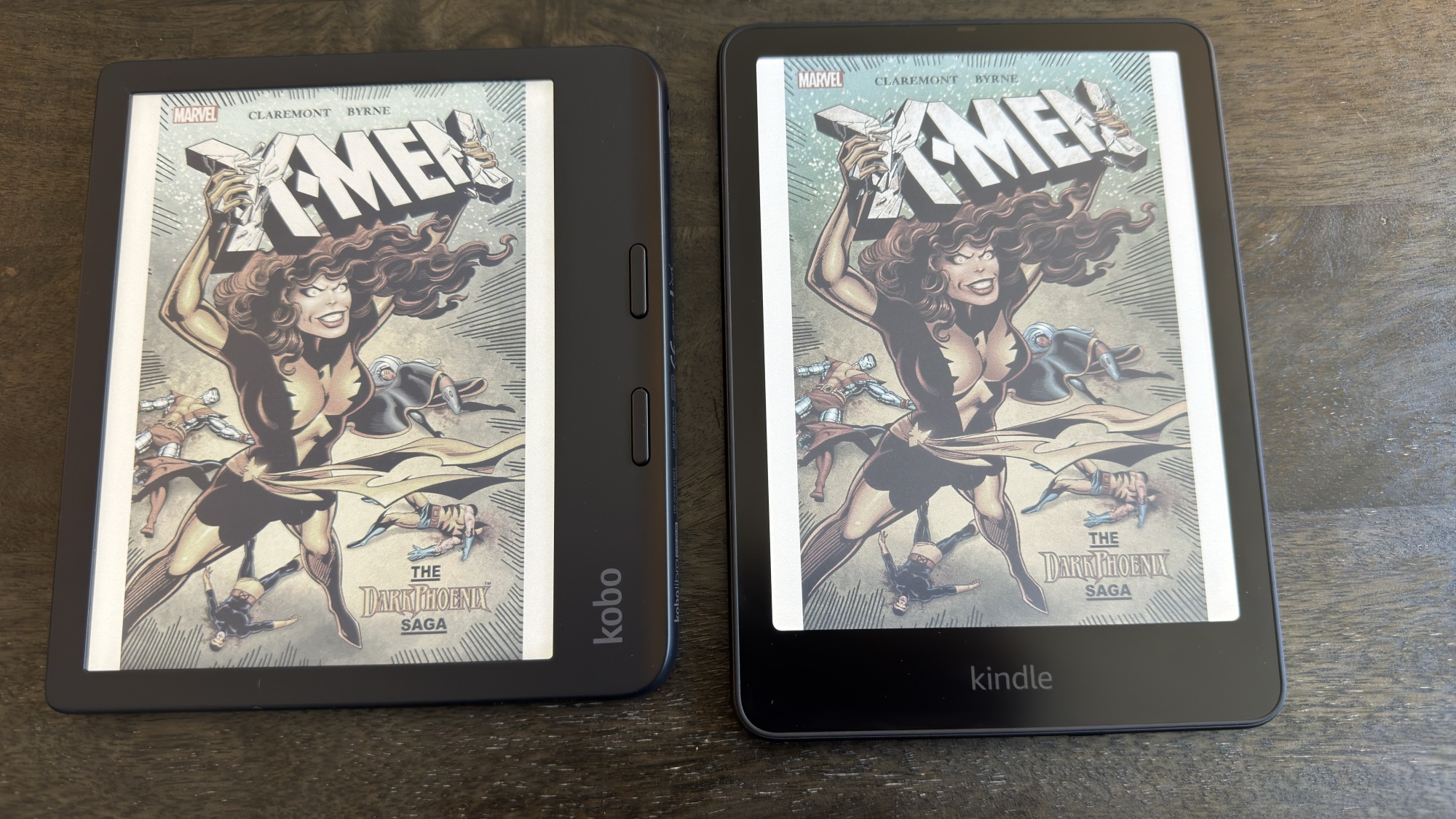
The core differentiator of the Kindle Colorsoft is, of course, its color display. It utilizes the E Ink Kaleido 3 technology, which is currently the standard for color e-readers. While this technology allows for color representation, it’s important to manage expectations. The colors are not as vibrant or saturated as those found on a typical tablet or smartphone screen. Instead, they are more muted and pastel-like, aiming for a more natural and less eye-straining reading experience.
Under the Hood: The “Soft” Advantage?
The name “Colorsoft” is somewhat enigmatic, as it doesn’t immediately convey the device’s purpose or features. As mentioned, the Kindle Colorsoft uses the E Ink Kaleido 3 display, which is commonplace among color e-readers. However, Amazon claims to have enhanced the display technology with an “oxide backplane” for faster refresh rates and higher contrast. They’ve also incorporated a “new light-guide with nitride LEDs” to improve color representation. These enhancements are intended to differentiate the Kindle Colorsoft from other color e-readers on the market.
The effectiveness of these enhancements is subjective. While the Kindle Colorsoft may offer slightly improved refresh rates and color accuracy compared to some competitors, the difference is not drastic. The color palette remains limited, and the overall visual experience is still significantly different from reading on a backlit LCD or OLED screen. The “soft” in the name seems to allude to Amazon’s attempt to create a more natural and less harsh color experience, but whether they’ve truly succeeded is debatable.
Who Is the Kindle Colorsoft For?
The Kindle Colorsoft isn’t a device for everyone. Its limitations make it a niche product best suited for specific use cases and reading preferences. Let’s explore the ideal target audience for this color e-reader:
- Comic Book and Graphic Novel Enthusiasts: The Kindle Colorsoft can enhance the reading experience for comic book and graphic novel fans. While the colors aren’t as vibrant as on a tablet, they add a new dimension to the artwork, making the panels more engaging.
- Children’s Book Readers: Young readers may appreciate the addition of color to children’s books. The muted color palette is less distracting than a bright screen, making it suitable for bedtime reading.
- Visual Learners: Individuals who prefer visual learning may find the Kindle Colorsoft helpful for reading textbooks and educational materials with diagrams and illustrations.
- Readers Seeking a Paper-Like Experience with Color: The Kindle Colorsoft provides a reading experience that is closer to paper than a traditional tablet, while also offering the benefit of color.
However, if you primarily read text-based novels, the color display may not offer significant advantages. In fact, some users may find the muted colors distracting or prefer the sharper contrast of a black and white e-ink display. Also, for users who require vibrant and accurate color representation for professional purposes or multimedia consumption, the Kindle Colorsoft is not the right choice.

Drawbacks and Considerations
Despite its potential, the Kindle Colorsoft has several drawbacks that potential buyers should consider:
- Color limitations: As mentioned earlier, the color palette is limited, and the colors are not as vibrant as on other devices. This may be disappointing for users expecting a more vivid color experience.
- Price: The Kindle Colorsoft is one of the more expensive Kindles in the lineup. The price may be difficult to justify for users who are not specifically interested in the color display.
- Lack of Premium Features: The absence of features like physical page turn buttons and stylus support feels like a missed opportunity, especially at this price point.
- Refresh Rate: While Amazon claims to have improved the refresh rate, it is still slower than on a traditional tablet or smartphone. This can be noticeable when navigating menus or turning pages.
Before purchasing the Kindle Colorsoft, it’s essential to weigh these drawbacks against the potential benefits of the color display. If you’re primarily a text-based reader or require vibrant colors, other e-readers or tablets may be a better choice. However, if you’re a comic book enthusiast, children’s book reader, or visual learner, the Kindle Colorsoft may offer a unique and enjoyable reading experience.

Alternative Color E-Readers
The Kindle Colorsoft isn’t the only color e-reader on the market. Several alternatives offer similar functionality and features. Here are a few noteworthy options:
- Boox Palma 2 Pro Color: This device features a similar E Ink Kaleido 3 display and runs on Android, allowing you to install various reading apps. If you’re looking for an alternative, you might want to check out the Boox Palma 2 Pro color e-reader upgrade.
- PocketBook InkPad Color: The PocketBook InkPad Color is another color e-reader with a larger display and a range of features, including support for various file formats and audio playback.
- Onyx Boox Nova Air C: This device offers a balance of portability and functionality, with a 7.8-inch color display and stylus support for note-taking and drawing.
When choosing a color e-reader, consider your specific needs and preferences. Factors to consider include screen size, operating system, features, and price. Comparing different models can help you find the device that best suits your reading habits.
The Kindle Ecosystem: A Seamless Experience
One of the key advantages of the Kindle Colorsoft is its integration with the Kindle ecosystem. Amazon’s vast library of ebooks, seamless syncing across devices, and user-friendly interface make it a compelling choice for avid readers. The Kindle Colorsoft also supports features like Whispersync, which allows you to pick up where you left off on any Kindle device or app. Furthermore, the Kindle Store offers a wide selection of comic books, graphic novels, and children’s books that are optimized for the color display.
However, the Kindle ecosystem also has its limitations. The Kindle Colorsoft only supports a limited number of file formats, and users are locked into Amazon’s ecosystem. This may be a drawback for readers who prefer to purchase ebooks from other sources or use alternative reading apps. Also, the Kindle Colorsoft does not support features like Google Play Store, which limits the availability of apps and customization options.
The Future of Color E-Readers
The Kindle Colorsoft represents an early step in the evolution of color e-readers. As technology advances, we can expect to see improvements in color accuracy, refresh rates, and overall performance. Future color e-readers may also incorporate features like higher resolution displays, stylus support, and improved battery life. The potential applications of color e-readers extend beyond recreational reading. They could be used in education, healthcare, and other industries where visual information is crucial.
Moreover, advancements in display technology are expected to make color e-readers more affordable and accessible to a wider audience. As manufacturing costs decrease and competition increases, the price gap between color and black and white e-readers is likely to narrow. This could make color e-readers a more attractive option for casual readers who are curious about the technology but hesitant to pay a premium price. If you’re considering upgrading your current devices, you might find the unbeatable Black Friday deal on the Dell 15 laptop for $250 quite enticing.
One area of potential growth is the integration of color e-readers with other devices and platforms. Future color e-readers may seamlessly connect with smartphones, tablets, and computers, allowing users to easily transfer content and access a wider range of services. Additionally, the development of open-source software and standardized file formats could reduce vendor lock-in and give users more freedom to customize their reading experience. The new Galaxy Watch 8 Classic is 100 off for Black Friday and could also be a great addition to your tech collection.
Final Verdict: A Promising Start, But Not For Everyone
The Kindle Colorsoft is a promising first attempt at a color e-reader from Amazon. Its familiar design, seamless integration with the Kindle ecosystem, and potential for enhancing visual content make it an appealing option for specific users. However, its limitations, including the muted color palette, high price, and lack of premium features, make it a niche product. The Kindle Colorsoft is best suited for comic book enthusiasts, children’s book readers, and visual learners who are willing to compromise on color accuracy and vibrancy. This e-reader is only for a very specific type of reader.
Ultimately, the decision to purchase the Kindle Colorsoft depends on your individual needs and preferences. If you’re looking for a versatile device that can handle a wide range of tasks, a traditional tablet may be a better choice. However, if you’re seeking a paper-like reading experience with the added benefit of color, the Kindle Colorsoft is worth considering. Just be sure to manage your expectations and understand its limitations before making a purchase. For audiophiles, the Sony WH-1000XM6 hit its lowest price ever for Black Friday 2025, presenting another excellent deal to consider.




