
Windows 11: Start Menu Set for a Major Overhaul
Get ready for a fresh look! Windows 11 users are eagerly anticipating a significant update to the Start Menu, slated to roll out this week. This redesign promises a more streamlined and personalized experience, addressing some long-standing user feedback and incorporating modern design principles. The updated Windows 11 Start Menu aims to improve usability and efficiency, making it easier than ever to access your favorite apps and information.
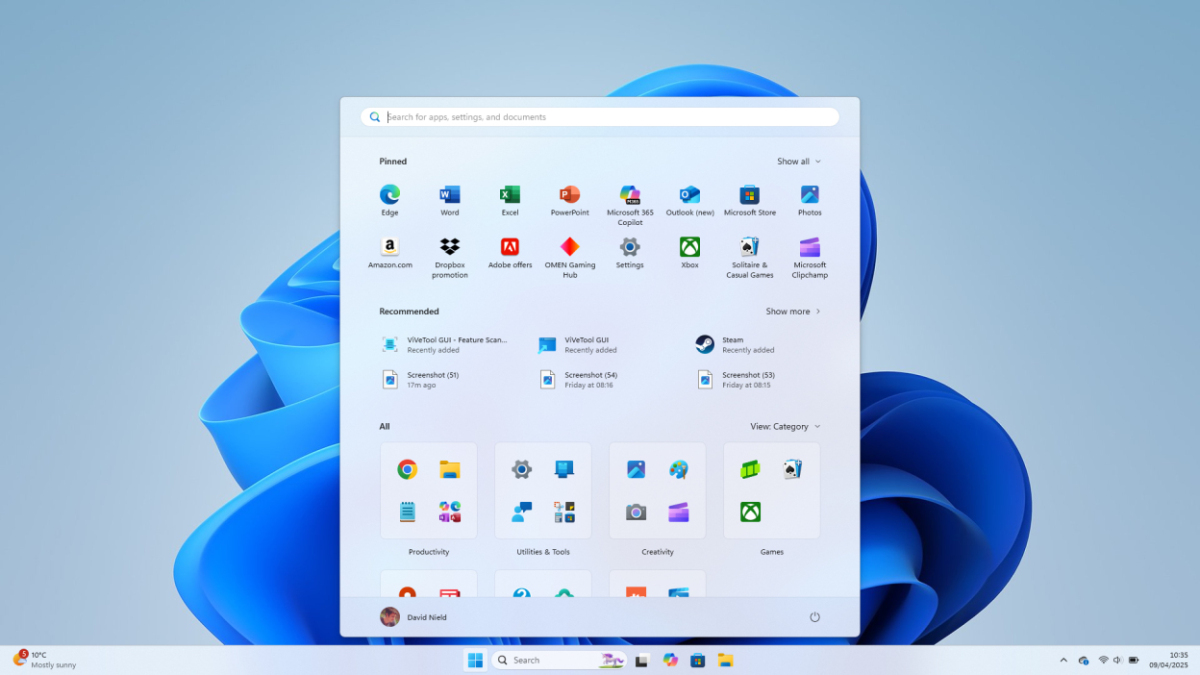
The current Start Menu in Windows 11, while a departure from its Windows 10 predecessor, has received mixed reviews. Some users find it less customizable and more cluttered than desired. Microsoft seems to have listened to these concerns, and this upcoming update reflects a commitment to refining the user experience based on real-world usage and feedback. The changes are expected to be significant, impacting both the visual appearance and the functional aspects of the Start Menu.
What to Expect from the Windows 11 Start Menu Redesign
While the exact details of the Windows 11 Start Menu redesign are still under wraps, several key improvements are anticipated. These include:
- Enhanced Customization: Users should have more control over the layout and organization of their pinned apps and recommended items. This could involve the ability to resize tiles, create custom groups, and filter content more effectively.
- Improved Search Functionality: The search bar within the Start Menu is expected to become more powerful, providing faster and more accurate results. This might include integration with cloud services and the ability to search for files, settings, and web content from a single location.
- Refined Visual Design: The overall aesthetic of the Start Menu is likely to be updated, possibly with a more modern and consistent look and feel. This could involve changes to the color scheme, icons, and animations.
- Better Integration with Microsoft Services: Expect tighter integration with other Microsoft services, such as OneDrive, Microsoft 365, and the Microsoft Store. This could make it easier to access your files, documents, and apps from the Start Menu.
- Performance Optimizations: The update should also include performance improvements, making the Start Menu faster and more responsive. This is particularly important for users with older hardware.
The redesign is expected to be rolled out in stages, starting with Windows Insiders before being released to the general public. This allows Microsoft to gather feedback and address any issues before the update is widely available. This phased approach ensures a smoother and more stable experience for all users.

Why is a Start Menu Redesign Important?
The Start Menu is a central hub for accessing applications, settings, and files on a Windows computer. A well-designed Start Menu can significantly improve productivity and user satisfaction. A cluttered or inefficient Start Menu, on the other hand, can be frustrating and time-consuming to navigate. The importance of a well-designed Start Menu cannot be overstated. It’s the first point of contact for many users when they interact with their operating system.
This major Start Menu redesign is crucial for several reasons:
- Improved User Experience: A more intuitive and customizable Start Menu can make it easier for users to find what they need, reducing frustration and increasing productivity.
- Modernization: The redesign can bring the Start Menu in line with modern design trends, making it more visually appealing and consistent with the overall Windows 11 aesthetic.
- Enhanced Functionality: New features and integrations can make the Start Menu more powerful and versatile, allowing users to accomplish more tasks from a single location.
- Addressing User Feedback: The redesign provides an opportunity for Microsoft to address user feedback and incorporate suggestions for improvement.
- Competitive Advantage: A well-designed Start Menu can help Windows 11 stand out from its competitors and attract new users.
Ultimately, the goal of the Windows 11 Start Menu redesign is to create a more user-friendly and efficient experience that meets the needs of a diverse range of users. By listening to feedback and incorporating modern design principles, Microsoft can create a Start Menu that is both functional and aesthetically pleasing.
The Evolution of the Start Menu
The Start Menu has been a staple of the Windows operating system since Windows 95, undergoing numerous changes and iterations over the years. Each version of Windows has introduced its own unique take on the Start Menu, reflecting the evolving needs and preferences of users. Understanding the history of the Start Menu can provide valuable context for the current redesign.
Here’s a brief overview of the evolution of the Start Menu:
- Windows 95/98/Me: The original Start Menu, featuring a hierarchical structure with cascading menus.
- Windows 2000/XP: Introduced personalized menus and the ability to pin frequently used programs.
- Windows Vista/7: Featured a search box directly within the Start Menu, making it easier to find applications and files.
- Windows 8: Replaced the traditional Start Menu with a full-screen Start screen, featuring live tiles.
- Windows 8.1: Brought back the Start button and allowed users to boot directly to the desktop.
- Windows 10: Combined the traditional Start Menu with live tiles, offering a hybrid approach.
- Windows 11: Centered the Start Menu on the taskbar and removed live tiles, focusing on a more streamlined design.
Each of these iterations has had its own strengths and weaknesses, and Microsoft has continuously refined the Start Menu based on user feedback and technological advancements. The current Windows 11 Start Menu redesign represents the latest chapter in this ongoing evolution.

Potential Challenges and Considerations
While the Windows 11 Start Menu redesign promises several improvements, there are also potential challenges and considerations to keep in mind. One of the biggest challenges is balancing the needs of different users. Some users prefer a minimalist design with only essential apps pinned, while others prefer a more comprehensive layout with a wide range of applications and shortcuts. Microsoft needs to find a way to accommodate both of these preferences.
Another challenge is ensuring that the redesign is compatible with existing workflows and habits. Users who are accustomed to the current Start Menu may be resistant to change, even if the new design is objectively better. Microsoft needs to carefully introduce the redesign and provide adequate documentation and support to help users adapt. Consider exploring the features of the Samsung Galaxy J8 to see how other interfaces are designed to promote user engagement.
Here are some specific considerations:
- Customization Options: The redesign should offer a wide range of customization options, allowing users to tailor the Start Menu to their specific needs and preferences.
- Accessibility: The redesign should be accessible to users with disabilities, including those who use screen readers or other assistive technologies.
- Performance: The redesign should be optimized for performance, ensuring that the Start Menu is fast and responsive even on older hardware.
- Compatibility: The redesign should be compatible with existing applications and shortcuts, ensuring that users can continue to use their favorite programs without any issues.
- User Feedback: Microsoft should continue to gather user feedback and incorporate suggestions for improvement after the redesign is released.
By carefully addressing these challenges and considerations, Microsoft can ensure that the Windows 11 Start Menu redesign is a success.
How to Prepare for the Start Menu Redesign
As the Windows 11 Start Menu redesign rolls out, there are several steps you can take to prepare:
- Stay Informed: Keep up-to-date on the latest news and announcements regarding the redesign. Microsoft will likely release more details about the changes in the coming weeks.
- Join the Windows Insider Program: If you’re comfortable with running pre-release software, consider joining the Windows Insider Program. This will give you early access to the redesign and allow you to provide feedback to Microsoft.
- Back Up Your Data: Before installing any major update, it’s always a good idea to back up your data. This will protect you in case something goes wrong during the installation process.
- Review Your Pinned Apps: Take some time to review your pinned apps and shortcuts in the current Start Menu. This will help you decide which items you want to keep in the new design.
- Explore Customization Options: Once the redesign is released, take some time to explore the customization options and tailor the Start Menu to your specific needs and preferences.
By taking these steps, you can ensure a smooth and seamless transition to the new Windows 11 Start Menu redesign. You might also want to check out the latest deals on Apple AirPods 4 on Amazon to enhance your listening experience while exploring the new features.

The Future of the Start Menu
The Windows 11 Start Menu redesign is just one step in the ongoing evolution of the Start Menu. As technology continues to advance and user needs continue to evolve, the Start Menu will likely undergo further changes and improvements in the future. Microsoft is likely to continue to refine the Start Menu based on user feedback and technological advancements. The future of the Start Menu is likely to be shaped by several factors, including:
- Artificial Intelligence: AI could be used to personalize the Start Menu even further, recommending apps and content based on your usage patterns and interests.
- Cloud Integration: The Start Menu could become even more tightly integrated with cloud services, allowing you to access your files and documents from anywhere.
- Voice Control: Voice control could become a more prominent feature of the Start Menu, allowing you to launch applications and perform tasks using voice commands.
- Augmented Reality: Augmented reality could be used to create a more immersive and interactive Start Menu experience.
The possibilities are endless, and it will be interesting to see how the Start Menu evolves in the years to come. As users adapt to the new features, they might find themselves looking for complementary tech. For example, learning about iPhone satellite connectivity and its game-changing features could enhance their overall digital experience.
Conclusion
The upcoming Windows 11 Start Menu redesign represents a significant step forward in Microsoft’s commitment to improving the user experience. By addressing user feedback, incorporating modern design principles, and enhancing functionality, the redesign promises to make the Start Menu more intuitive, efficient, and personalized. While there are potential challenges to overcome, the benefits of a well-designed Start Menu are clear. As the redesign rolls out, users can look forward to a more streamlined and enjoyable computing experience. And if you’re looking to upgrade your mobile experience, take a look at the specs of the Samsung Galaxy J4 for a comprehensive overview of its features.
Lifehacker, since 2005, continues its mission to provide reliable tech help and credible life advice, helping users live better. This Windows 11 Start Menu redesign aligns perfectly with that mission, offering practical improvements to a core component of the operating system.




