
Refined Listening: Why ‘Albums’ Replaced My Apple Music App
For years, Apple Music has been my go-to for streaming music. The sheer breadth of its catalog is undeniable, offering an almost limitless supply of tunes at my fingertips. However, the official Apple Music Mac app has always felt…clunky. It’s not that it’s unusable, but its performance issues and a certain lack of focus have consistently left me wanting more. That’s why I’ve embraced ‘Albums,’ a dedicated app that prioritizes the album listening experience, and why it’s become my preferred way to enjoy Apple Music on my Mac.
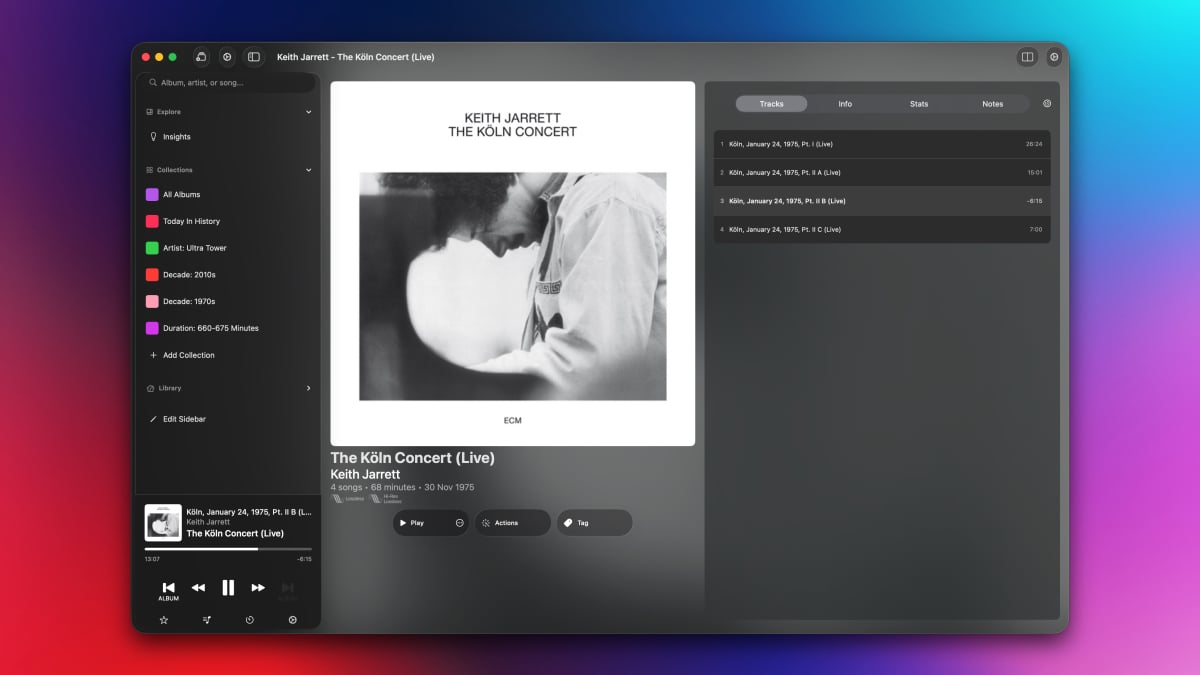
The official Apple Music app often feels bogged down by its attempts to be everything to everyone. It’s a store, a radio station, a playlist generator, and a music player, all rolled into one. This multi-functionality leads to a bloated interface and, more importantly, a diluted focus on the core experience of simply listening to music, especially albums. ‘Albums,’ on the other hand, strips away the excess and delivers a streamlined, album-centric experience that caters perfectly to my preferred listening style.
The Allure of the Album Experience
There’s something uniquely satisfying about listening to an album from start to finish. It’s an experience that allows you to fully immerse yourself in the artist’s vision, to appreciate the sequencing and flow of the tracks, and to discover hidden gems that might otherwise be overlooked when shuffling through individual songs. While playlists have their place, the album format provides a curated journey, a complete artistic statement that deserves to be appreciated in its entirety. This is where ‘Albums’ shines, offering a dedicated space to rediscover and enjoy the art of the album.
I’ve found myself increasingly drawn back to albums recently. Perhaps it’s a reaction to the fragmented, song-by-song nature of modern music consumption, or maybe it’s simply a renewed appreciation for the artistry and storytelling that albums can offer. Whatever the reason, ‘Albums’ has become an indispensable tool in my quest to rediscover the joy of listening to complete albums. The app’s sole focus is on playing whole albums from your Apple Music library, rather than mixing and matching songs, and that’s precisely what makes it so appealing.
Why ‘Albums’ Trumps the Official App: A Detailed Comparison
So, what specifically makes ‘Albums’ a better choice for album listening than the official Apple Music app? Let’s delve into the key differences:
- Focus: The official Apple Music app suffers from feature creep. It tries to do too much, resulting in a cluttered and often confusing interface. ‘Albums’ is laser-focused on one thing: playing albums. This singular focus allows for a cleaner, more intuitive user experience.
- Performance: The Apple Music app on macOS has a reputation for being sluggish and resource-intensive. ‘Albums’ feels significantly lighter and more responsive, even when dealing with large music libraries. This performance boost translates to a more enjoyable and seamless listening experience.
- Album-Centric Design: ‘Albums’ presents your music library in a visually appealing grid of album covers. This design makes it easy to browse and discover albums, highlighting the artwork and emphasizing the album as a cohesive unit. The official app, while displaying album art, often buries it amidst other features and information.
- Ease of Use: ‘Albums’ is incredibly simple to use. You open the app, browse your albums, and start listening. There are no convoluted menus or hidden features to navigate. The app prioritizes simplicity and ease of use, making it a joy to use on a daily basis.
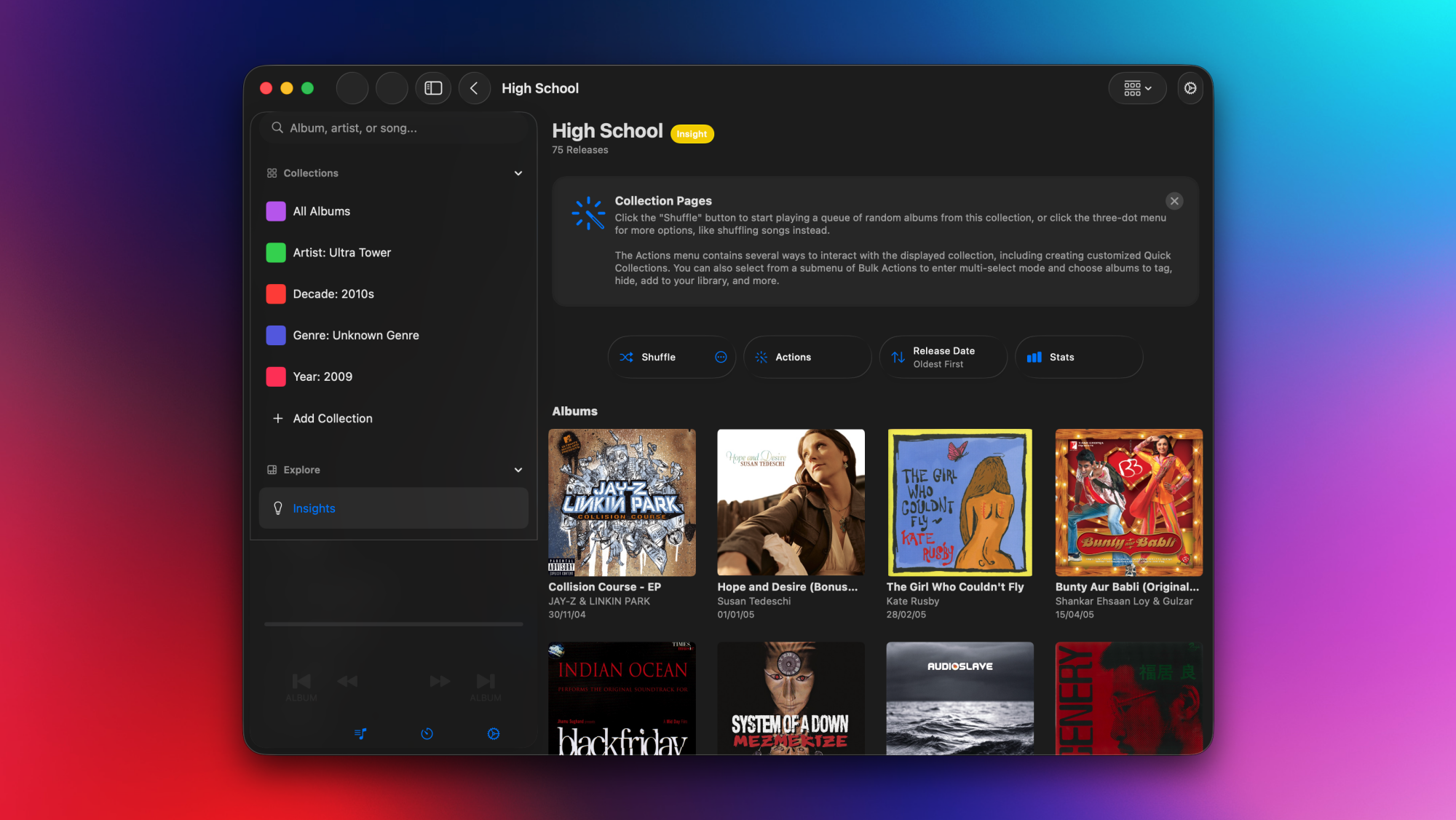
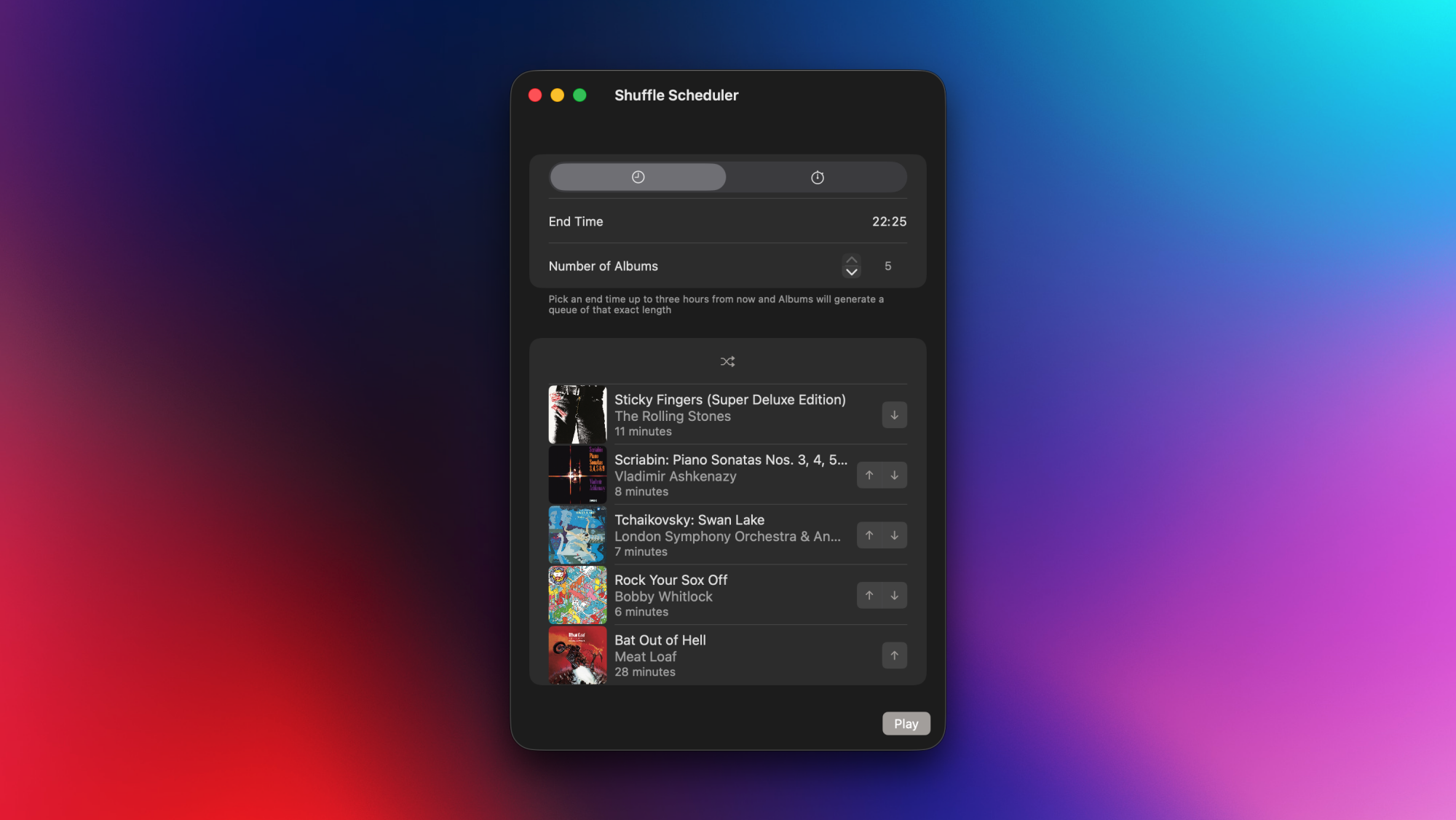
Beyond these core advantages, ‘Albums’ also offers a few thoughtful features that enhance the album listening experience. The ability to queue multiple albums is particularly useful, allowing you to create a personalized listening session without having to constantly switch between albums manually. The randomized grid of albums encourages discovery, prompting you to revisit albums you may have forgotten about. These small details add up to a significantly more enjoyable and engaging listening experience than the official Apple Music app provides.
The app’s design also complements macOS beautifully. Similar to how a closer look at display and resolution can enhance visual experiences, ‘Albums’ offers a refined auditory experience that aligns with the aesthetic of the operating system. I also appreciate apps that offer a focused experience, much like how a deep dive into specs and features can help you appreciate the nuances of a device like the Google Pixel 2 XL.
Diving Deeper: Exploring the Features of ‘Albums’
‘Albums’ is available as a free download from the Mac App Store, offering a solid foundation for album listening. However, the app also offers a premium tier that unlocks a range of powerful features for serious music enthusiasts. Let’s take a closer look at what ‘Albums’ has to offer, both in its free and premium versions:
Free Tier Features:
- Album Search: The free version allows you to search for and listen to any album in your Apple Music library. This is the core functionality of the app, and it works flawlessly.
- Randomized Album Grid: The app displays a randomized grid of all the albums in your library, encouraging discovery and revisiting forgotten favorites.
- Album Queueing: You can easily queue albums to play after the current one ends, creating a seamless listening session.
Premium Tier Features:
- Listening Stats: The premium tier unlocks detailed listening statistics, allowing you to track your listening habits and gain insights into your musical preferences.
- Release Feed: The release feed tracks upcoming albums from artists in your library, ensuring you never miss a new release.
- “Insights” Section: The “Insights” section provides curated lists of music albums you’ve listened to before, helping you rediscover old favorites and explore new music based on your listening history.
The premium tier is available as a subscription ($2/month or $19/year) or a one-time purchase ($90). While the one-time purchase price may seem steep, it’s a worthwhile investment for serious music lovers who value the additional features and want to support the development of the app. I find the listening stats and release feed particularly valuable, as they help me stay on top of my music library and discover new music that aligns with my tastes.
The Value Proposition: Is ‘Albums’ Worth It?
For me, the answer is a resounding yes. While the official Apple Music app is a serviceable tool for streaming music, it simply doesn’t offer the focused, album-centric experience that I crave. ‘Albums’ fills that void perfectly, providing a streamlined and enjoyable way to rediscover and appreciate the art of the album. The app’s performance is superior, its design is more intuitive, and its additional features (especially in the premium tier) add significant value to the listening experience.
Of course, whether or not ‘Albums’ is worth it for you depends on your individual listening habits and preferences. If you primarily listen to individual songs or playlists, the official Apple Music app may suffice. However, if you value the album listening experience and are looking for a more focused and enjoyable way to enjoy your music library, ‘Albums’ is definitely worth considering. The free version is a great way to try out the app and see if it fits your needs, and the premium tier offers a wealth of additional features for serious music enthusiasts.
Just as the Huawei Mate 10 Lite offers a compelling value proposition in the smartphone market, ‘Albums’ provides a focused and valuable alternative to the official Apple Music app. The streamlined design and album-centric approach make it a worthwhile investment for those who prioritize the complete album listening experience. Even older devices like the Apple iPhone 5c can benefit from a well-designed music app, and ‘Albums’ delivers that on macOS.
Addressing Potential Drawbacks
While I’m a strong advocate for ‘Albums,’ it’s important to acknowledge its potential drawbacks. The app’s singular focus on albums means that it’s not ideal for listening to individual songs or playlists. If you frequently switch between albums and other types of content, you may find yourself needing to use both ‘Albums’ and the official Apple Music app. Additionally, the premium tier’s one-time purchase price may be prohibitive for some users. However, the subscription option provides a more affordable way to access the premium features.
Another potential drawback is the app’s reliance on an active Apple Music subscription. ‘Albums’ is essentially a front-end for Apple Music, meaning that you need to be subscribed to Apple Music in order to use it. This may not be an issue for most users, but it’s worth noting for those who prefer to own their music outright. Despite these potential drawbacks, I believe that the benefits of ‘Albums’ far outweigh its limitations, especially for those who prioritize the album listening experience.
Alternatives to Consider
While ‘Albums’ is my preferred choice, it’s not the only option for enhancing your Apple Music listening experience on macOS. Several other apps offer similar functionality or cater to different needs. Here are a few alternatives to consider:
- Swinsian: Swinsian is a powerful music player for macOS that offers advanced features such as gapless playback, smart playlists, and support for a wide range of audio formats. While it’s not specifically designed for Apple Music, it can be used to manage and play your Apple Music library.
- Vox: Vox is another popular music player for macOS that offers a clean and minimalist interface, support for high-resolution audio, and integration with various streaming services, including Apple Music.
- Colibri: Colibri is a lightweight and efficient music player for macOS that focuses on simplicity and ease of use. It supports a variety of audio formats and offers a clean and uncluttered interface.
Ultimately, the best music player for you will depend on your individual needs and preferences. I encourage you to try out a few different apps and see which one best suits your listening style. For me, ‘Albums’ strikes the perfect balance between simplicity, functionality, and focus, making it the ideal choice for enjoying my Apple Music library on my Mac.
The Future of ‘Albums’ and Album Listening
I’m excited to see what the future holds for ‘Albums.’ The app has already established itself as a valuable tool for album enthusiasts, and I believe that it has the potential to become even more popular as more people rediscover the joy of listening to complete albums. I hope that the developers continue to refine the app and add new features that enhance the album listening experience. Perhaps future versions could include features such as album artwork customization, improved playlist integration, and support for other streaming services.
More broadly, I believe that there’s a growing trend towards more intentional and focused music consumption. In a world of endless streaming options and fragmented listening habits, there’s a renewed appreciation for the curated experience of the album. Apps like ‘Albums’ are helping to fuel this trend by providing dedicated spaces for album listening and encouraging users to rediscover the artistry and storytelling that albums can offer. I’m optimistic that the future of music listening will be one that embraces both the convenience of streaming and the artistic integrity of the album.
Similar to how the 2025 Toyota GR Corolla represents a track-ready evolution in the automotive world, ‘Albums’ offers a refined and evolved approach to music listening. The focus on albums and the streamlined design provide a superior experience compared to the official Apple Music app. Even if you are considering the features of the Honor 6X, it’s important to consider the apps you use daily, and for music lovers, ‘Albums’ is a game-changer.
Conclusion: Embracing the Album-Centric Approach
In conclusion, while Apple Music provides a vast library of music, the official Mac app often falls short in delivering a truly enjoyable and focused album listening experience. ‘Albums’ addresses this shortcoming perfectly, offering a streamlined, intuitive, and album-centric alternative that has become my preferred way to enjoy Apple Music on my Mac. Its focus, performance, and thoughtful features make it a worthwhile investment for any music lover who values the art of the album. So, if you’re looking for a better way to experience your Apple Music library, I highly recommend giving ‘Albums’ a try. You might just find yourself rediscovering the joy of listening to complete albums, one track at a time.




