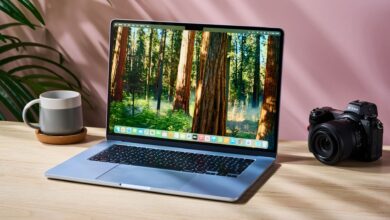
Choosing the right laptop is crucial for students navigating the demands of college and school life. In 2025, the market offers a diverse range of options, each with its strengths and weaknesses. This guide presents our top-tested choices for the best student laptops, considering factors like performance, battery life, portability, and price. We’ll delve into what makes each laptop stand out and help you find the perfect fit for your academic needs. Whether you’re writing essays, attending online lectures, or working on complex projects, having a reliable laptop is essential. The options available cater to various budgets and requirements, from lightweight Chromebooks ideal for basic tasks to powerful MacBooks capable of handling demanding applications. Let’s explore the top contenders for the title of the best student laptops in 2025.

Top 5 Student Laptops of 2025: A Detailed Overview
Our selection process involves rigorous testing and evaluation, covering key aspects such as processing power, memory, storage, display quality, keyboard comfort, and overall build quality. We also consider the operating system and its compatibility with common student software. Each laptop is assessed based on its ability to handle everyday tasks, multitasking, and more demanding applications. Battery life is a critical factor, ensuring students can get through a full day of classes without needing to constantly search for a power outlet. Portability is also important, as students often need to carry their laptops between classes, libraries, and home. Price is always a consideration, and we strive to include options that offer excellent value for money. These are the best student laptops in 2025:
- Apple MacBook Air 13-inch (M3, 2024)
- Acer Chromebook Plus 514 (2025)
- HP Chromebook Plus 15.6-inch (2025)
- Microsoft Surface Laptop 13 (2025)
- Apple MacBook Air 15-inch (M4, 2025)
1. Apple MacBook Air 13-inch (M3, 2024): The All-Round Performer
The Apple MacBook Air 13-inch (M3, 2024) remains a top contender for the best student laptop due to its exceptional performance and sleek design. Powered by the M3 chip, this laptop delivers impressive speed and efficiency, making it ideal for handling demanding tasks like video editing, graphic design, and coding. The M3 chip also provides excellent battery life, allowing students to work for extended periods without needing to recharge. The MacBook Air’s lightweight and slim design make it highly portable, perfect for carrying around campus. The Retina display offers vibrant colors and sharp details, enhancing the overall user experience. The macOS operating system is user-friendly and comes with a suite of productivity apps. Though it’s been succeeded by the M4, the M3 MacBook Air remains a fantastic option, especially if you can find it at a discounted price. In fact, you might even be able to score the M3 MacBook Air at Black Friday’s lowest price, making it an even more attractive option for budget-conscious students.

2. Acer Chromebook Plus 514 (2025): The Budget-Friendly Choice
For students on a tight budget, the Acer Chromebook Plus 514 (2025) offers excellent value for money. This Chromebook provides reliable performance for everyday tasks like web browsing, document editing, and online research. The Chrome OS is lightweight and easy to use, with access to a wide range of apps through the Google Play Store. The Chromebook Plus 514 features a comfortable keyboard and a decent display, making it suitable for long hours of typing and reading. Its long battery life ensures students can get through a full day of classes without needing to recharge. While it may not be as powerful as the MacBook Air, the Chromebook Plus 514 is a great option for students who primarily need a laptop for basic tasks and online learning. Plus, with potential Black Friday deals on Acer Chromebooks, it could be an even more affordable option.
3. HP Chromebook Plus 15.6-inch (2025): The Versatile All-Rounder
The HP Chromebook Plus 15.6-inch (2025) strikes a balance between performance, features, and affordability. Its larger display provides ample screen space for multitasking and viewing documents, making it ideal for students who need to work with multiple windows simultaneously. The Chromebook Plus 15.6-inch offers a comfortable keyboard and a responsive trackpad, enhancing the typing experience. It also features a decent processor and ample storage for storing files and apps. The Chrome OS is easy to use and comes with a suite of productivity tools. The HP Chromebook Plus 15.6-inch is a great all-round performer that can handle a variety of tasks, from writing essays to creating presentations. It’s also a good option for students who need a laptop for both schoolwork and entertainment.
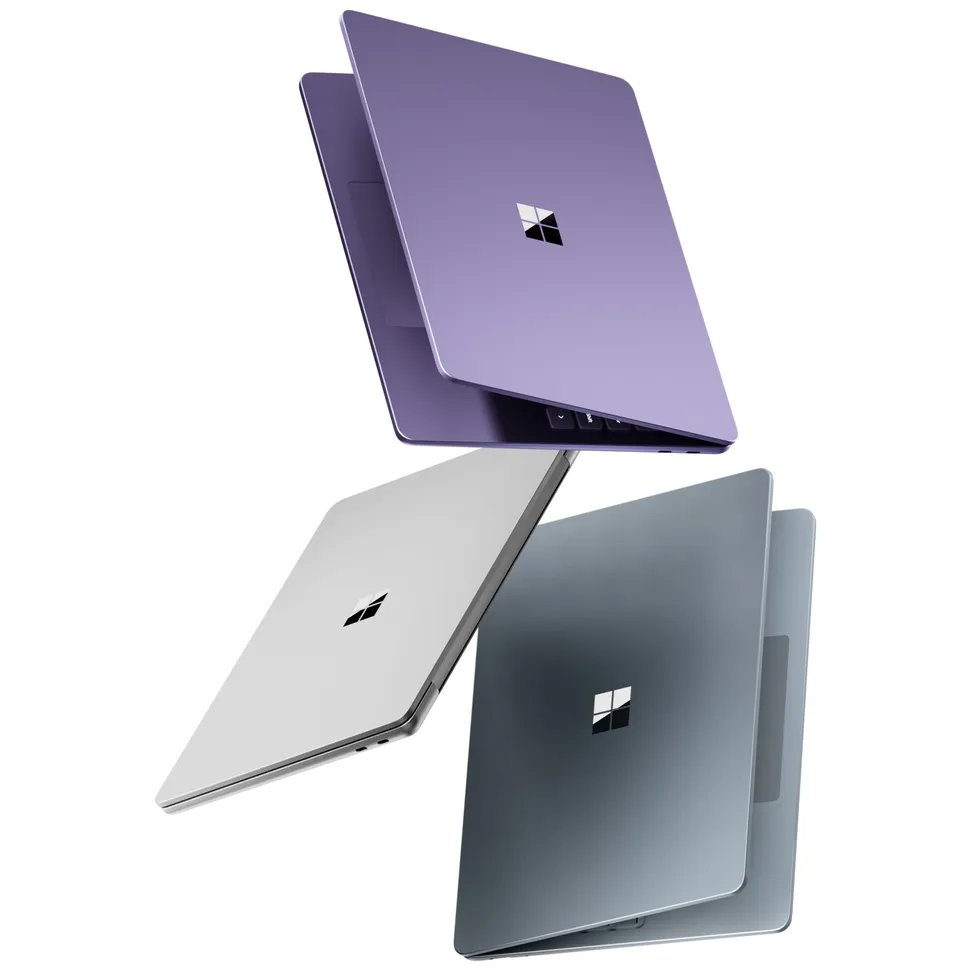
4. Microsoft Surface Laptop 13 (2025): The Stylish and Functional Choice
The Microsoft Surface Laptop 13 (2025) stands out for its stunning design and premium build quality. This laptop features a sleek and modern aesthetic, with a comfortable Alcantara keyboard and a vibrant touchscreen display. The Surface Laptop 13 offers excellent performance for everyday tasks, thanks to its Intel Core processor and ample memory. The Windows 11 operating system is user-friendly and comes with a suite of productivity apps. The Surface Laptop 13 is also highly portable, making it easy to carry around campus. While it may be more expensive than some other options, the Surface Laptop 13 offers a premium experience that is well worth the investment. It’s a great choice for students who value both style and functionality. For those looking for flexibility, the best Windows 2-in-1 laptops, often available at discounted prices, offer similar functionality with the added benefit of tablet mode.
5. Apple MacBook Air 15-inch (M4, 2025): The Powerhouse
The Apple MacBook Air 15-inch (M4, 2025) is the latest and greatest in the MacBook Air lineup, offering even more power and performance than its M3 predecessor. Powered by the M4 chip, this laptop delivers blazing-fast speeds and exceptional efficiency, making it ideal for handling demanding tasks like video editing, 3D rendering, and gaming. The larger 15-inch display provides ample screen space for multitasking and creative work. The MacBook Air 15-inch also features a long battery life, ensuring students can work for extended periods without needing to recharge. The macOS operating system is user-friendly and comes with a suite of productivity apps. While it is the most expensive option on this list, the MacBook Air 15-inch is a powerhouse that can handle anything a student throws at it. If you’re a manga enthusiast, you might also consider exploring e-readers like the Boox Note Max for a comfortable reading experience.
Factors to Consider When Choosing a Student Laptop
Choosing the best student laptop involves careful consideration of several factors. Here are some key aspects to keep in mind:
- Performance: Consider the processor, RAM, and storage capacity. A faster processor and more RAM will allow you to run multiple applications simultaneously without experiencing slowdowns. Adequate storage is essential for storing files, documents, and software.
- Battery Life: Look for a laptop with a long battery life, especially if you plan to use it for extended periods without access to a power outlet. A battery life of 8 hours or more is ideal for most students.
- Portability: Choose a laptop that is lightweight and easy to carry around campus. A smaller screen size and a slim design can make a big difference in portability.
- Operating System: Consider the operating system that you are most comfortable with. Windows, macOS, and Chrome OS all have their strengths and weaknesses.
- Price: Set a budget and stick to it. There are many great student laptops available at different price points.
- Keyboard and Trackpad: Ensure the keyboard is comfortable to type on and the trackpad is responsive and accurate. These are essential for productivity.
- Display Quality: Look for a laptop with a high-resolution display that offers vibrant colors and sharp details. This will enhance your overall viewing experience.
Comparing the Top Student Laptops: A Detailed Table
To help you make a more informed decision, here’s a comparison table of the top student laptops discussed above:
This table provides a quick overview of the key specifications of each laptop, allowing you to easily compare their features and prices. Consider your specific needs and budget when making your decision. For example, if you need a laptop for demanding tasks like video editing, the MacBook Air 15-inch (M4) is the best choice. If you’re on a tight budget, the Acer Chromebook Plus 514 is a great option. The Microsoft Surface Laptop 13 offers a balance of style and performance, while the HP Chromebook Plus 15.6-inch provides a larger display for multitasking.

The Importance of a Good Student Laptop
A reliable laptop is an essential tool for students in today’s digital age. It enables them to access online resources, complete assignments, communicate with classmates and professors, and stay organized. A good student laptop can significantly improve academic performance and enhance the overall learning experience. With the rise of online learning, having a laptop is no longer a luxury but a necessity. Students need a device that can handle the demands of online lectures, virtual meetings, and digital textbooks. A good laptop can also help students develop essential skills such as digital literacy, critical thinking, and problem-solving. Furthermore, a laptop can provide students with access to a wide range of educational resources and tools, such as online libraries, research databases, and collaborative platforms. Consider your laptop an investment in your education.
Tips for Maintaining Your Student Laptop
To ensure your student laptop lasts throughout your academic journey, it’s important to take proper care of it. Here are some tips for maintaining your laptop:
- Keep it clean: Regularly clean your laptop’s screen, keyboard, and exterior to prevent dust and dirt buildup.
- Protect it from damage: Use a laptop sleeve or bag to protect your laptop from scratches, bumps, and spills.
- Update your software: Keep your operating system, drivers, and applications up to date to ensure optimal performance and security.
- Back up your data: Regularly back up your important files and documents to an external hard drive or cloud storage service.
- Avoid overheating: Don’t use your laptop on soft surfaces like beds or blankets, as this can block the ventilation and cause it to overheat.
- Manage your battery: Avoid letting your battery completely drain, and don’t leave it plugged in all the time.
- Install antivirus software: Protect your laptop from viruses, malware, and other security threats by installing and regularly updating antivirus software.
By following these tips, you can extend the lifespan of your student laptop and ensure it remains a reliable tool throughout your academic career. Proper maintenance can prevent costly repairs and downtime, allowing you to focus on your studies.
Future Trends in Student Laptops
The student laptop market is constantly evolving, with new technologies and features emerging every year. Here are some future trends to watch out for:
- Increased Integration of AI: Artificial intelligence will play an increasingly important role in student laptops, providing features such as intelligent assistants, personalized learning experiences, and automated task management.
- Enhanced Security Features: Laptops will incorporate more advanced security features, such as biometric authentication, encryption, and anti-theft technology, to protect student data and privacy.
- Foldable and Flexible Displays: Foldable and flexible displays will become more common, allowing students to transform their laptops into tablets or e-readers.
- Improved Battery Technology: Battery technology will continue to improve, providing longer battery life and faster charging times.
- Greater Emphasis on Sustainability: Laptop manufacturers will focus on using more sustainable materials and reducing their environmental impact.
- Cloud-Based Computing: Cloud-based computing will become more prevalent, allowing students to access their files and applications from anywhere with an internet connection.
- Integration with AR/VR: Augmented reality (AR) and virtual reality (VR) technologies will be integrated into student laptops, providing immersive learning experiences.
These trends suggest that student laptops will become even more powerful, versatile, and user-friendly in the years to come. Students can expect to see laptops that are better equipped to meet their evolving needs and enhance their learning experiences. As technology continues to advance, student laptops will play an increasingly important role in education.
Conclusion
Choosing the best student laptop in 2025 requires careful consideration of your individual needs, budget, and preferences. The models discussed in this guide represent some of the top contenders in the market, each offering a unique blend of performance, features, and value. Whether you prioritize power and performance, portability and affordability, or style and functionality, there is a student laptop out there that is perfect for you. Take the time to research your options, read reviews, and compare specifications to make an informed decision. A good student laptop can be a valuable investment in your education and can help you achieve your academic goals. Remember to consider factors such as processing power, memory, storage, battery life, keyboard comfort, and display quality when making your choice. With the right laptop, you can enhance your learning experience and succeed in your studies. And don’t forget to protect your investment; explore options for over-ear headphones to minimize distractions and create a conducive study environment.