
Transform Your iPhone: The Ultimate Budget Game Boy Controller
The allure of retro gaming holds a powerful charm for many, evoking memories of simpler times spent hunched over a pixelated screen. While dedicated handheld consoles like the original Game Boy are iconic, they’re often tucked away in dusty attics or command premium prices from collectors. What if you could recapture that magic using the device already in your pocket? Thanks to innovative accessories, turning your modern iPhone into a nostalgic Game Boy experience is not only possible but also surprisingly affordable. This article explores how a simple, budget-friendly iPhone Game Boy controller can unlock a world of classic gaming, offering an authentic tactile experience without breaking the bank.
Gone are the days when mobile gaming was synonymous with simple tap-and-swipe mechanics. The powerful processors and vibrant displays of contemporary iPhones make them ideal platforms for emulating classic systems. However, the one persistent hurdle has always been the input method. Touchscreens, while versatile, simply cannot replicate the satisfying click of a D-pad or the precise feel of physical buttons. This is where a dedicated controller comes into play, specifically designed to bridge the gap between modern tech and retro play, making your iPhone feel like a true handheld gaming console.
The Resurgence of Retro Gaming on Mobile
The phenomenon of retro gaming isn’t just a fleeting trend; it’s a cultural cornerstone that continues to captivate new generations while providing a comforting dose of nostalgia for veterans. From the pixel-art masterpieces of the 8-bit era to the more complex 16-bit adventures, these games offer timeless fun, often with intuitive mechanics that remain engaging decades later. The accessibility of mobile platforms has only fueled this resurgence, allowing millions to carry entire libraries of classic titles in their pockets.
Why iPhones are Perfect for Emulation
Apple’s iPhones, with their high-resolution Retina displays, powerful A-series chips, and robust App Store ecosystem, are exceptionally well-suited for game emulation. The vibrant screens breathe new life into pixelated graphics, making older games look sharper and more vivid than ever before. The processing power ensures smooth performance, eliminating lag and stutter that plagued early emulation attempts on less capable devices. Furthermore, the longevity of iPhone support and the vast array of available applications provide a stable and user-friendly environment for exploring classic gaming libraries. While devices like the Boox Palma 2 Pro offer specialized experiences for reading, the iPhone’s versatility makes it a prime candidate for transforming into a dedicated gaming handheld, capable of much more than just retro games.
The Challenge: Touchscreen Limitations for Classic Controls
Despite the iPhone’s many strengths, the touchscreen remains its Achilles’ heel for serious retro gaming. Classic games were designed around physical inputs – directional pads for movement, distinct buttons for actions, and triggers for quick responses. Replicating these with virtual on-screen buttons often leads to an imprecise, uncomfortable, and ultimately frustrating experience. The lack of tactile feedback means players often mispress buttons, obscure the screen with their thumbs, and lose the immersive connection to the game. This fundamental mismatch is precisely why a physical iPhone Game Boy controller becomes indispensable for anyone serious about reliving the glory days of portable gaming.
Introducing the Budget-Friendly iPhone Game Boy Controller
The market is now brimming with controllers designed to transform your iPhone into a formidable retro gaming machine. These accessories typically come in various forms, from telescopic designs that cradle your iPhone in the center, mimicking a Nintendo Switch, to clip-on styles that attach to the sides, providing a more traditional handheld feel. The key differentiator for many enthusiasts, however, is finding a solution that doesn’t cost an arm and a leg, allowing access to a premium retro experience on a budget. These affordable controllers often focus on core functionality and robust design, prioritizing playability over flashy, expensive features.
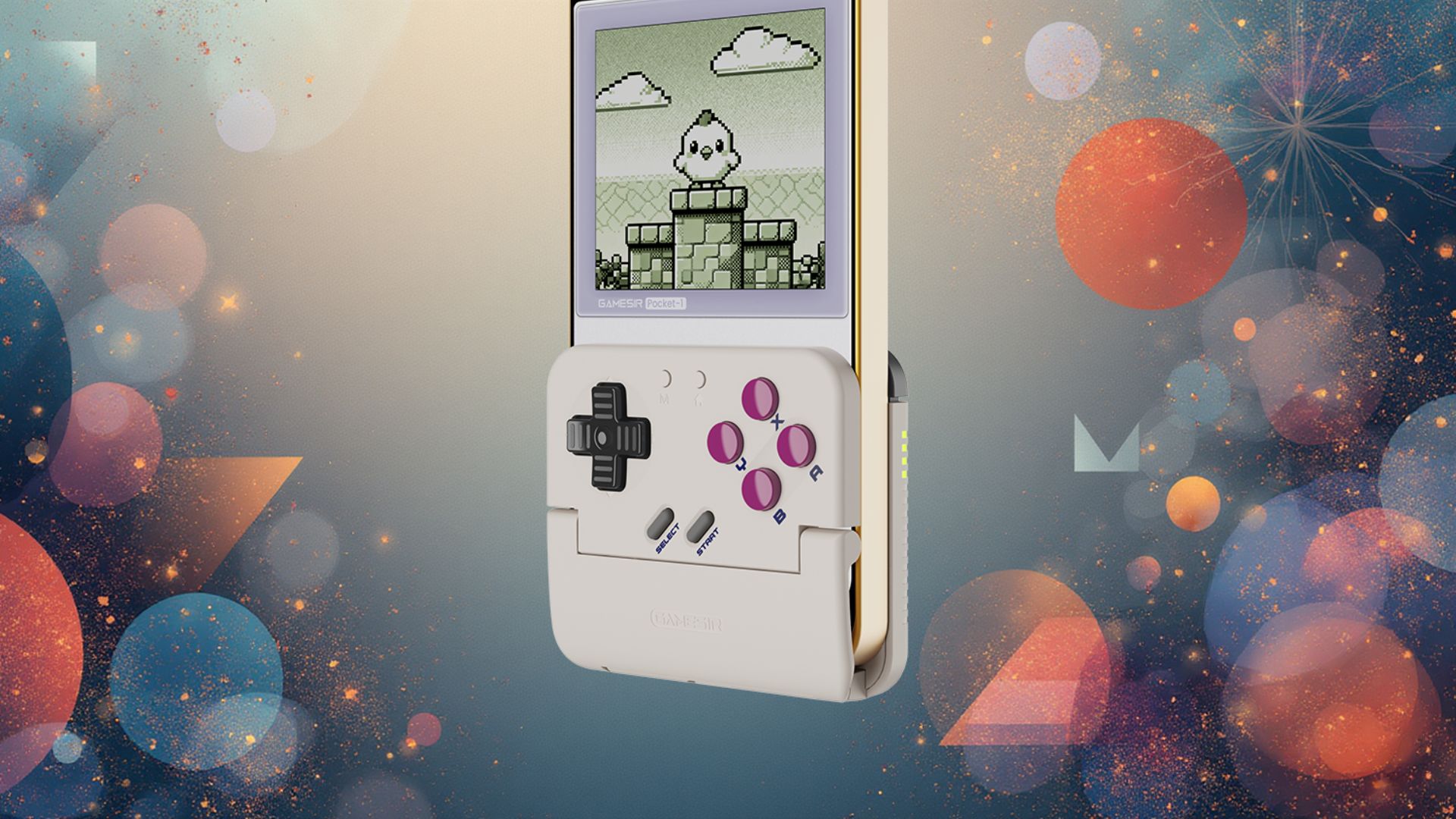
Design and Ergonomics: How it Mimics the Game Boy Feel
Many budget iPhone controllers draw heavy inspiration from classic handhelds, particularly the Game Boy. This often means a focus on a comfortable, ergonomic grip, a responsive D-pad, and strategically placed action buttons. The goal is to provide a familiar feel that instantly transports players back to their childhoods. Some designs even incorporate the chunky, angular aesthetic of the original Game Boy, while others opt for a more streamlined, modern look that still prioritizes button layout and tactile feedback. The best controllers will ensure that your iPhone feels like a natural extension of the device, not an awkward attachment. This attention to design ensures that the physical interaction with the game is as authentic and enjoyable as possible, a crucial element for true retro enthusiasts.
Compatibility and Setup: iPhone Models, App Requirements
One of the primary considerations when choosing an iPhone Game Boy controller is compatibility. Most modern controllers connect via Bluetooth and are designed to work with a wide range of iPhone models, often accommodating various sizes from the compact Mini to the larger Pro Max versions. It’s important to check if the controller supports your specific iPhone model and iOS version. Setup is typically straightforward: pair the controller via Bluetooth, and it should be recognized by most MFi (Made for iPhone) compatible games and, crucially, by popular emulation applications. These emulators, often available through alternative app stores or sideloading methods (depending on regional regulations and Apple’s policies), are the gateway to playing classic Game Boy, Game Boy Color, and Game Boy Advance titles, along with other retro systems. The ease of setup ensures that users can quickly dive into their favorite games without unnecessary technical hurdles, similar to how modern phones prioritize user experience, even for those featured in top 10 trending phones lists.
Key Features for Authentic Play: Buttons, D-pad, Responsiveness
The quality of a budget controller hinges on a few core features. A good D-pad is paramount for many retro games, offering precise directional input essential for platformers and fighting games. Look for controllers with distinct, responsive buttons that provide satisfying feedback. Analog sticks, while not always necessary for Game Boy titles, are a welcome addition for other retro systems or modern mobile games. Low latency is also critical; there’s nothing more frustrating than a delay between your input and the on-screen action. Many affordable options now offer surprisingly good responsiveness, rivalling their more expensive counterparts. Ensuring these core elements are well-executed is what truly delivers an authentic and enjoyable gaming experience, transforming your iPhone into a genuine retro handheld.
A Deep Dive into the Gaming Experience
Once you have your iPhone Game Boy controller paired and ready, the real fun begins. The tactile feedback and precise controls fundamentally alter the mobile gaming experience, especially for retro titles. No longer are you fighting against unresponsive touch controls; instead, you’re interacting with the game in the way it was originally intended. This shift reintroduces a layer of immersion and control that is often lost on modern touch devices, making challenging platformers less frustrating and intricate RPGs more manageable.
Emulators and ROMs: The Gateway to Classics
To play Game Boy games, you’ll need an emulator application and game ROMs. Emulators are software programs that mimic the hardware of a classic console, allowing its games to run on a different system (in this case, your iPhone). Popular emulators often support multiple systems, including the Game Boy, NES, SNES, and more. When it comes to ROMs, which are digital copies of game cartridges, it’s crucial to understand the legalities. Generally, owning the original game cartridge gives you the right to play its ROM for personal use. A thriving community exists around emulation, providing resources and support for setting up these systems on iOS, often through web-based emulators or alternative app stores that bypass Apple’s strict review process for such applications. The availability of these tools is what truly unlocks the potential of an iPhone as a retro gaming device.
Beyond Game Boy: Other Retro Systems Supported
While the focus might be on transforming your iPhone into a Game Boy, most budget controllers and emulators are far more versatile. With the right setup, your iPhone can become a portable arcade for NES and SNES classics, a Sega Genesis powerhouse, or even delve into PlayStation 1 titles. The power of modern iPhones means they can handle a surprising range of older systems with ease. This expands your retro library exponentially, making your affordable controller an even greater value proposition. Whether you crave the platforming precision of Mario, the role-playing depth of Final Fantasy, or the fighting action of Street Fighter, your iPhone and its new controller can deliver.
The Cost-Benefit Analysis: Why “Cheap” Doesn’t Mean “Compromise”
The term “cheap” often carries a negative connotation, implying low quality or a compromised experience. However, in the realm of iPhone Game Boy controllers, “cheap” often refers to affordability without sacrificing core functionality. Many manufacturers have perfected the art of producing durable, responsive controllers at price points significantly lower than official console accessories or high-end mobile gaming gear. This is achieved by focusing on essential features, using cost-effective materials, and leveraging efficient manufacturing processes. The benefit is clear: you get an excellent retro gaming experience for a fraction of the cost of a dedicated retro handheld or a premium mobile controller. This makes it an incredibly attractive option for budget-conscious gamers who still demand quality play, much like how there are cost-effective alternatives for household appliances like tumble dryers.
Comparing Options: Is it Really the Best Budget Choice?
The market for mobile gaming accessories is competitive, offering a spectrum of choices from ultra-budget options to premium, feature-rich devices. Understanding where budget iPhone Game Boy controllers fit into this landscape requires a look at their strengths, weaknesses, and the alternatives available. It’s about finding the sweet spot where cost, performance, and user satisfaction align, ensuring that your investment, no matter how small, yields maximum enjoyment.
Pros and Cons of Budget Controllers
The advantages of a budget iPhone Game Boy controller are numerous. Foremost is the cost-effectiveness, providing an affordable entry point into high-quality retro gaming. They offer superior tactile feedback compared to touchscreens, enhancing immersion and precision. Many are also highly portable, easily fitting into a bag or pocket. However, there are potential drawbacks. Build quality can vary; some cheaper options might use less durable plastics or have less responsive buttons. Battery life might be shorter, and some might lack advanced features found in premium controllers, such as pass-through charging or rumble feedback. Latency, while generally low, can sometimes be an issue with very cheap Bluetooth modules. It’s a balance, but for the price, the pros often heavily outweigh the cons for most users.
Alternatives: High-End Controllers, Dedicated Handhelds
For those willing to spend more, several alternatives exist. High-end mobile controllers from brands like Backbone or Razer offer premium build quality, advanced features, and often direct connection via Lightning port, reducing latency further. These come at a significantly higher price point. Another alternative is a dedicated retro handheld console, such as those from Anbernic or Retroid. These devices are purpose-built for emulation, often running Linux or Android, and come with pre-installed emulators. While they offer a truly authentic experience, they represent another device to carry and manage, and can often be more expensive than a budget controller paired with your existing iPhone. For those seeking immersive experiences at a fraction of the cost, much like the significant savings available on a Meta Quest 3 VR headset, budget iPhone controllers offer an accessible entry point into retro gaming.
What to Look for in an Affordable iPhone Game Boy Controller
When selecting a budget controller, prioritize these aspects:
- Compatibility: Ensure it fits your specific iPhone model and iOS version.
- Ergonomics: Read reviews about comfort during extended play sessions.
- D-pad Quality: Crucial for retro games; look for positive feedback on its responsiveness and accuracy.
- Button Feel: Buttons should be clicky and responsive, not mushy.
- Connectivity: Bluetooth 4.0 or higher is preferable for stable connection and lower latency.
- Build Quality: While “budget,” it shouldn’t feel flimsy. A solid construction ensures longevity.
- Battery Life: Adequate battery life for your typical gaming sessions.
By focusing on these elements, you can find a high-value iPhone Game Boy controller that delivers an excellent experience without breaking your budget.
Maximizing Your Retro Gaming Setup
Acquiring a budget iPhone Game Boy controller is just the first step. To truly unlock the full potential of your retro gaming setup, a few additional considerations and optimizations can significantly enhance your experience. From protecting your device to fine-tuning emulator settings, these tips will help you get the most out of your newfound portable arcade.
Essential Accessories: Cases, Screen Protectors
When your iPhone is transformed into a gaming handheld, it’s subjected to more handling and potential knocks. A sturdy case is essential to protect your device from accidental drops, especially if you’re using a clip-on style controller that might expose more of the phone’s edges. A high-quality screen protector is also highly recommended to guard against scratches, particularly if you’re prone to aggressive button mashing. Some controllers might even come with their own travel cases, which are excellent for keeping both your iPhone and the controller safe when on the go. Investing a small amount in protection can save you a much larger sum in repair costs down the line, ensuring your retro gaming adventures are worry-free.
Customization and Settings: Optimizing Emulator Performance
Emulators often come with a plethora of settings that can be tweaked to optimize performance and visual fidelity. For Game Boy games, you might want to experiment with different display filters to replicate the original screen look, or even enhance it with crisp pixel scaling. Audio settings can be adjusted to improve sound quality, and input mapping can be customized to ensure your controller buttons feel just right. Frame rate settings, save states, and fast-forward options are also common features that can greatly improve the quality-of-life for retro gaming. Taking the time to explore these options within your chosen emulator can elevate a good experience to a great one. Ensuring a seamless gaming experience also means avoiding software frustrations, a sentiment shared by users facing issues with platforms like Google Messages, highlighting the importance of reliable software.
Community and Resources: Where to Find More Info
The retro gaming and emulation communities are vibrant and incredibly helpful resources. Online forums, dedicated subreddits, and YouTube channels are treasure troves of information on everything from choosing the best emulators to finding obscure ROMs (legally, of course!). You can find guides on optimizing performance, troubleshooting common issues, and discovering new games. Engaging with these communities can provide valuable insights, tips, and even recommendations for new controllers or accessories. This collective knowledge ensures that even beginners can quickly get up to speed and enjoy the rich world of retro gaming on their iPhones. While high-end gaming benefits from robust hardware, including ample RAM, even with potential challenges like 16GB RAM phone shortages, current iPhones offer more than enough power for retro emulation, making community support for software optimization even more valuable.
The Future of Mobile Retro Gaming
The landscape of mobile gaming is constantly evolving, and with it, the possibilities for retro emulation. As iPhones become even more powerful and connectivity options expand, the line between dedicated




