
Unlocking Potential: The Apple Watch Series 9 GPS 45mm Deep Dive
The Apple Watch has consistently redefined what a wearable device can achieve, seamlessly blending cutting-edge technology with intuitive design to enhance daily life. With each iteration, Apple pushes the boundaries of personal health, communication, and convenience. The Apple Watch Series 9 GPS 45mm stands as a testament to this relentless innovation, offering a sophisticated suite of features designed to empower users with greater control over their well-being and connectivity. This comprehensive review will delve into the intricate details of its design, performance, health monitoring capabilities, and overall user experience, demonstrating why it remains a benchmark in the smartwatch market.
From its vibrant display to its advanced health sensors, the Apple Watch Series 9 GPS 45mm is engineered to be more than just a time-telling device; it is a personal assistant, a fitness coach, and a guardian of your health, all elegantly wrapped around your wrist. Its larger 45mm case size ensures a more immersive viewing experience and easier interaction, while the GPS-only model provides robust tracking for workouts and navigation without requiring cellular connectivity, making it an ideal companion for a wide range of users.
Design and Display Innovations: A Brighter Perspective
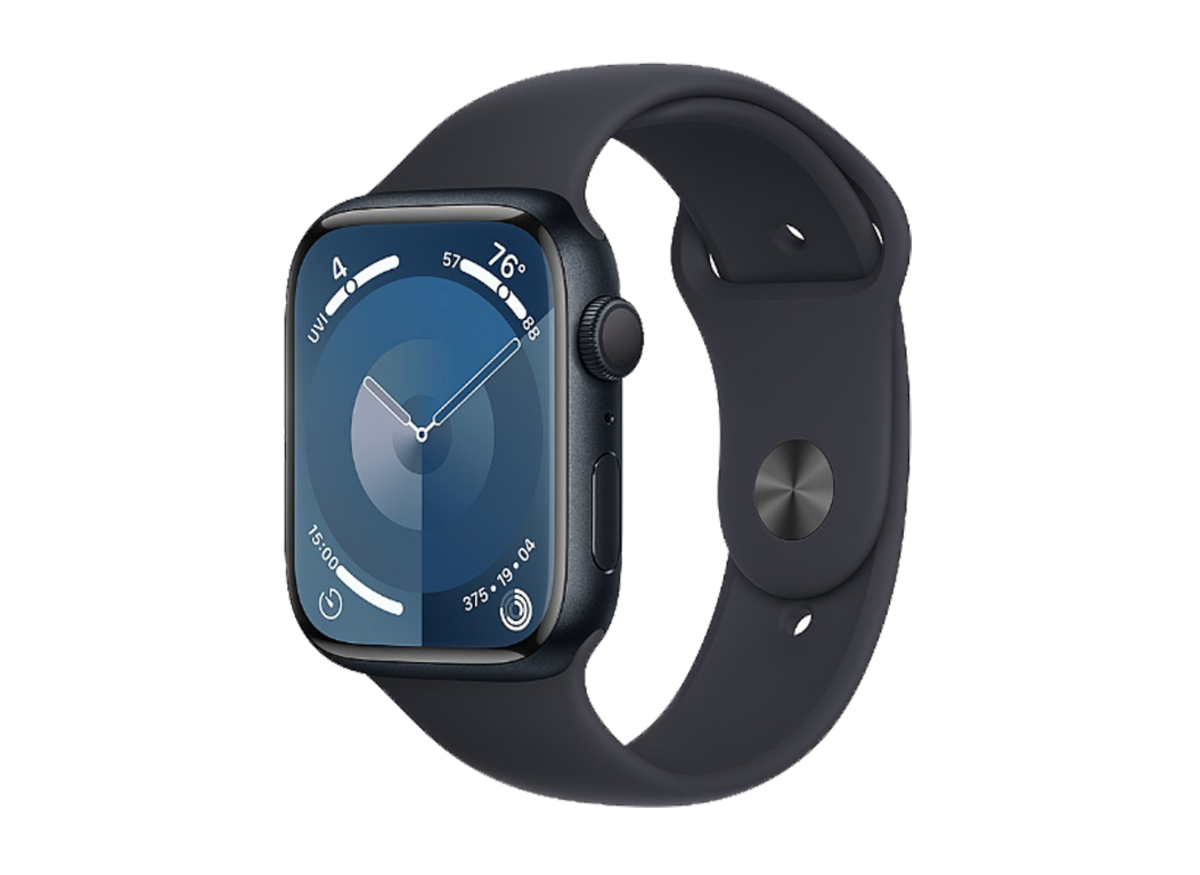
The aesthetic appeal and functional design of the Apple Watch Series 9 GPS 45mm are immediately apparent. Building upon the iconic rectangular form factor, the Series 9 refines the user interface with an edge-to-edge display that maximizes screen real estate. The 45mm model, in particular, offers a generous canvas for notifications, apps, and watch faces, making interactions more comfortable and data more legible, even at a glance.
Brighter, More Adaptive Retina Display
One of the most significant upgrades in the Series 9 is its advanced Always-On Retina display. Capable of reaching an impressive peak brightness of 2000 nits, it is twice as bright as the Series 8, ensuring exceptional visibility outdoors under direct sunlight. Conversely, it can dim down to just 1 nit in dark environments, preserving battery life and making it less intrusive in settings like a movie theater or during sleep. This dynamic range adaptability is crucial for usability, allowing users to effortlessly check information in any lighting condition without needing to raise their wrist or tap the screen.
The display is crafted from robust Ion-X glass, providing enhanced durability against scratches and impacts, a vital feature for a device worn daily. The seamless integration of the display with the watch case creates a sleek, premium look that is both modern and timeless. The Series 9 continues to support a vast array of watch faces, allowing for deep personalization to match any style or occasion, further enhancing its appeal as a fashion statement as much as a technological marvel.
Refined Materials and Finishes
The Apple Watch Series 9 GPS 45mm is available in a range of aluminum finishes, including Midnight, Starlight, Silver, (PRODUCT)RED, and a new Pink option. Each finish is meticulously applied, contributing to the device’s elegant appearance. Apple’s commitment to sustainability is also evident, with the Series 9 featuring components made from recycled materials, aligning with the company’s broader environmental initiatives. The choice of materials not only contributes to its premium feel but also ensures longevity and resilience, making it a reliable companion for years to come.
Performance and Core Technologies: Powering Your Day
At the heart of the Apple Watch Series 9 GPS 45mm lies the new S9 SiP (System in Package), a custom-designed chip that delivers substantial improvements in performance and efficiency. This powerful processor is the engine behind all the watch’s advanced features, from fluid app navigation to complex health data analysis.
The S9 SiP: A Leap in Processing Power
The S9 SiP boasts a 5.6 billion transistor count and a new 4-core Neural Engine, which is twice as fast as its predecessor. This translates into snappier app launches, smoother animations, and more responsive interactions across the board. The enhanced Neural Engine specifically accelerates on-device machine learning tasks, which are critical for features like the new Double Tap gesture and improved Siri processing. Unlike some other smartwatches that might struggle with demanding applications, the Series 9 ensures a consistently fluid and powerful experience, rivaling the performance of even high-end smartphones like the OnePlus 8 in terms of responsiveness for everyday tasks.
Revolutionary Double Tap Gesture
Perhaps one of the most intuitive and innovative new features powered by the S9 SiP is the “Double Tap” gesture. This allows users to control the watch with just one hand, by simply tapping their index finger and thumb together twice. This gesture can answer calls, stop timers, play/pause music, or scroll through Smart Stack widgets. It leverages the Neural Engine to analyze subtle changes in blood flow and muscle movement, providing a hands-free interaction method that feels incredibly natural and convenient, particularly when your other hand is occupied.
This gesture is a game-changer for accessibility and everyday usability, demonstrating Apple’s commitment to thoughtful user interface design. It represents a significant step forward in how we interact with wearables, making the Apple Watch Series 9 GPS 45mm even more integrated into our lives without requiring direct screen contact for common actions.
Enhanced On-Device Siri
The S9 SiP also enables on-device processing for Siri requests. This means that many common Siri commands no longer require an internet connection, leading to faster and more reliable responses. For instance, setting a timer, starting a workout, or checking your health data can now be done almost instantaneously, even when you’re out of Wi-Fi or cellular range. This privacy-focused approach also means that personal health data accessed by Siri remains on the device, never leaving your wrist.
Health and Fitness Tracking Capabilities: Your Personal Wellness Hub
The Apple Watch Series 9 GPS 45mm continues Apple’s tradition of offering best-in-class health and fitness tracking, providing a comprehensive suite of tools to monitor and improve your well-being. From heart health to sleep patterns, the watch acts as a vigilant guardian, offering insights and alerts that can be life-saving.
Advanced Health Sensors
- ECG App: The Electrocardiogram app can record your heart rhythm and check for signs of atrial fibrillation (AFib), a serious form of irregular heart rhythm. This feature provides critical data that can be shared with medical professionals.
- Blood Oxygen Sensor: Measure your blood oxygen saturation on demand, giving you insight into an important indicator of overall wellness.
- Temperature Sensing: Introduced with Series 8, the Series 9 enhances this feature, primarily benefiting women’s health by providing retrospective ovulation estimates and advanced cycle tracking. This data is rigorously protected for user privacy.
- Heart Rate Monitoring: Continuous heart rate monitoring, with high and low heart rate notifications, and irregular rhythm notifications, helps users stay aware of potential cardiac issues.
Comprehensive Fitness Tracking
For fitness enthusiasts, the Apple Watch Series 9 GPS 45mm is an indispensable tool. It tracks a wide array of workouts with incredible accuracy, from running and cycling to swimming and yoga. The enhanced GPS ensures precise distance and pace tracking, even in challenging environments. Customizable workout views allow users to see the metrics most important to them at a glance, keeping them motivated and informed during their sessions.
The Activity Rings – Move, Exercise, and Stand – provide a simple yet powerful visual representation of daily activity, encouraging users to close their rings and achieve their fitness goals. With features like automatic workout detection and personalized coaching, the Series 9 makes it easier than ever to stay active and make progress towards a healthier lifestyle. For those who push their limits in more extreme conditions, exploring devices like the Garmin Fenix 8 might offer specialized ruggedness, but for everyday fitness and smart features, the Series 9 excels.
Mental Health and Mindfulness
Beyond physical health, the Series 9 also integrates features to support mental well-being. The Mindfulness app, with its Reflect and Breathe sessions, helps users manage stress and practice gratitude. The watch also offers insights into sleep stages, providing a detailed breakdown of time spent in REM, Core, and Deep sleep, along with wakefulness, helping users understand and improve their sleep hygiene. This holistic approach to health underscores the Apple Watch’s role as a comprehensive wellness companion.
Connectivity and Smart Features: Seamless Integration
The GPS-only model of the Apple Watch Series 9 GPS 45mm focuses on seamless integration with your iPhone, providing a robust suite of connectivity and smart features that keep you informed and connected throughout your day.
Notifications and Communication
Receive all your iPhone notifications directly on your wrist – calls, texts, emails, and app alerts. With the Series 9, you can respond to messages using dictation, scribble, or quick replies, and even take calls directly from your watch when your iPhone is nearby. This level of convenience means you can stay connected without constantly pulling out your phone, whether you’re in a meeting or on a run. The larger 45mm display makes reading and responding to messages particularly comfortable.
Apple Pay and Wallet
Leave your wallet at home. The Apple Watch Series 9 GPS 45mm supports Apple Pay, allowing you to make secure and convenient payments with a simple tap of your wrist at compatible terminals. Your boarding passes, event tickets, and loyalty cards can also be stored in the Wallet app, streamlining your daily interactions and reducing the need for physical cards.
Enhanced Find My Capabilities
The Series 9 features a second-generation Ultra Wideband chip, which enables Precision Finding for iPhone 15 models. This means you can get exact directions to your misplaced iPhone, complete with haptic feedback and visual cues on the watch display. This is a significant upgrade from previous “Find My” features, offering unparalleled accuracy when you need to locate your device, akin to the advanced tracking found in other premium smart devices.
Smart Home Control
With the Home app on your Apple Watch, you can control HomeKit-enabled smart home devices directly from your wrist. Turn off lights, adjust thermostats, or lock doors with a simple tap or Siri command, adding another layer of convenience to your smart living experience. This integration highlights the Apple Watch’s role as a central hub in your personal technology ecosystem.
Battery Life and Charging: Powering Through Your Day
Battery life is a critical consideration for any wearable, and the Apple Watch Series 9 GPS 45mm is designed to offer all-day power for most users. Apple rates the Series 9 for up to 18 hours of typical use on a single charge, which includes a mix of notifications, app usage, and workout tracking. For those needing to extend usage, a Low Power Mode can stretch the battery life up to 36 hours by temporarily disabling certain features like the Always-On display and automatic workout detection.
Charging is swift and convenient thanks to the included magnetic fast charging USB-C cable. The Series 9 can reach 80% charge in approximately 45 minutes and a full charge in about 75 minutes. This fast charging capability ensures that even if you forget to charge overnight, a quick top-up in the morning or during a break can provide enough power to last you through the rest of the day. This balance of performance and endurance makes the Apple Watch Series 9 GPS 45mm a reliable companion for daily use, even for those with active lifestyles.
User Experience and watchOS: Intuitive and Refined
The user experience on the Apple Watch Series 9 GPS 45mm is defined by watchOS, Apple’s dedicated operating system for its wearables. watchOS 10, which debuted with the Series 9, brings a host of improvements focused on enhancing glanceability, navigation, and app functionality.
Redesigned Apps and Smart Stack
watchOS 10 introduces redesigned apps that take full advantage of the larger display, presenting more information at a glance. The new Smart Stack feature, accessible by simply turning the Digital Crown, provides timely and relevant information based on your context and time of day. This could include weather forecasts, upcoming calendar appointments, or music controls, all dynamically presented without needing to open individual apps. This intelligent organization streamlines access to essential information, making the watch even more useful throughout the day.
Enhanced Navigation and Customization
Navigation remains intuitive, combining the Digital Crown for scrolling and zooming, and the side button for accessing favorite apps and Apple Pay. The wide array of watch faces, from utilitarian to artistic, allows for extensive personalization. Complications – small widgets that display information from apps – can be added to most watch faces, offering quick access to data like heart rate, activity progress, or upcoming events. This level of customization ensures that each user can tailor their Apple Watch Series 9 GPS 45mm to perfectly suit their individual needs and preferences.
Comparing the Apple Watch Series 9 GPS 45mm to Other Smartwatches
While the Apple Watch Series 9 GPS 45mm excels in its blend of health, fitness, and smart features, it’s helpful to understand its position relative to other devices in the market. Apple offers various models tailored to different user needs. For instance, the Apple Watch Ultra 2, and its anticipated successor, the Apple Watch Ultra 3, are designed for extreme sports and adventure, boasting enhanced durability, longer battery life, and specialized features not found in the Series 9. These Ultra models cater to a niche of users who require military-grade resilience and advanced outdoor navigation.
In the broader smartwatch ecosystem, devices like the Garmin Forerunner 165 Music offer a strong focus on running and music integration, appealing to dedicated athletes who prioritize specific training metrics and offline music playback. While the Series 9 provides excellent all-around fitness tracking, Garmin often leads in highly specialized sport profiles and multi-day battery life for continuous GPS tracking. The choice between these devices often comes down to specific priorities: comprehensive smart features and health monitoring with Apple, or ultra-specialized athletic tracking with Garmin.
The Apple Watch Series 9 GPS 45mm also integrates seamlessly with the iPhone ecosystem, a key differentiator from smartwatches designed for Android devices, such as those that pair with a Samsung Galaxy S10 Lite or a Huawei Nova 7i. This deep integration allows for features like Handoff, shared health data, and consistent UI/UX across devices, offering a cohesive experience that is hard to match outside of Apple’s walled garden. For iPhone users, the Series 9 often represents the most natural and feature-rich choice.
Who is the Apple Watch Series 9 GPS 45mm For?
The Apple Watch Series 9 GPS 45mm is an excellent choice for a wide range of individuals seeking a powerful, stylish, and health-focused smartwatch. It particularly appeals to:
- iPhone Users: For anyone already invested in the Apple ecosystem, the Series 9 offers unparalleled integration, making it the most seamless and functional smartwatch companion.
- Health & Fitness Enthusiasts: With its comprehensive health monitoring (ECG, Blood Oxygen, Temperature Sensing) and advanced fitness tracking, it’s ideal for those committed to understanding and improving their well-being.
- Individuals Seeking Convenience: The Double Tap gesture, enhanced Siri, and robust notification management make daily interactions effortless, allowing users to stay connected and productive without constantly reaching for their phone.
- Style-Conscious Consumers: The elegant design, vibrant display, and wide range of customizable bands and watch faces ensure it complements any personal style.
- Those Prioritizing Privacy: With on-device Siri processing and strict data protection for health information, the Series 9 offers peace of mind regarding personal data security.
While the cellular model offers independence from the iPhone, the GPS-only 45mm variant provides all the core smart features and health tracking at a more accessible price point, making it a fantastic value for those who typically keep their iPhone nearby.
Key Specifications of the Apple Watch Series 9 GPS 45mm
Conclusion: The Definitive Smartwatch for Everyday Life
The Apple Watch Series 9 GPS 45mm solidifies its position as a leading force in the smartwatch market, offering an unparalleled combination of advanced health features, robust fitness tracking, seamless connectivity, and intuitive user experience. Its vibrant, brighter display, powerful S9 SiP, and innovative Double Tap gesture elevate daily interactions to new heights of convenience and efficiency. Whether you’re a dedicated athlete, a health-conscious individual, or simply seeking a smarter way to stay connected, the Series 9 provides a comprehensive solution that integrates effortlessly into your digital life.
With its commitment to user privacy, sustainable design, and continuous software innovation through watchOS, the Apple Watch Series 9 GPS 45mm is more than just a gadget; it’s a personal health guardian, a communication hub, and a stylish accessory that empowers you throughout your day. It represents the pinnacle of Apple’s wearable technology, making it an indispensable tool for anyone looking to enhance their well-being and stay connected in the modern world.




