
Transform Art into Heirloom: Crafting a Personalized Apron with AI
Gifting something truly unique and personal is a cherished tradition. What if you could transform a loved one’s artistic creation into a wearable piece of art? This article details how I used Adobe’s AI tools to create a personalized apron featuring my mother’s stunning paintings, offering a step-by-step guide for you to do the same. This journey combines traditional art with modern technology, resulting in a meaningful and practical gift.
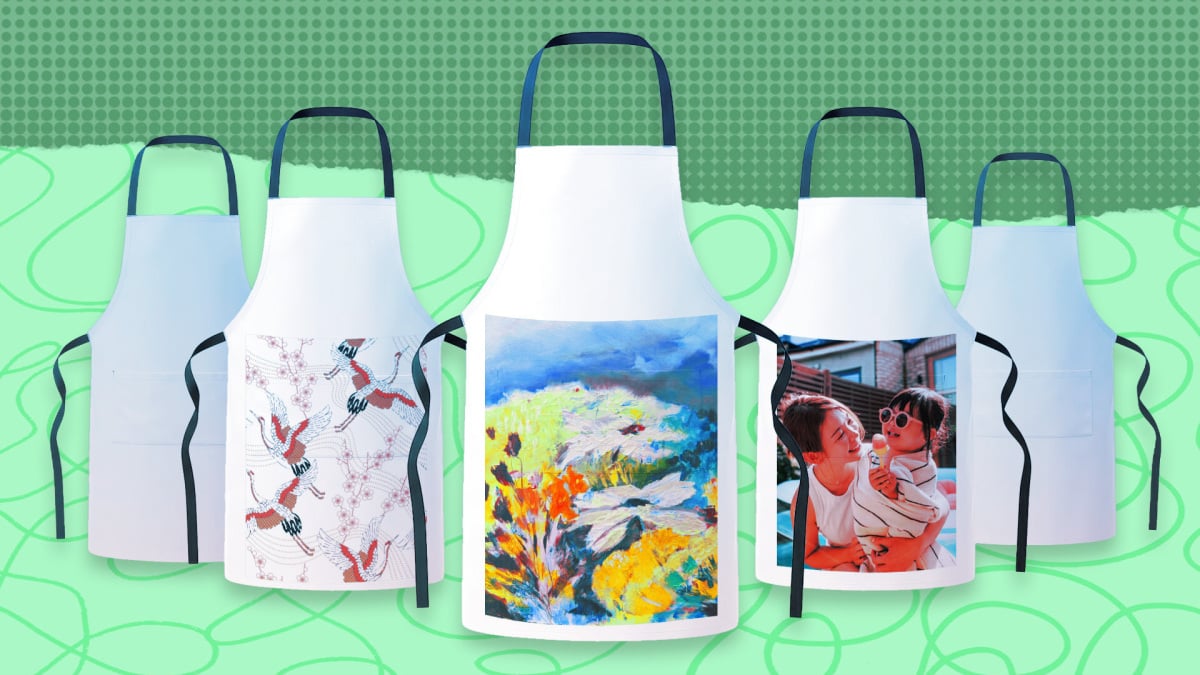
The process leverages the power of Adobe Firefly and Photoshop, both equipped with impressive AI capabilities. Adobe Firefly allows for quick visualization of artwork on various products, aiding in the selection of the perfect canvas. Photoshop’s AI upscaling feature ensures that every detail of the original artwork is preserved and enhanced, even when printed on a larger scale. This combination makes it possible to create stunning, high-quality personalized gifts with relative ease. If you are looking for unbeatable tech black friday deals under $50, you might find some useful tools to help with this process.
Selecting the Perfect Canvas: Why an Apron?
While the possibilities are endless – from scarves and dresses to mugs and phone cases – I ultimately chose an apron. There are several reasons why an apron made the ideal choice for this project. First, my mother enjoys spending time in the kitchen, making it a practical and thoughtful gift. Second, the large, flat surface of an apron provides ample space to showcase her artwork in all its glory. Finally, an apron is a durable and long-lasting item, ensuring that her art will be appreciated for years to come.
Beyond the personal connection, aprons offer a unique opportunity to display art in a functional way. Every time my mother wears her custom apron, she’ll be reminded of the love and effort that went into creating it. It’s a gift that combines practicality with sentimentality, making it truly special.
Step-by-Step Guide: Creating Your Personalized Apron
This section provides a detailed, step-by-step guide to creating your own personalized apron using Adobe’s AI tools. Whether you’re working with original artwork, family photos, or digital designs, the process is similar and can be adapted to suit your specific needs.
1. Visualizing Your Artwork with Adobe Firefly
Adobe Firefly is a powerful generative AI application that allows you to visualize your artwork on various products. This is a crucial step in the process, as it helps you determine the best way to showcase your art and choose the perfect item for your personalized gift. Here’s how to use Firefly to visualize your artwork on an apron:
- Upload Your Artwork: Begin by uploading a high-resolution image of your chosen artwork to Adobe Firefly.
- Select “Generative Fill”: Use the “Generative Fill” tool to select the area of the apron where you want your artwork to appear.
- Describe Your Vision: In the text prompt, describe how you want your artwork to be integrated into the apron design. For example, you could write “Chinese painting on a white apron” or “abstract art filling the entire apron.”
- Generate Variations: Firefly will generate several variations of your design based on your prompt. Browse through the options and choose the one that best captures your vision.
- Experiment and Refine: Don’t be afraid to experiment with different prompts and settings to achieve the desired result. You can also refine the generated images using Firefly’s editing tools.
This initial visualization helps you confirm that the artwork translates well onto the chosen product and allows you to make any necessary adjustments before moving on to the next step. If you’re looking to score a remarkable deal this Black Friday, consider investing in a subscription to Adobe Creative Cloud to access these powerful AI tools.
2. Enhancing Your Artwork with Photoshop’s AI Upscaling
Once you’ve visualized your artwork and chosen your product, the next step is to enhance the image quality using Photoshop’s AI upscaling feature. This is particularly important when working with scanned images or artwork that needs to be printed on a larger scale. Here’s how to use Photoshop’s AI upscaling feature:
- Open Your Image in Photoshop: Open the image of your artwork in Photoshop.
- Navigate to “Image” > “Image Size”: This will open the Image Size dialog box.
- Select “Resample”: In the Resample dropdown menu, choose “Preserve Details 2.0 (AI)”. This option utilizes Photoshop’s AI to intelligently upscale the image while preserving fine details.
- Adjust the Resolution: Increase the resolution to the desired print size. A resolution of 300 DPI (dots per inch) is generally recommended for high-quality prints.
- Fine-Tune the Details: Use the “Reduce Noise” slider to minimize any artifacts or noise that may be introduced during the upscaling process.
- Save Your Enhanced Image: Save the enhanced image as a high-resolution TIFF or PNG file to preserve its quality.
Photoshop’s AI upscaling feature intelligently analyzes the image and fills in missing details, resulting in a sharper, more vibrant final product. This step is crucial for ensuring that your personalized apron looks its best.
3. Choosing a Print-on-Demand Provider
With your enhanced artwork ready, the next step is to choose a print-on-demand provider. These platforms allow you to upload your designs and have them printed on a variety of products, including aprons. Several popular print-on-demand providers are available, each with its own strengths and weaknesses. Here are a few options to consider:
- Printful: Printful is a popular choice for its wide range of products, high-quality printing, and reliable shipping.
- Printify: Printify offers a vast network of printing partners, allowing you to choose the best option based on price, location, and product availability.
- Redbubble: Redbubble is a marketplace where artists can sell their designs on a variety of products. It’s a great option if you want to reach a wider audience.
- Society6: Society6 is similar to Redbubble, offering a platform for artists to sell their designs on a range of products.
When choosing a print-on-demand provider, consider factors such as product selection, printing quality, pricing, shipping options, and customer service. Read reviews and compare prices to find the best option for your needs.
4. Uploading Your Artwork and Ordering Your Apron
Once you’ve chosen a print-on-demand provider, the final step is to upload your enhanced artwork and order your personalized apron. The process varies slightly depending on the provider you choose, but the general steps are as follows:
- Create an Account: Create an account on the print-on-demand platform.
- Upload Your Artwork: Upload the high-resolution image of your artwork to the platform.
- Select Your Product: Choose the apron as your desired product.
- Position and Scale Your Artwork: Use the platform’s design tools to position and scale your artwork on the apron.
- Choose Your Printing Options: Select your desired printing options, such as print size, color, and placement.
- Review and Approve Your Design: Carefully review your design to ensure that everything looks as expected.
- Place Your Order: Place your order and wait for your personalized apron to arrive!
Before placing your order, be sure to double-check all the details, including the design, product, and shipping address. Once your order is placed, the print-on-demand provider will handle the printing and shipping, delivering your personalized apron directly to your doorstep.
Addressing Potential Challenges
While the process of creating a personalized apron with AI tools is relatively straightforward, there are a few potential challenges that you may encounter along the way. Here are some tips for overcoming these challenges:
- Low-Resolution Artwork: If your original artwork is low-resolution, Photoshop’s AI upscaling feature may not be able to fully restore the details. In this case, consider scanning the artwork at a higher resolution or using a different image.
- Complex Designs: Complex designs with intricate details may be difficult to reproduce accurately using print-on-demand services. Simplify your design or choose a printing provider that specializes in high-quality prints.
- Color Accuracy: Colors may vary slightly between your screen and the printed product. Calibrate your monitor and order a sample print to ensure that the colors are accurate.
- Copyright Issues: Ensure that you have the necessary rights to use the artwork you are printing. If you are using artwork created by someone else, obtain permission from the copyright holder.
By being aware of these potential challenges and taking the necessary precautions, you can ensure that your personalized apron turns out exactly as you envisioned.
The Emotional Impact of a Personalized Gift
Beyond the technical aspects of creating a personalized apron, it’s important to consider the emotional impact of such a gift. A personalized gift shows that you’ve put thought and effort into creating something truly unique and meaningful for the recipient. It demonstrates that you care about their interests, passions, and artistic talents.
When I gifted my mother the personalized apron featuring her artwork, her reaction was priceless. She was touched by the thoughtfulness of the gift and the fact that I had taken the time to create something so special for her. The apron quickly became one of her favorite kitchen accessories, and she proudly wears it whenever she’s cooking or baking.
Creating a personalized gift is a powerful way to strengthen relationships, express your love and appreciation, and create lasting memories. Whether you’re gifting an apron, a scarf, or any other personalized item, the emotional impact will be far greater than any store-bought gift.
Exploring Other Creative Applications of AI in Art
The use of AI in art is not limited to creating personalized gifts. AI tools are rapidly transforming the art world, opening up new possibilities for artists and designers. Here are a few other creative applications of AI in art:
- AI-Generated Art: AI algorithms can generate original artwork in a variety of styles, from abstract paintings to photorealistic landscapes.
- Art Restoration: AI can be used to restore damaged or faded artwork, bringing old masterpieces back to life.
- Art Authentication: AI can help to authenticate artwork by analyzing its style, composition, and materials.
- Art Education: AI can provide personalized art education, helping students to learn about art history, techniques, and styles.
As AI technology continues to evolve, we can expect to see even more innovative and creative applications in the art world. The possibilities are endless!
Moreover, as technology advances, the possibilities for personalizing gifts will only expand. Imagine creating interactive artwork that changes based on the wearer’s mood, or designing fabrics with embedded sensors that respond to the environment. The intersection of art and technology is a fertile ground for innovation, and the future of personalized gifts is bright.
The Future of Personalized Gifts: Embracing AI and Creativity
The process of creating a personalized apron using Adobe’s AI tools offers a glimpse into the future of gift-giving. As AI technology becomes more accessible and sophisticated, we can expect to see a surge in personalized gifts that are tailored to the individual’s unique tastes and preferences. This shift towards personalization reflects a growing desire for meaningful connections and authentic expressions of love and appreciation.
In the future, AI may be able to analyze a person’s personality, interests, and social media activity to automatically generate personalized gift ideas. Imagine an AI assistant that suggests the perfect gift based on a person’s online profile, or a 3D printer that creates custom-designed objects based on your specific requirements. The possibilities are truly limitless.
While AI can play a significant role in the creation of personalized gifts, it’s important to remember that the human element is still essential. The most meaningful gifts are those that are created with love, care, and attention to detail. AI should be seen as a tool that enhances our creativity, not replaces it. By combining the power of AI with our own artistic talents and emotional intelligence, we can create truly unforgettable personalized gifts that will be cherished for years to come.
Furthermore, consider the potential for collaboration between artists and AI. Artists can use AI tools to explore new creative avenues, generate unique design elements, and streamline their workflow. AI can serve as a powerful assistant, freeing up artists to focus on the aspects of their work that require human creativity and intuition. This collaboration can lead to the creation of truly innovative and groundbreaking personalized gifts.
As the demand for personalized gifts continues to grow, businesses will need to adapt to meet the evolving needs of consumers. This includes investing in AI technology, offering a wider range of customization options, and providing excellent customer service. Businesses that can successfully navigate this changing landscape will be well-positioned to thrive in the future of personalized gifts. For those looking for the best over-ear headphones of 2025, Black Friday sales may offer some great deals to enhance their creative process.
The journey of creating a personalized apron for my mother using Adobe’s AI tools was a rewarding experience that demonstrated the power of combining art and technology. By following the steps outlined in this article, you can create your own unique and meaningful personalized gifts that will be cherished for years to come. Embrace the future of gift-giving and let your creativity soar!
Conclusion: A Heartfelt Gift Powered by AI
Creating a personalized apron with my mom’s art was more than just a craft project; it was a heartfelt expression of love and appreciation. Adobe’s AI tools made the process accessible and efficient, allowing me to transform her beautiful paintings into a wearable piece of art. This experience highlights the potential of AI to enhance creativity and create truly unique and meaningful gifts. Whether you’re celebrating a special occasion or simply want to show someone you care, consider using AI to create a personalized gift that will be treasured for years to come. When considering gadgets to complement your creative workflow, you might find some unbeatable tech black friday deals under $50.




