
Samsung Galaxy Z Fold 2: Specs & Features Unveiled
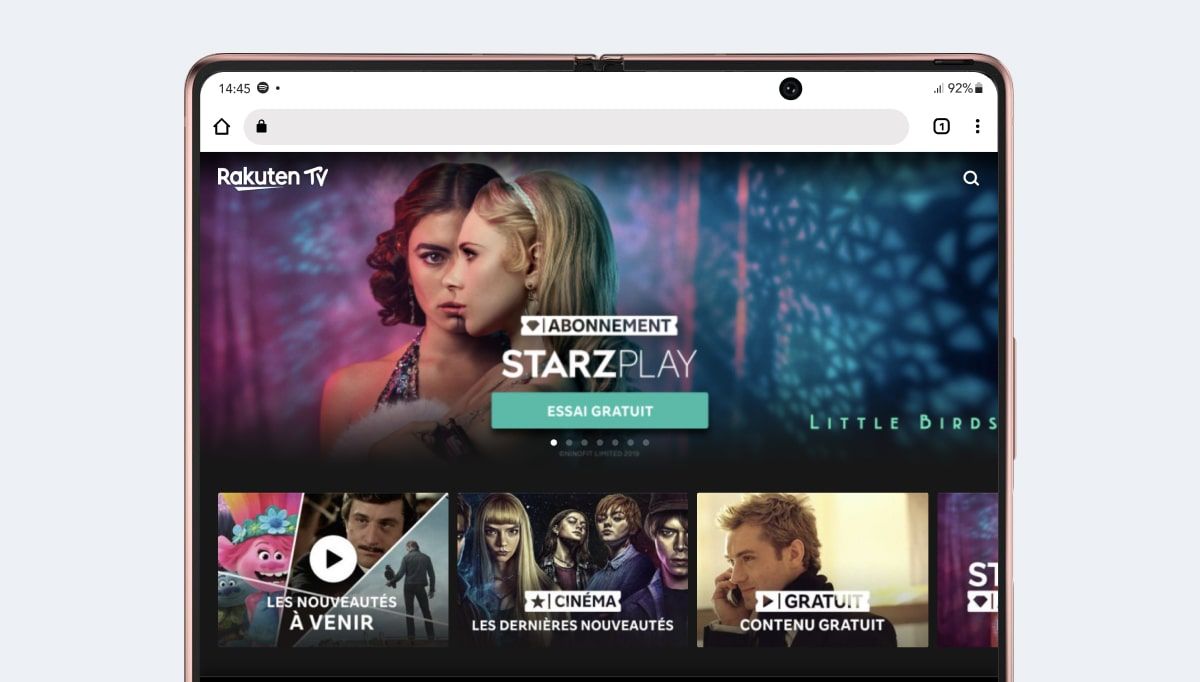
The Samsung Galaxy Z Fold 2 (2020) marked a significant step forward in foldable smartphone technology. This device aimed to blend the functionality of a tablet with the portability of a smartphone, offering users a unique and versatile experience. Let’s delve into the key characteristics that defined this innovative device, exploring its design, display, performance, and camera capabilities. Understanding these features provides valuable insight into the evolution of foldable technology and its potential impact on the mobile landscape. The device’s viewport resolution is a crucial factor for designers and developers, influencing breakpoints and media query definitions. For the Samsung Galaxy Z Fold 2 (2020), this resolution is typically 884 pixels in width and 1104 pixels in height. However, it’s important to note that the height can be indicative due to browser adjustments.
Design and Build Quality
The Samsung Galaxy Z Fold 2 boasts a refined design compared to its predecessor. The hinge mechanism was significantly improved, offering a smoother and more durable folding experience. The device features a premium build with a combination of glass and metal, providing a solid and luxurious feel. The external cover screen received a size upgrade, making it more functional for everyday tasks without unfolding the device. Samsung clearly focused on addressing the durability concerns of the original Fold, resulting in a more robust and reliable foldable device. Its design not only enhances its aesthetics but also contributes to its overall usability and longevity. The improved hinge, in particular, represents a crucial advancement in foldable phone technology. This attention to detail in design and build quality is a testament to Samsung’s commitment to pushing the boundaries of mobile innovation.
- Improved Hinge Mechanism
- Premium Glass and Metal Construction
- Larger Cover Screen
Display Characteristics of the Galaxy Z Fold 2
The display is arguably the most defining feature of the Samsung Galaxy Z Fold 2. The main foldable display utilizes Dynamic AMOLED technology, delivering vibrant colors, deep blacks, and excellent viewing angles. The refresh rate was increased to 120Hz, providing a smoother and more responsive user experience. The cover display also received an upgrade, offering a more immersive and usable experience compared to the original Fold. The larger screen real estate of the unfolded display enables enhanced multitasking capabilities, allowing users to run multiple apps simultaneously. The quality and size of the displays make the Z Fold 2 a compelling device for media consumption, gaming, and productivity. The pixel density on both screens ensures sharp and detailed visuals, further enhancing the overall user experience. For those interested in comparing other high-end Samsung devices, exploring the features of the Samsung Galaxy S21 Ultra can provide a broader perspective on Samsung’s display technology.
- Main Display: Dynamic AMOLED, 120Hz Refresh Rate
- Cover Display: Larger and More Usable
- Enhanced Multitasking Capabilities
Performance and Hardware
Under the hood, the Samsung Galaxy Z Fold 2 packs a powerful processor and ample RAM, ensuring smooth and responsive performance even with demanding tasks. The device also features a generous amount of internal storage for storing apps, files, and media. The battery capacity is sufficient to power the device throughout a typical day of usage. The Z Fold 2 supports fast charging and wireless charging, adding to its convenience. The overall hardware configuration is designed to deliver a premium and seamless user experience. The combination of processing power, RAM, and storage makes the Z Fold 2 capable of handling a wide range of tasks, from gaming and video editing to productivity and multitasking. For users considering other powerful devices, it’s worth noting that the Apple MacBook Air 2020 also offers excellent performance for its form factor.
- Powerful Processor
- Ample RAM and Internal Storage
- Sufficient Battery Capacity
- Fast Charging and Wireless Charging Support
Camera System
The Samsung Galaxy Z Fold 2 features a versatile camera system with multiple lenses, allowing users to capture high-quality photos and videos in various scenarios. The camera setup typically includes a wide-angle lens, an ultra-wide-angle lens, and a telephoto lens. The device supports various shooting modes and features, such as night mode, portrait mode, and video recording at up to 4K resolution. The camera performance is generally excellent, producing sharp, detailed, and vibrant images. The front-facing camera, located on both the cover display and the main display, enables high-quality selfies and video calls. The camera system on the Z Fold 2 is a significant improvement over its predecessor, offering a more comprehensive and capable photography experience. The ability to take photos and videos in various modes and resolutions adds to the device’s versatility. The camera’s performance aligns with other high-end smartphones in the market, providing users with a reliable and enjoyable photography experience.
- Multiple Lenses: Wide-Angle, Ultra-Wide-Angle, Telephoto
- Various Shooting Modes and Features
- High-Quality Photo and Video Capture
- Front-Facing Cameras on Both Displays
Software and User Interface
The Samsung Galaxy Z Fold 2 runs on Android with Samsung’s One UI on top. The software is optimized for the foldable form factor, offering features such as app continuity, which allows apps to seamlessly transition between the cover display and the main display. Multitasking is also enhanced, allowing users to run multiple apps simultaneously in split-screen mode. The user interface is clean, intuitive, and customizable, providing a user-friendly experience. Samsung also provides regular software updates, ensuring that the device remains secure and up-to-date with the latest features. The software experience on the Z Fold 2 is a key differentiator, leveraging the unique capabilities of the foldable display to enhance productivity and entertainment. The seamless app transitions and enhanced multitasking features are particularly useful for users who want to maximize their efficiency. The user interface is designed to be both functional and visually appealing, contributing to a positive overall user experience. The software enhancements significantly contribute to the overall appeal of the Samsung Galaxy Z Fold 2.
Connectivity and Other Features
The Samsung Galaxy Z Fold 2 supports a wide range of connectivity options, including 5G, Wi-Fi 6, Bluetooth 5.0, and NFC. The device also features a USB-C port for charging and data transfer. Other notable features include stereo speakers, a side-mounted fingerprint sensor, and support for Samsung DeX, which allows users to connect the device to an external display and use it as a desktop computer. The Z Fold 2 also supports wireless charging and reverse wireless charging, allowing users to charge other devices using the phone’s battery. The comprehensive connectivity options and additional features make the Z Fold 2 a versatile and convenient device for both personal and professional use. The inclusion of 5G support ensures that users can take advantage of the fastest mobile network speeds. The stereo speakers provide an immersive audio experience, while the side-mounted fingerprint sensor offers secure and convenient authentication. These features collectively enhance the overall user experience and add to the device’s value.
Viewport Resolution Explained
The viewport resolution is a crucial concept for web developers and designers, especially when creating responsive websites. It refers to the visible area of a webpage on a device’s screen. The Samsung Galaxy Z Fold 2 (2020), when unfolded, has a viewport resolution of approximately 884 pixels in width and 1104 pixels in height. These values are essential for defining breakpoints in CSS media queries, allowing developers to tailor the layout and design of their websites to fit the device’s screen size perfectly. It’s important to note that the reported height can sometimes be misleading due to browser UI elements that reduce the visible area. Developers should always test their websites on actual devices or emulators to ensure accurate rendering. Understanding the viewport resolution is fundamental for creating a seamless and user-friendly web experience on the Samsung Galaxy Z Fold 2. By utilizing media queries based on the viewport dimensions, developers can ensure that their websites are optimized for the device’s unique screen size and aspect ratio. This, in turn, enhances user engagement and satisfaction.
Pixel Density and Its Impact
Pixel density, measured in pixels per inch (PPI), is another important factor affecting the visual quality of a display. The Samsung Galaxy Z Fold 2 (2020) has a high pixel density, resulting in sharp and detailed images. A higher pixel density means that there are more pixels packed into a given area, making individual pixels less noticeable to the human eye. This leads to a smoother and more realistic visual experience. The pixel density of the Z Fold 2 contributes to its excellent display quality, making it ideal for viewing photos, videos, and other visual content. When designing websites and apps for the Z Fold 2, developers should ensure that their assets are optimized for high-resolution displays. This means using high-resolution images and vector graphics to prevent pixelation and maintain visual clarity. By paying attention to pixel density, developers can create a visually stunning experience that takes full advantage of the device’s capabilities. Understanding pixel density is crucial for delivering a premium visual experience on high-resolution displays.
Constructor Resolution vs. Viewport Resolution
It’s important to differentiate between the constructor resolution and the viewport resolution. The constructor resolution refers to the physical number of pixels on the device’s screen. For the Samsung Galaxy Z Fold 2 (2020), the constructor resolution is 1768 pixels in width and 2208 pixels in height. This is double the viewport resolution due to the device’s pixel density of 2. Some analytics tools may report the constructor resolution instead of the viewport resolution, which can lead to confusion when interpreting website traffic data. Developers should always use the viewport resolution when defining breakpoints in CSS media queries. The constructor resolution is primarily relevant for understanding the physical capabilities of the display. By understanding the difference between these two resolutions, developers can accurately interpret website traffic data and optimize their websites for the Samsung Galaxy Z Fold 2. Always verify which resolution your analytics tools are reporting to ensure accurate insights. This ensures that websites are optimized for the actual viewing experience on the device.
Testing Your Website on the Galaxy Z Fold 2
Testing your website on the Samsung Galaxy Z Fold 2 is crucial to ensure a seamless user experience. There are several ways to test your website, including using browser developer tools, emulators, and real devices. Browser developer tools allow you to simulate different screen sizes and resolutions, making it easy to test your website on the Z Fold 2’s viewport resolution. Emulators provide a more realistic testing environment, simulating the device’s hardware and software. Testing on a real device is the most accurate way to ensure that your website works perfectly on the Z Fold 2. When testing, pay attention to the layout, typography, images, and interactive elements to ensure that they are displayed correctly. Also, test the website in both folded and unfolded modes to ensure that it adapts seamlessly to the different screen sizes. Thorough testing is essential for delivering a polished and professional website experience on the Samsung Galaxy Z Fold 2. By using a combination of testing methods, developers can identify and fix any issues before launching their website. This ensures a positive user experience and maximizes user engagement.
The Foldable Future
Foldable phones are rapidly evolving, with manufacturers constantly innovating to improve durability, functionality, and user experience. The Samsung Galaxy Z Fold 2 represented a significant step in this evolution, showcasing the potential of foldable technology. As technology advances, we can expect to see even more sophisticated foldable devices with improved displays, enhanced performance, and more versatile software. Foldable phones have the potential to revolutionize the way we use mobile devices, blurring the lines between smartphones and tablets. They offer a unique combination of portability and screen real estate, making them ideal for multitasking, media consumption, and productivity. The success of the Z Fold 2 paved the way for future foldable devices, driving innovation and competition in the mobile market. Foldable technology is poised to become a mainstream feature in the years to come, transforming the landscape of mobile computing.
The resolution of the viewport is essential for web designers and developers as it dictates the breakpoints and media queries needed for responsive design. The Samsung Galaxy Z Fold 2 (2020) has a viewport resolution of 884 pixels wide and 1104 pixels high. It’s important to remember that the height is an approximate value because browsers like Safari and Chrome reduce the visible area. Some analytics tools may display the constructor resolution rather than the viewport resolution, so be careful when interpreting results. For those interested in other mobile devices, the Apple iPhone 11 Pro Max also offers a compelling mobile experience.
The pixel density on the Samsung Galaxy Z Fold 2 (2020) is 2. If you want to target devices with at least this pixel density in CSS, you can use the following media query:
@media only screen and (-webkit-min-device-pixel-ratio: 2) { /* CSS rules here */ }
You can also retrieve the pixel density value in JavaScript using window.devicePixelRatio.
The constructor resolution of the Samsung Galaxy Z Fold 2 (2020) is 1768 pixels wide and 2208 pixels high, given its pixel density.
When considering the longevity of your devices, understanding factors like battery health is crucial. This also applies to electric vehicles, and you can learn more about maintaining battery health in our article about the Ram 1500 REV.
Comparing the Galaxy Z Fold 2 to Other Devices
When evaluating the Samsung Galaxy Z Fold 2, it’s helpful to compare it to other devices in the market, both foldable and traditional smartphones. This comparison can highlight the strengths and weaknesses of the Z Fold 2 and help potential buyers make an informed decision. Compared to traditional smartphones, the Z Fold 2 offers a larger screen real estate, making it ideal for multitasking and media consumption. However, it is also more expensive and less durable than traditional smartphones. Compared to other foldable devices, the Z Fold 2 boasts a more refined design, improved hinge mechanism, and more usable cover display. However, it is also heavier and bulkier than some other foldable devices. By comparing the Z Fold 2 to other devices, potential buyers can weigh the pros and cons and determine whether it is the right choice for their needs. Factors to consider include price, durability, screen size, performance, and camera capabilities. Understanding these comparisons can help users make a well-informed decision.
Tips and Tricks for Galaxy Z Fold 2 Users
To maximize the potential of your Samsung Galaxy Z Fold 2, here are some tips and tricks: Utilize the app continuity feature to seamlessly transition between the cover display and the main display. Take advantage of the multitasking capabilities to run multiple apps simultaneously in split-screen mode. Customize the user interface to suit your preferences. Use the side-mounted fingerprint sensor for secure and convenient authentication. Explore the various shooting modes and features of the camera system to capture stunning photos and videos. Connect the device to an external display using Samsung DeX to use it as a desktop computer. Use wireless charging and reverse wireless charging for convenient power management. By following these tips and tricks, you can enhance your experience with the Samsung Galaxy Z Fold 2 and unlock its full potential. These tips are designed to improve productivity, enhance entertainment, and simplify everyday tasks. By mastering these tips and tricks, users can truly make the most of their Galaxy Z Fold 2.
For car enthusiasts, understanding the specifications and features is also critical. Just as with smartphones, knowing the details can greatly influence purchasing decisions. For example, reviewing the Cadillac LYRIQ V-Series provides insight into the performance and technology of electric vehicles.
Conclusion
The Samsung Galaxy Z Fold 2 (2020) was a remarkable device that showcased the potential of foldable smartphone technology. With its refined design, impressive displays, powerful performance, and versatile camera system, the Z Fold 2 offered a unique and compelling user experience. While foldable technology is still evolving, the Z Fold 2 represented a significant step forward, paving the way for future innovations in the mobile market. Understanding the characteristics of the Z Fold 2 provides valuable insight into the direction of mobile technology and the potential of foldable devices. The device’s impact on the industry is undeniable, driving innovation and pushing the boundaries of what’s possible with mobile devices. The Z Fold 2 serves as a testament to Samsung’s commitment to innovation and its vision for the future of mobile computing. It’s clear that foldable technology is here to stay, and the Z Fold 2 has played a crucial role in shaping its trajectory.




