
Seamless Migration: iOS 26.3 Beta 1 Elevates Android Transfers
The technological landscape is ever-evolving, and Apple, a key player, continues to shape user experiences with its iterative software updates. Hot on the heels of iOS 26.2, Apple has commenced seeding the first iOS 26.3 Beta 1 to developers and public testers alike. This pivotal release introduces a suite of enhancements, most notably ushering in a new era of interoperability with two significant features: considerably easier transfers to Android devices and a sophisticated system for notification forwarding to third-party wearables. These additions signal a nuanced shift in Apple’s approach to cross-platform compatibility, offering users unprecedented flexibility and control over their digital lives.
For years, migrating from an iPhone to an Android device has been a multi-step process, often requiring third-party tools or cumbersome manual transfers. iOS 26.3 Beta 1 directly addresses this pain point, integrating a native, streamlined solution that promises to make the transition smoother than ever before. This move is particularly significant in a market where users frequently switch between ecosystems, seeking the best features, hardware, or value. By simplifying the departure process, Apple might paradoxically foster greater trust and openness, potentially encouraging more users to explore iOS without fear of being locked in.
The other groundbreaking feature, notification forwarding to third-party wearables, primarily stems from regulatory pressures, especially within the European Union. This functionality liberates users from the confines of the Apple Watch ecosystem for receiving iPhone notifications, opening doors for a broader range of smartwatches and fitness trackers to integrate more deeply with iOS. While initially geographically restricted, its implications for user choice and market competition are profound. These two features together underscore a broader theme in iOS 26.3 Beta 1: enhanced user freedom and a more interconnected mobile experience.
The Dawn of Enhanced Android Interoperability with iOS 26.3 Beta 1
The most anticipated feature in iOS 26.3 Beta 1 is undoubtedly the new, built-in transfer tool designed to facilitate easier transfers to Android devices. Historically, Apple has offered a “Move to iOS” app on Android to help users migrate data *to* an iPhone, but a robust, native solution for moving *from* an iPhone to Android has been conspicuously absent. This gap often left users resorting to cloud services, manual backups, or third-party applications, none of which offered the seamless, integrated experience Apple is known for.
The introduction of this native transfer capability within iOS 26.3 Beta 1 is a game-changer. It signifies a maturation in Apple’s ecosystem strategy, acknowledging that users may choose to move between platforms and that providing a smooth exit path can ultimately enhance user satisfaction and brand loyalty. This is not merely a technical update; it’s a philosophical one, indicative of a more open approach to mobile device management and user data portability.
How the New Transfer Tool Works in iOS 26.3 Beta 1
The new transfer tool leverages local network connectivity to perform data migration. Users initiating a transfer will connect both their iPhone and the target Android device to the same wireless network. This local connection method typically offers faster and more secure transfers compared to relying on internet-based cloud services, which can be subject to bandwidth limitations and privacy concerns. The process is expected to be guided by clear on-screen instructions within iOS, making it accessible even for less tech-savvy individuals.
The beauty of this new feature lies in its simplicity and integration. Unlike previous workarounds that often involved downloading separate applications or navigating complex file systems, the iOS 26.3 Beta 1 Android transfers are now a core part of the operating system. This means a more reliable, consistent, and user-friendly experience, removing friction from a process that was once a significant hurdle for many. This streamlined approach aligns with Apple’s general philosophy of intuitive design, extending it to cross-platform interactions.
Data Types Supported for Migration
The preliminary information indicates that the iOS 26.3 Beta 1 transfer tool will support a comprehensive range of data types crucial for a complete migration. This includes:
- Applications: While app data itself might be complex to transfer directly due to platform differences, the tool aims to migrate the *list* of apps, prompting users to find Android equivalents or download them from the Play Store.
- Photos and Videos: Often the most critical and voluminous data for users, the ability to transfer media directly and efficiently is a significant advantage.
- Contacts: Essential for communication, contact lists will be seamlessly moved.
- Messages: SMS and iMessage histories are often cherished and contain vital information, making their transfer a highly valued feature.
- Calendar Events: Appointments and schedules are crucial for daily planning and will be migrated to ensure continuity.
- Notes: Personal notes and reminders are also part of the transfer package.
This extensive data migration capability positions iOS 26.3 Beta 1 as a robust solution for those contemplating a switch, ensuring that the vast majority of their personal data makes the journey with them. The focus on core personal data reflects an understanding of user priorities during such a transition.
The Significance of Built-in Transfers for iOS 26.3 Beta 1
The integration of this transfer tool directly into iOS is not just a convenience; it represents a strategic shift. By making the process native, Apple takes ownership of the experience, ensuring reliability and security. It removes the need for users to trust third-party apps with sensitive data, which often come with their own set of privacy and security concerns. This self-contained approach is characteristic of Apple’s ecosystem design, now extended to cover interoperability.
Moreover, this feature could subtly impact market dynamics. While Apple maintains a strong ecosystem, actively facilitating migration to a rival platform demonstrates a level of confidence and perhaps a response to regulatory pressures advocating for greater user choice and data portability. This move could be seen as an olive branch to regulators while simultaneously enhancing user perception of Apple as a consumer-friendly company.
In the broader context of mobile operating systems, the continuous evolution of Android also plays a role. Devices like the Xiaomi 15 Ultra, receiving stable HyperOS 3 update based on Android 16, showcase the advancements on the Android side, making the transition between these sophisticated platforms more appealing. Apple’s response ensures that even if users consider such cutting-edge Android devices, the transition from an iPhone will be less daunting.
Expanding Notification Horizons: Notification Forwarding in iOS 26.3 Beta 1
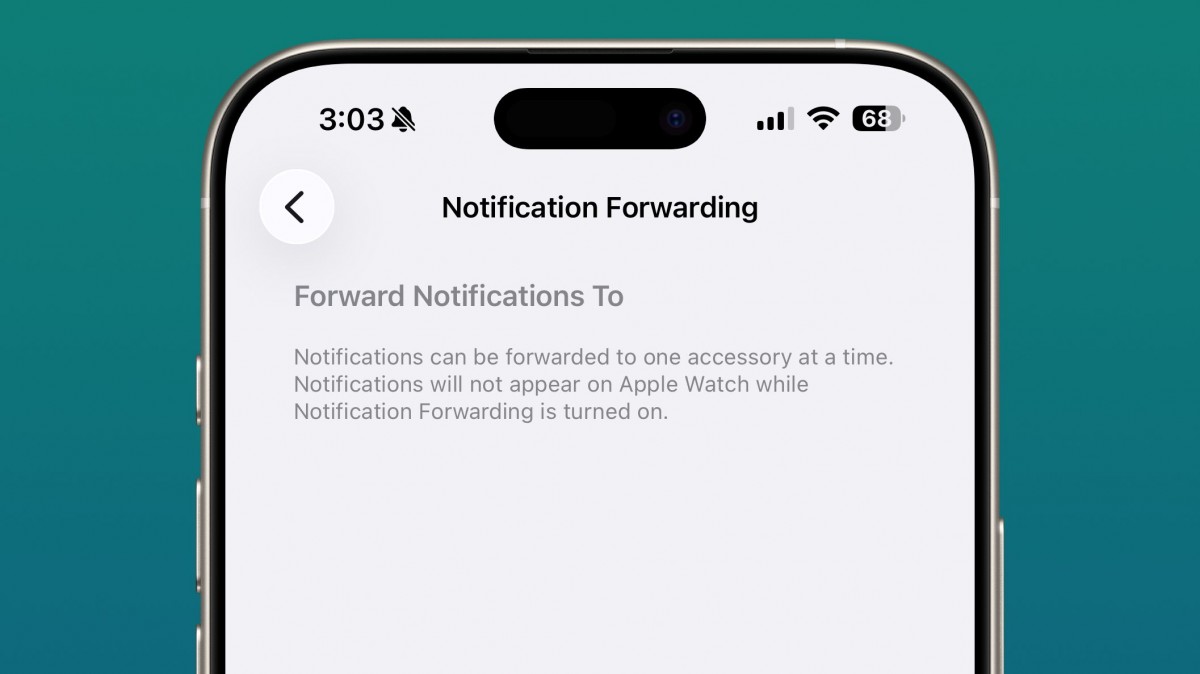
The second major addition in iOS 26.3 Beta 1 is the introduction of notification forwarding to third-party wearables. This feature, while currently exclusive to the European Union, represents a significant concession from Apple, driven primarily by the European Union’s Digital Markets Act (DMA). The DMA aims to foster greater competition and interoperability in digital markets, effectively compelling gatekeepers like Apple to open up their platforms.
For years, the Apple Watch has enjoyed a near-exclusive privilege in seamlessly receiving notifications from iPhones. While some third-party wearables could display basic alerts, the deep integration and rich notification experience were largely reserved for Apple’s own device. This created a strong incentive for iPhone users to purchase an Apple Watch, limiting consumer choice in the wearables market.
EU-Specific Implementation and DMA Impact
The geographical restriction of notification forwarding to the EU underscores its regulatory origins. The Digital Markets Act specifically targets practices that create “walled gardens” and limit competition. By opening up its notification system, Apple is directly complying with these regulations, preventing potential fines and legal challenges. This move, while perhaps reluctant, is a crucial step towards a more open and competitive wearables market within the EU.
The impact of the DMA is far-reaching, and this specific implementation in iOS 26.3 Beta 1 serves as a precedent. It demonstrates that regulatory pressure can indeed force significant changes in how dominant tech platforms operate, ultimately benefiting consumers by increasing choice and fostering innovation among third-party accessory manufacturers. This change could inspire similar legislation in other regions, potentially expanding the feature globally in the future.
Configuring Notification Forwarding in iOS 26.3 Beta 1
Enabling this new feature is designed to be straightforward for users. Within iOS 26.3 Beta 1, users can navigate to:
Settings > Notifications > Notification ForwardingOnce inside this new section, users will find options to toggle the feature on. Crucially, they will also be able to granularly select which specific applications are permitted to send notifications to their connected third-party wearable. This level of control is vital for managing notification fatigue and ensuring that only relevant alerts reach the wrist.
The ability to pick and choose apps is a user-centric design choice, empowering individuals to tailor their notification experience precisely to their needs. This contrasts with a blanket “all or nothing” approach, providing a more refined and useful functionality.
Current Limitations and Future Prospects of Notification Forwarding
While a significant step forward, notification forwarding in iOS 26.3 Beta 1 does come with an important current limitation: it works on a single device at a time. This means if an Apple Watch is already connected to the iPhone and receiving notifications, the new third-party wearable forwarding feature will not be active simultaneously. This limitation suggests that Apple is still prioritizing its own ecosystem, or perhaps it’s a technical constraint in the initial beta phase. Users will need to choose which wearable they want to receive notifications on.
Despite this, the future prospects are bright. As the DMA continues to exert influence, and as Apple refines the implementation, it’s conceivable that this single-device limitation could be relaxed in future iOS updates. The initial rollout in the EU serves as a testing ground, and if successful, could pave the way for a global expansion of this highly requested feature. This could open up new avenues for Android-based wearables, for example, to gain deeper integration with iPhones, similar to how the Samsung Galaxy A07 5G specifications revealed via Geekbench indicate a continued push for accessible Android hardware.
Beyond Core Features: Other Noteworthy Updates in iOS 26.3 Beta 1
While the iOS 26.3 Beta 1 Android transfers and notification forwarding are the headline features, Apple often bundles other quality-of-life improvements and minor enhancements into its beta releases. One such cosmetic yet welcome addition in this beta is the enhanced Weather wallpaper.
The Revamped Weather Wallpaper
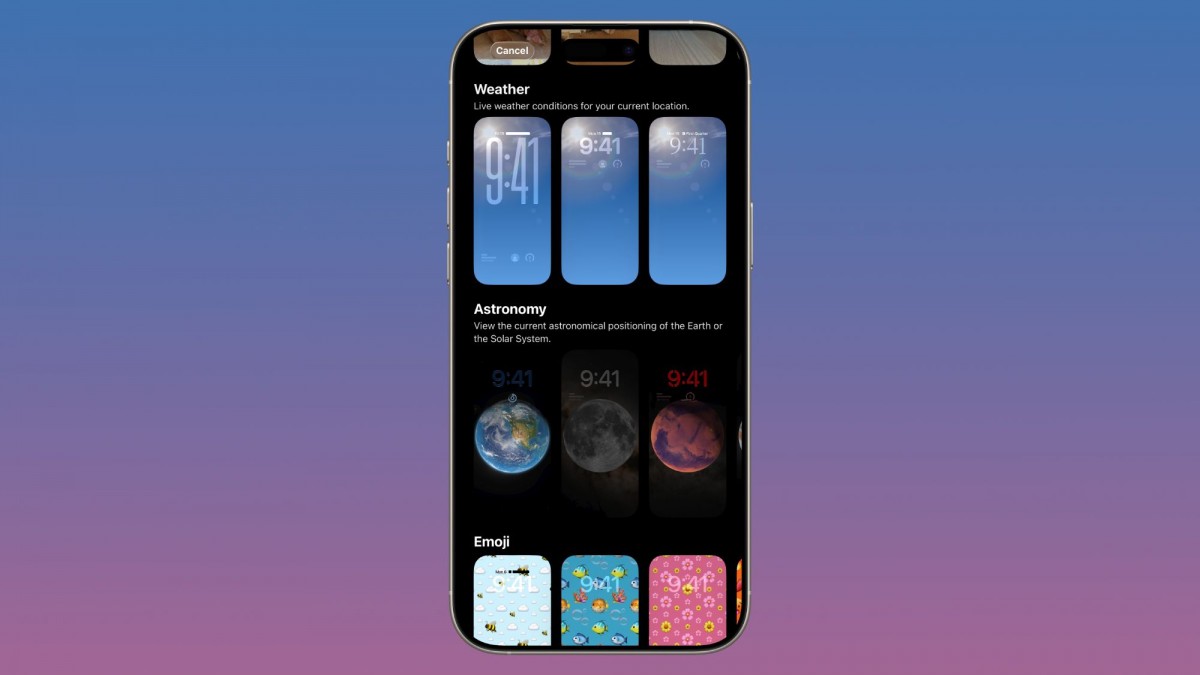
The Weather wallpaper feature, which dynamically displays current weather conditions on the Lock Screen, now receives its own dedicated section within the Lock Screen customization options. Previously, finding and configuring this feature might have been less intuitive, buried within broader wallpaper settings. By giving it a distinct section, Apple improves discoverability and ease of use.
This attention to detail in user interface and experience is a hallmark of iOS development. While not as impactful as data transfer or notification features, these smaller refinements contribute to the overall polished feel of the operating system. Users appreciate the ability to personalize their devices, and a more accessible Weather wallpaper allows for deeper customization of the Lock Screen, making it not just aesthetically pleasing but also functionally informative at a glance.
These smaller updates, coupled with the major interoperability features, paint a picture of an iOS that is simultaneously refining its core experience and responding to external pressures and user demands for greater flexibility. The beta cycle allows Apple to gather feedback on these changes, ensuring that the final release is as robust and user-friendly as possible.
Impact and Implications for Users and the Ecosystem
The features introduced in iOS 26.3 Beta 1 carry significant implications, not just for individual users but for the broader mobile technology ecosystem. The easier transfers to Android devices and notification forwarding capabilities challenge long-held perceptions about Apple’s closed ecosystem and signal a potential shift in strategy.
User Experience Enhancements
For users, the benefits are clear. The simplified Android transfer process removes a major barrier for those considering a switch, offering peace of mind that their data will follow them. This reduces anxiety and makes exploring other platforms a less daunting prospect. It also fosters a sense of empowerment, knowing that one’s digital life isn’t inextricably tied to a single brand or operating system.
Notification forwarding, even with its current limitations, significantly enhances the utility of third-party wearables for iPhone users in the EU. Instead of being forced into the Apple Watch ecosystem for a premium notification experience, users can now choose from a wider array of devices, including those with specialized features, different aesthetics, or more competitive pricing. This newfound freedom of choice is a direct win for consumers, allowing them to select hardware that best fits their needs and preferences, such as opting for an Android wearable that pairs well with a new device like the Honor Play 60A with its 5300mAh battery and Dimensity 6300.
Apple’s Shifting Stance on Interoperability
These updates represent a notable evolution in Apple’s stance on interoperability. Historically, Apple’s strength has been its tightly integrated ecosystem, offering a seamless experience within its own walled garden. While this approach has garnered immense loyalty, it has also drawn criticism for limiting user choice and creating potential monopolies.
The changes in iOS 26.3 Beta 1 suggest a strategic adaptation. While maintaining the core integrity of its ecosystem, Apple appears to be selectively opening up certain pathways, particularly where regulatory pressures are high or where user demand for greater flexibility is undeniable. This could be a proactive measure to avoid more stringent regulations in the future, positioning Apple as a company that responds to market needs and legislative mandates.
This shift could also be seen as an acknowledgment of the increasingly diverse mobile landscape. With innovative devices like Xiaomi’s innovative slim phone with a 10,000 mAh battery pushing boundaries on the Android side, the competition for user attention is fierce. By making it easier for users to migrate, Apple might be betting that the strength of iOS will ultimately draw them back, or at least prevent negative sentiment from perceived lock-in.
Developer Opportunities and Challenges
For developers, especially those creating accessories and apps for the Android ecosystem, the changes in iOS 26.3 Beta 1 present new opportunities. Wearable manufacturers can now design products with the confidence that they can offer a richer notification experience to iPhone users in the EU, potentially expanding their market reach. This could lead to more innovation in the third-party wearables space, as companies compete to offer compelling alternatives to the Apple Watch.
However, there are also challenges. Developers will need to ensure their apps and devices are fully compatible with Apple’s new notification forwarding APIs and that they can handle the nuances of iOS notifications. This requires careful testing and adherence to Apple’s guidelines, even if the feature is driven by external mandates. The ecosystem for Android devices continues to be vibrant, with new entries like the HMD Pearl’s Geekbench listing, potentially revealing the Pulse 2 Pro, suggesting a continuous stream of new hardware that could benefit from better iOS integration.




