
Optimizing Your Run: A Comprehensive Review of the Garmin Forerunner 265
For dedicated runners and multi-sport athletes, a reliable and insightful companion on the wrist is more than just a gadget; it’s an indispensable training partner. The Garmin Forerunner 265 emerges as a formidable contender in this space, building on Garmin’s legacy of precision and performance. This smartwatch isn’t merely about tracking miles; it’s engineered to elevate every aspect of your training, recovery, and daily wellness. With its vibrant AMOLED display, advanced physiological metrics, and robust GPS capabilities, the Forerunner 265 aims to provide a holistic view of an athlete’s potential and progress, guiding them towards smarter, more effective training decisions. This article will delve deep into its features, explore its benefits, and help you understand why it might be the ultimate tool for your athletic endeavors.
The Brilliance of Display and Ergonomic Design
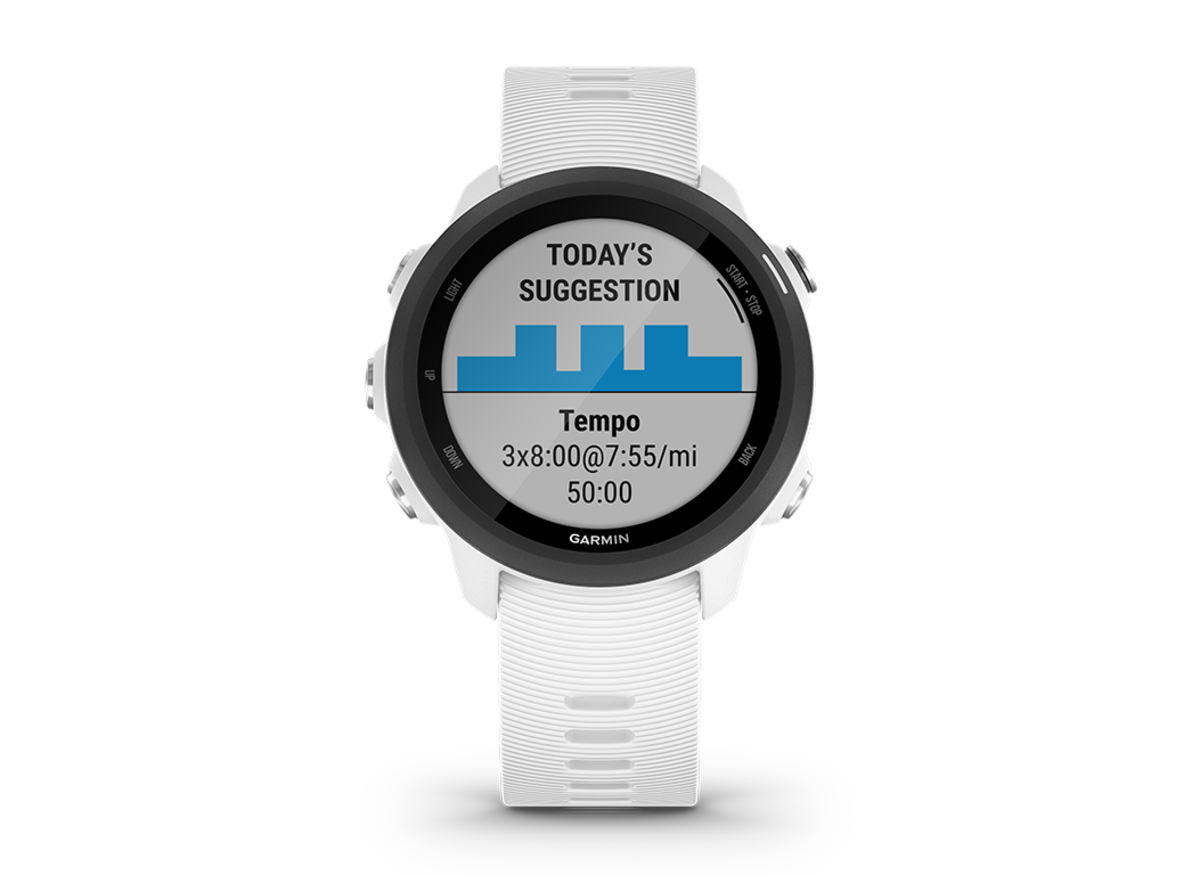
One of the most striking upgrades in the Garmin Forerunner 265 is its stunning AMOLED display. Unlike the transflective memory-in-pixel (MIP) screens of its predecessors, the AMOLED panel delivers incredibly vivid colors, deep blacks, and exceptional contrast. This makes all your running metrics, maps, and notifications pop with clarity, even in bright sunlight, which is a significant advantage for outdoor athletes. The vibrant display not only enhances readability but also transforms the overall user experience, making the watch feel more premium and modern. The responsive touchscreen complements the traditional five-button interface, offering the best of both worlds: quick navigation through menus with swipes and taps, and reliable control during activities where precision and tactile feedback are crucial, even with sweaty hands or gloves.
Beyond its visual appeal, the ergonomic design of the Garmin Forerunner 265 ensures it remains a comfortable companion throughout your day, from intense workouts to restful sleep. Crafted with a lightweight polymer case and a soft silicone strap, the watch is barely noticeable on the wrist, which is essential for athletes who wear their devices for extended periods. Its streamlined profile avoids bulkiness, allowing for unrestricted movement and preventing chafing during long runs or swims. This focus on comfort is not merely a luxury; it’s a necessity for accurate data collection, particularly for metrics like heart rate variability (HRV) and sleep tracking, which require continuous wear. The robust construction also ensures durability, making it resistant to the rigors of various environments, from dusty trails to chlorinated pools.
Advanced Training Dynamics and Performance Metrics
The true power of the Garmin Forerunner 265 lies in its unparalleled ability to provide deep insights into your training. It moves beyond simple distance and pace, offering sophisticated metrics that help you understand your body’s response to training and optimize your performance.
Elevating Your Training Readiness
At the forefront of these advanced metrics is Training Readiness. This innovative feature acts as your personal coach, analyzing multiple data points such as recent sleep quality, recovery time, HRV status, acute load, and stress history to provide a single, actionable score indicating how ready you are for a challenging workout. A high score suggests you’re well-rested and prepared for intensity, while a lower score advises caution, perhaps recommending an easy day or rest. This personalized insight is crucial for preventing overtraining, reducing injury risk, and ensuring you hit your peak performance at the right time. For athletes striving for consistent progress, understanding their body’s readiness is as important as the training itself. The Garmin Forerunner 265 also integrates HRV Status, which tracks your heart rate variability during sleep to provide a deeper understanding of your body’s recovery and overall physiological stress, further enriching the Training Readiness score.
Precision Pacing with PacePro and Race Widget
For runners aiming for specific race times or looking to manage their effort effectively, the Garmin Forerunner 265 offers PacePro and the Race Widget. PacePro provides grade-adjusted pace guidance, helping you maintain your target pace across varying terrains. Whether you’re tackling a hilly course or aiming for a consistent negative split, PacePro adjusts your target pace in real-time, ensuring you don’t burn out too early or leave too much in the tank. The Race Widget, on the other hand, helps you prepare for an upcoming event by providing race-day performance predictions, personalized daily suggested workouts based on your training history, and a countdown to your race. It even considers the course profile and weather conditions if available, offering a comprehensive strategy to optimize your race performance. This level of predictive analytics and personalized guidance is what sets the Garmin Forerunner 265 apart as a serious training tool.
Running Power and Dynamics On-Wrist
Understanding running power has become increasingly vital for many athletes, offering a more consistent and immediate measure of effort compared to pace or heart rate, especially on varied terrain. The Garmin Forerunner 265 integrates running power directly from the wrist, eliminating the need for external pods or sensors. This means you can track your power output in real-time, allowing for more precise effort management during interval training, hill repeats, or long endurance runs. Additionally, the watch provides advanced running dynamics such as cadence, stride length, ground contact time, and vertical oscillation. By analyzing these metrics, runners can identify inefficiencies in their form, work on specific areas for improvement, and ultimately run more efficiently and reduce the risk of injury. The ability to access these sophisticated metrics directly from your wrist simplifies data collection and empowers athletes with actionable insights into their biomechanics.
Unrivaled GPS Accuracy and Route Navigation
Accurate location tracking is the bedrock of any running watch, and the Garmin Forerunner 265 excels in this area, thanks to its advanced GPS capabilities. Whether you’re exploring new trails or pounding the pavement in a dense urban environment, you can trust your data.
Multi-Band GPS for Superior Tracking
The Garmin Forerunner 265 features multi-band GNSS (Global Navigation Satellite System) support, which means it can receive signals from multiple satellite frequencies (L1 and L5) across various satellite systems (GPS, GLONASS, Galileo). This significantly improves positional accuracy, especially in challenging environments where traditional GPS signals might be obstructed, such as canyons, dense forests, or cities with tall buildings. For runners, this translates to more precise distance, pace, and route tracking, ensuring that every meter of your effort is accurately recorded. This technology minimizes “GPS drift” and provides a more consistent data stream, giving you confidence in your workout stats and mapped routes. This enhanced accuracy is a game-changer for athletes who demand the utmost precision from their devices, distinguishing it from models with less sophisticated GPS capabilities.
Navigating Your Adventures
While not a full-fledged mapping watch, the Garmin Forerunner 265 offers essential navigation features that are incredibly useful for exploration and safety. It can follow pre-loaded courses, providing turn-by-turn guidance or simply a breadcrumb trail to keep you on track. This is invaluable for trail runners or those exploring new areas, ensuring they don’t get lost. The “back-to-start” feature is another lifesaver, guiding you back to your starting point using the most direct route, which is particularly reassuring when adventuring off the beaten path. These navigation tools, combined with the superior GPS accuracy, empower athletes to push their boundaries and discover new routes with confidence, knowing their watch has their back. This blend of precise tracking and simple navigation makes the Garmin Forerunner 265 a versatile tool for both performance and adventure.
Holistic Health and Wellness Insights
While primarily a running watch, the Garmin Forerunner 265 doesn’t neglect your overall health and wellness. It provides a suite of features designed to help you understand your body’s recovery and daily physiological state, crucial for sustained performance and general well-being. For a broader perspective on health-focused wearables, you might also be interested in how devices like the Garmin Venu 3 elevate your wellness journey, offering a different emphasis on daily health tracking.
Comprehensive Body Monitoring
The Garmin Forerunner 265 continuously monitors a range of vital health metrics. The Body Battery feature uses HRV, stress, and sleep data to show your energy reserves throughout the day, helping you understand when to push and when to rest. Stress tracking identifies periods of physical and mental strain, prompting you to engage in mindfulness or relaxation techniques. Pulse Ox sensors measure blood oxygen saturation, providing insights into acclimatization at altitude and sleep quality. Advanced sleep monitoring breaks down your sleep stages (light, deep, REM) and scores your sleep, offering personalized recommendations for improving rest. These comprehensive insights, available directly on your wrist, empower you to make informed decisions about your daily activities, recovery, and overall lifestyle choices, contributing significantly to long-term health and athletic performance. Furthermore, for those seeking even more specialized wellness tracking, exploring guides like the ultimate guide to wellness tracking with the Garmin Venu 3S can offer additional perspectives on dedicated health features.
Women’s Health Tracking
Recognizing the unique physiological needs of women, the Garmin Forerunner 265 includes dedicated features for menstrual cycle and pregnancy tracking. Users can log symptoms, receive predictions for their period and fertile window, and gain insights into how their cycle might impact training and performance. During pregnancy, the watch can track progress, provide personalized workout recommendations, and offer educational resources. This thoughtful inclusion ensures that women athletes have the tools to understand their bodies better and adapt their training plans accordingly, fostering a more informed and supportive approach to their athletic journey. These features underscore Garmin’s commitment to providing comprehensive health insights for all users.
Smart Features and Enduring Battery Life
Beyond its primary function as a sports watch, the Garmin Forerunner 265 integrates seamlessly into your daily life with a suite of smart features, complemented by impressive battery longevity. These capabilities transform it from a mere training tool into a versatile everyday companion.
Seamless Connectivity and Smart Notifications
The Garmin Forerunner 265 pairs effortlessly with your smartphone, keeping you connected without needing to constantly check your phone. You’ll receive smart notifications for calls, texts, emails, and app alerts directly on your wrist, allowing you to stay informed even during a run or workout. This integration ensures you can prioritize your focus while still being aware of important communications. The watch also features safety and tracking functionalities, such as incident detection and assistance, which can send your live location to pre-selected emergency contacts if an incident is detected or manually triggered. For users of devices like the Samsung Galaxy Note20 or those exploring the detailed guide on Samsung Galaxy S20 Ultra characteristics, the seamless pairing experience ensures that your essential phone functions are always just a glance away. This level of connectivity enhances both convenience and peace of mind.
On-Wrist Music and Contactless Payments
One of the most appreciated smart features for runners is the ability to store music directly on the watch. With enough internal storage for hundreds of songs, you can leave your phone behind and enjoy your favorite tunes or podcasts via Bluetooth headphones during your runs. This freedom from carrying a bulky smartphone significantly enhances the running experience. Furthermore, the inclusion of Garmin Pay enables contactless payments. You can make purchases directly from your wrist at participating vendors, offering unparalleled convenience for grabbing a post-run coffee or essentials without needing your wallet or phone. These features transform the Garmin Forerunner 265 into a truly independent device for many daily scenarios.
Powering Your Longest Endeavors
Despite its vibrant AMOLED display and advanced features, the Garmin Forerunner 265 boasts an impressive battery life. In smartwatch mode, it can last for up to 13 days, ensuring you don’t need to charge it every night. When using GPS with music, you can expect up to 6.5 hours, which is sufficient for most marathons and even some ultra-marathons. In GPS-only mode, it extends to about 20 hours, providing ample juice for extended training sessions or multi-day adventures. This exceptional battery performance means less time worrying about charging and more time focused on your activities, making the Garmin Forerunner 265 a reliable partner for even your longest endeavors. The balance between powerful features and enduring battery life is a testament to Garmin’s engineering prowess.
Comparing the Forerunner 265: A Runner’s Perspective




