Affordable 1TB Flash Drive: MacBook Air Storage Solution
For MacBook Air users constantly battling storage limitations, a tiny, affordable 1TB flash drive might just be the game-changer you’ve been waiting for. Apple’s premium pricing on internal storage upgrades can quickly inflate the cost of a new MacBook Air. However, a compact USB-C drive like the SanDisk Extreme Fit offers a cost-effective alternative, providing ample storage without breaking the bank. Let’s dive into how this affordable 1TB flash drive can save you money and enhance your MacBook Air experience.
Imagine purchasing a base model MacBook Air with minimal internal storage and supplementing it with a 1TB flash drive for significantly less than Apple’s upgrade costs. This approach allows you to enjoy the sleek design and performance of the MacBook Air while having plenty of space for your files, applications, and media. This article explores the benefits of using an affordable 1TB flash drive with your MacBook Air, focusing on cost savings, convenience, and performance.
Why MacBook Air Users Need More Storage
The MacBook Air is renowned for its portability and performance, but its Achilles’ heel is often its limited storage capacity. The base models typically come with a relatively small SSD, which can quickly fill up with operating system files, applications, documents, photos, and videos. While Apple offers storage upgrades, they come at a premium price, making them an expensive proposition for budget-conscious users. This is where an affordable 1TB flash drive steps in, offering a practical and economical solution.
- Limited Internal Storage: The base storage of a MacBook Air is often insufficient for most users.
- High Upgrade Costs: Apple’s storage upgrade prices are significantly higher than the cost of external storage solutions.
- Growing File Sizes: Modern applications, high-resolution photos, and 4K videos consume a considerable amount of storage space.
- Need for Portability: Users require a portable storage solution that can be easily carried around.
For instance, a student working on large video projects or a professional photographer handling high-resolution images will quickly find the base storage inadequate. Upgrading the internal storage through Apple can add hundreds of dollars to the purchase price, making the affordable 1TB flash drive an attractive alternative.
The SanDisk Extreme Fit: A Perfect Match for MacBook Air

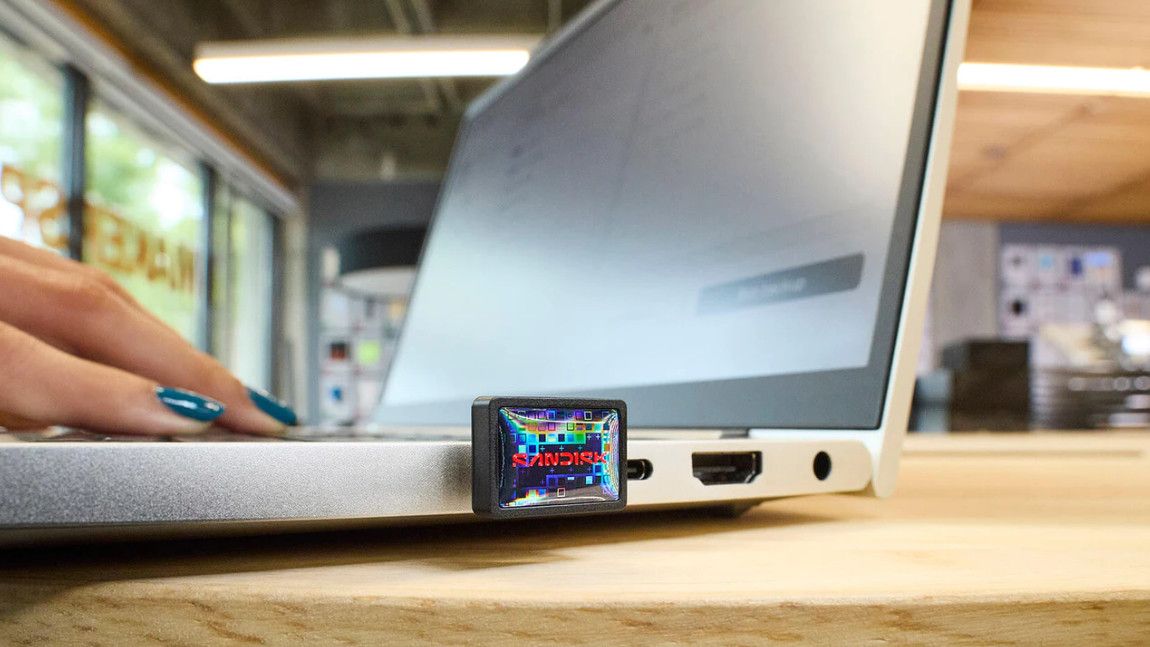
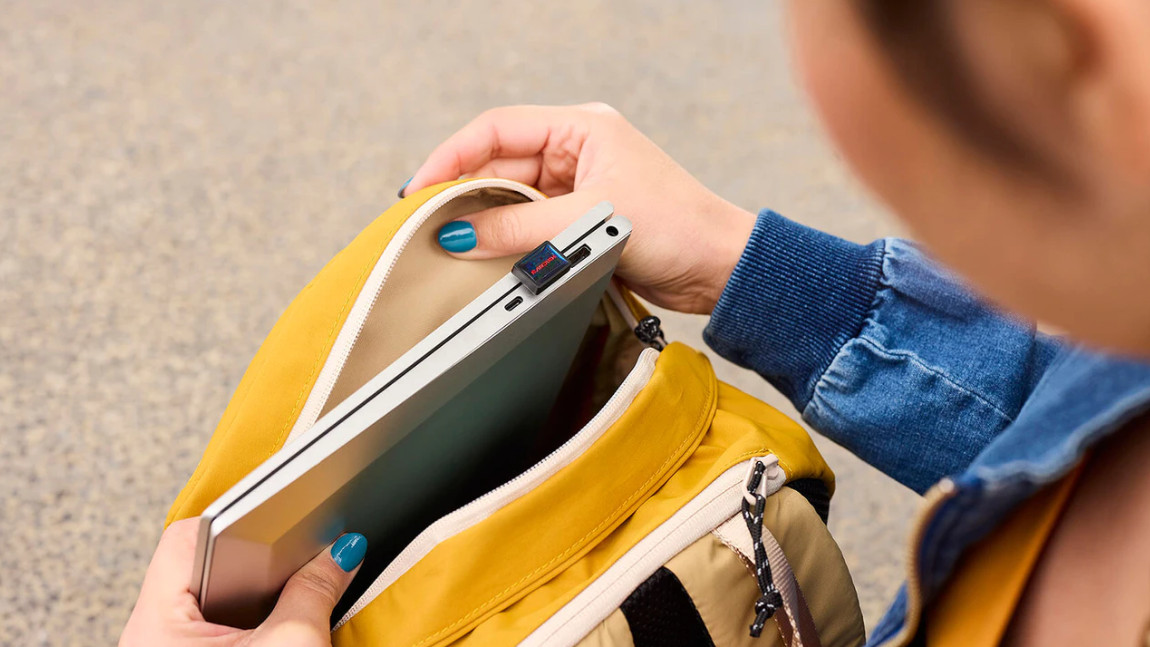
The SanDisk Extreme Fit is a USB-C flash drive designed to be a semi-permanent fixture in your laptop. Its compact “plug and stay” design ensures that it remains flush with the side of your MacBook Air, minimizing the risk of accidental bumps or disconnections. Available in capacities up to 1TB, this drive offers ample storage space for your files and applications. With read speeds of up to 400MB/s, it provides quick access to your data, making it a viable alternative to upgrading your MacBook Air’s internal storage. This makes the affordable 1TB flash drive a great investment.
The key features of the SanDisk Extreme Fit include:
- Compact Design: Its low-profile design ensures it stays out of the way.
- High Capacity: Available up to 1TB, providing ample storage space.
- Fast Read Speeds: Up to 400MB/s, ensuring quick access to your files.
- USB-C Connectivity: Compatible with modern MacBook Air models.
- Affordable Price: Significantly cheaper than Apple’s internal storage upgrades.
The L-shaped design of the drive further enhances its appeal, allowing it to sit almost seamlessly against the MacBook Air’s chassis. This design consideration minimizes the chances of the drive being accidentally knocked or damaged, providing a secure and reliable storage solution.
Cost Savings: How Much Can You Save?
One of the most compelling reasons to opt for an affordable 1TB flash drive is the significant cost savings compared to Apple’s internal storage upgrades. Apple charges a substantial premium for increasing the SSD capacity of a MacBook Air. By purchasing a base model with minimal storage and supplementing it with a SanDisk Extreme Fit, you can save hundreds of dollars. The savings can be even more pronounced if you find the flash drive on sale or during promotional periods.
Consider the following scenario:
- Base Model MacBook Air: Typically comes with 256GB of storage.
- Apple Upgrade to 1TB: Can cost an additional $300 or more.
- SanDisk Extreme Fit 1TB: Available for around $110 (prices may vary).
In this scenario, you could save close to $200 by choosing the affordable 1TB flash drive over Apple’s internal storage upgrade. These savings can be put towards other accessories, software, or even future upgrades. The financial benefit is clear, making the flash drive a smart choice for budget-conscious MacBook Air users.
Performance Considerations: Is It Fast Enough?
While the SanDisk Extreme Fit offers read speeds of up to 400MB/s, it’s important to consider how this translates into real-world performance. While it won’t match the speed of the MacBook Air’s internal SSD, it’s still fast enough for most everyday tasks. Opening documents, browsing photos, and playing videos should be seamless. However, tasks that require intensive disk access, such as video editing or running virtual machines, might be slightly slower compared to using the internal SSD.
To maximize performance, consider the following tips:
- Use for Media and Documents: Store large media files and documents on the flash drive to free up space on the internal SSD.
- Keep the SSD for Applications: Install applications on the internal SSD for faster launch times and performance.
- Regularly Backup Your Data: Ensure you have a backup of your data on the flash drive in case of data loss.
For users who prioritize portability and cost savings over absolute performance, the affordable 1TB flash drive is a worthwhile compromise. It provides a significant boost in storage capacity without sacrificing too much in terms of speed.
Setting Up and Using the Flash Drive
Setting up and using the SanDisk Extreme Fit with your MacBook Air is straightforward. Simply plug the drive into one of the USB-C ports on your MacBook Air. The drive should be automatically recognized by macOS. You can then drag and drop files onto the drive or configure it as a Time Machine backup destination. To ensure optimal performance, format the drive using the APFS (Apple File System) format.
Here’s a step-by-step guide:
- Plug in the Drive: Connect the SanDisk Extreme Fit to a USB-C port on your MacBook Air.
- Open Disk Utility: Launch Disk Utility from the Applications/Utilities folder.
- Select the Drive: Choose the SanDisk Extreme Fit from the list of available drives.
- Erase and Format: Click the “Erase” button and select APFS as the format.
- Name the Drive: Give the drive a descriptive name, such as “External Storage.”
- Click Erase: Confirm the formatting process.
Once the drive is formatted, you can start using it to store your files and applications. You can also create folders to organize your data and make it easier to find what you need. Consider using the flash drive as a dedicated storage location for your media library or document archive. This can free up valuable space on your internal SSD and improve the overall performance of your MacBook Air.
Alternative Storage Solutions
While the affordable 1TB flash drive offers a compelling solution for MacBook Air users, it’s worth considering other storage options as well. External hard drives, portable SSDs, and cloud storage services all offer different advantages and disadvantages. Each option caters to specific needs and preferences. Understanding these alternatives can help you make the best decision for your particular situation.
Here’s a comparison of different storage solutions:
External hard drives offer high capacity at a low cost, but they are generally slower and less durable than SSDs. Portable SSDs provide faster speeds and greater durability, but they come at a higher price point. Cloud storage offers accessibility from anywhere with an internet connection, but it requires a recurring subscription fee and raises security concerns. Ultimately, the best storage solution depends on your individual needs and priorities. If you are looking for headphones with premium sound at a reasonable price, you might want to consider the CMF Headphone Pro, which offers a great listening experience.
Addressing Potential Concerns
While the affordable 1TB flash drive offers numerous benefits, it’s important to address potential concerns. Some users may worry about the durability of flash drives or the risk of data loss. Others may be concerned about the speed limitations compared to internal SSDs. Addressing these concerns can help you make an informed decision and mitigate potential risks.

Here are some common concerns and how to address them:
- Durability: Flash drives can be susceptible to damage from physical impacts or extreme temperatures. To mitigate this risk, handle the drive with care and avoid exposing it to harsh conditions.
- Data Loss: Data loss can occur due to hardware failure or accidental deletion. To protect your data, regularly back up your files to another storage device or cloud service.
- Speed Limitations: Flash drives are generally slower than internal SSDs. To minimize the impact of speed limitations, use the flash drive for storing less frequently accessed files and applications.
By taking these precautions, you can minimize the risks associated with using an affordable 1TB flash drive and enjoy the benefits of increased storage capacity and cost savings. Furthermore, if you are interested in AI-powered e-reading, you might want to explore the Viwoods AiPaper Reader for an enhanced reading experience.
The Future of Portable Storage
The future of portable storage looks promising, with ongoing advancements in technology leading to faster speeds, higher capacities, and greater durability. As USB-C ports become increasingly common on laptops and other devices, flash drives like the SanDisk Extreme Fit will become even more popular as a convenient and affordable storage solution. We can also expect to see the emergence of new storage technologies that offer even better performance and reliability. The increasing popularity of wearable technology can also be seen in the Garmin Vivoactive 6, which elevates your fitness journey.
Some potential future developments include:
- Faster Transfer Speeds: USB 4 and Thunderbolt technologies will enable even faster data transfer rates.
- Higher Capacities: Flash drives with capacities of 2TB or more will become more affordable.
- Improved Durability: New materials and manufacturing processes will make flash drives more resistant to physical damage and environmental factors.
- Integration with Cloud Services: Flash drives will seamlessly integrate with cloud storage services for automatic backups and easy access to files from anywhere.
As technology continues to evolve, affordable 1TB flash drive will play an increasingly important role in meeting the storage needs of MacBook Air users and others who require portable and convenient storage solutions.
Conclusion
For MacBook Air users seeking a cost-effective way to expand their storage capacity, an affordable 1TB flash drive like the SanDisk Extreme Fit offers a compelling solution. By opting for a base model MacBook Air with minimal internal storage and supplementing it with a flash drive, you can save hundreds of dollars compared to Apple’s internal storage upgrades. While there are some performance considerations to keep in mind, the benefits of increased storage capacity and cost savings outweigh the drawbacks for many users. As technology continues to advance, flash drives will become even more powerful and versatile, making them an indispensable tool for anyone who needs portable and convenient storage. Another great option to consider for your Apple devices is the Apple Watch 2, which seamlessly elevates your digital lifestyle.