Unleash Affordable Power: Used Ford Mustang 5.0
The allure of a powerful, rear-wheel-drive sports car is undeniable. For many, the dream of owning a V8 muscle car remains just that – a dream, often sidelined by concerns about cost and practicality. However, there’s a way to experience exhilarating performance without breaking the bank: the used Ford Mustang with a 5.0-litre V8 engine. This article explores the compelling reasons why a pre-owned Mustang 5.0 offers a thrilling and surprisingly affordable entry into the world of high-performance vehicles.
We’ll delve into the various aspects that make the used Mustang 5.0 such an attractive option, from its potent engine and engaging driving experience to its relative affordability and the potential pitfalls to watch out for when buying used. Whether you’re a seasoned car enthusiast or a newcomer to the world of performance vehicles, this guide will provide you with the information you need to determine if a used Ford Mustang 5.0 is the right choice for you.

The Heart of the Beast: The 5.0-Litre V8 Engine
The undeniable star of the Ford Mustang 5.0 is, of course, its engine. This naturally aspirated V8, often referred to as the “Coyote” engine, is a masterpiece of engineering. It delivers a raw, visceral experience that few modern cars can match. Depending on the model year, the 5.0-litre V8 produces upwards of 400 horsepower, providing ample power for exhilarating acceleration and a thrilling top speed. The engine’s responsiveness and the intoxicating sound it produces are key components of the Mustang’s appeal.
The beauty of a naturally aspirated engine lies in its linear power delivery. Unlike turbocharged engines that can sometimes exhibit lag, the Mustang’s V8 responds instantly to throttle input, providing a predictable and engaging driving experience. This makes it a joy to drive on both the open road and the racetrack. The robust construction of the Coyote engine also contributes to its reliability, making it a relatively low-maintenance option compared to some other high-performance engines.
Performance Figures and Driving Dynamics
The performance figures of the Ford Mustang 5.0 speak for themselves. Depending on the model year and transmission, the Mustang 5.0 can accelerate from 0 to 60 mph in around 4 to 5 seconds. This puts it in the same league as many high-end sports cars, at a fraction of the price. The Mustang’s rear-wheel-drive configuration and well-tuned suspension also contribute to its engaging driving dynamics. It offers a balance of comfort and performance, making it suitable for both daily driving and weekend track days.
The availability of both manual and automatic transmissions adds to the Mustang’s appeal. The manual transmission offers a more connected and engaging driving experience, while the automatic transmission provides smoother and more effortless acceleration. Ultimately, the choice between the two comes down to personal preference.
Engine Reliability and Maintenance
The Ford Mustang 5.0’s Coyote engine is known for its reliability, but like any performance engine, it requires regular maintenance to ensure optimal performance and longevity. This includes regular oil changes, spark plug replacements, and inspections of the cooling system. Fortunately, parts for the Mustang 5.0 are readily available and relatively affordable, making it a cost-effective option to maintain. Many owners also choose to upgrade certain components, such as the exhaust system or air intake, to further enhance the engine’s performance and sound. Consider exploring the latest innovations from Ford to understand the evolution of their performance vehicles.
Affordability: The Smart Choice for Muscle Car Enthusiasts
One of the most compelling reasons to consider a used Ford Mustang 5.0 is its affordability. Compared to buying a new performance car, a used Mustang 5.0 offers significant savings. You can often find well-maintained examples for a fraction of the price of a new Mustang GT, allowing you to experience the thrill of V8 power without emptying your bank account. The depreciation curve of the Mustang also tends to flatten out after a few years, meaning that you’re less likely to lose a significant amount of money if you decide to sell it in the future.
Furthermore, the used car market offers a wider range of options and model years to choose from. This allows you to find a Mustang 5.0 that fits your specific budget and preferences. You might be able to find a slightly older model with lower mileage or a newer model with more features for a comparable price. The key is to do your research and carefully inspect any potential purchase to ensure that it’s in good condition.
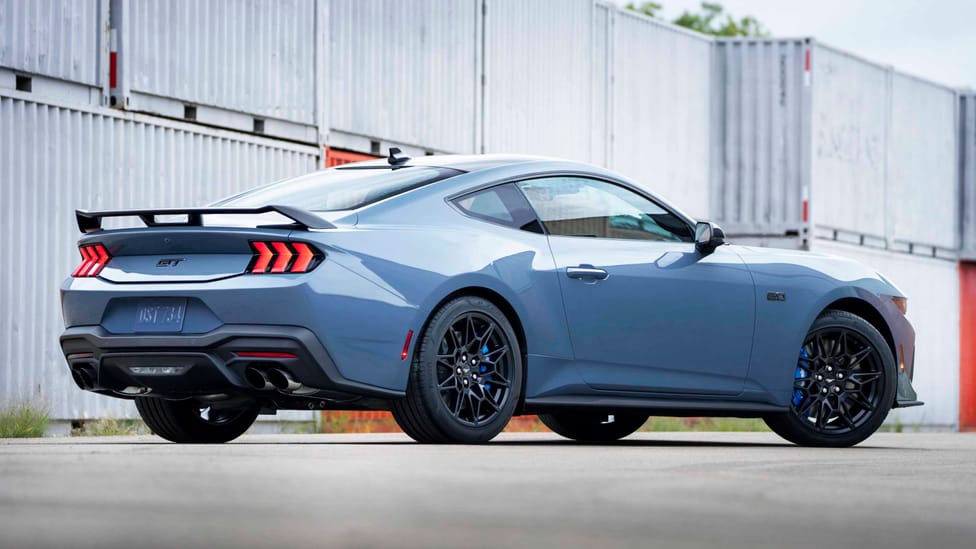
Comparing Prices: New vs. Used
The price difference between a new and a used Ford Mustang 5.0 can be substantial. A brand new Mustang GT can easily cost upwards of $40,000, depending on the options and trim level. In contrast, a used Mustang 5.0 from a few years ago can often be found for under $30,000, or even less if you’re willing to consider an older model. This price difference can free up a significant amount of money that can be used for other expenses, such as insurance, maintenance, or even upgrades.
When comparing prices, it’s important to consider the overall cost of ownership. This includes factors such as insurance, fuel consumption, and maintenance. While the Mustang 5.0 is not the most fuel-efficient car on the road, its relatively affordable maintenance costs can help offset some of the higher fuel expenses. Furthermore, insurance rates for older vehicles tend to be lower than for new vehicles, which can further reduce the overall cost of ownership.
Financing Options for Used Vehicles
Financing a used car is often easier and more affordable than financing a new car. Banks and credit unions typically offer lower interest rates on used car loans, and the loan terms are often more flexible. This can make it easier to fit the monthly payments into your budget. It’s important to shop around for the best loan rates and terms before committing to a purchase. You should also consider getting pre-approved for a loan before you start shopping for a car, as this will give you a better idea of how much you can afford to spend. Consider options that offer flexible repayment plans, similar to how you might manage audio equipment financing.
Potential Pitfalls and How to Avoid Them
While a used Ford Mustang 5.0 can be a great value, it’s important to be aware of the potential pitfalls and take steps to avoid them. One of the biggest concerns is the car’s history. You’ll want to make sure that the car has been well-maintained and that it hasn’t been involved in any major accidents. A vehicle history report, such as Carfax or AutoCheck, can provide valuable information about the car’s past, including any accidents, title issues, or odometer discrepancies.
Another important consideration is the car’s condition. You’ll want to carefully inspect the car for any signs of damage or wear and tear. This includes checking the paint, body panels, interior, and tires. You should also pay close attention to the engine and transmission. Listen for any unusual noises or vibrations, and check for any leaks. If possible, it’s a good idea to have a mechanic inspect the car before you buy it. A mechanic can identify any potential problems that you might not be able to see yourself.

The Importance of a Pre-Purchase Inspection
A pre-purchase inspection is an essential step in the used car buying process. A qualified mechanic can thoroughly inspect the car and identify any potential problems that you might not be able to see yourself. This can save you a lot of money and headaches in the long run. A pre-purchase inspection typically costs around $100 to $200, which is a small price to pay for the peace of mind it provides. The mechanic will check the engine, transmission, brakes, suspension, and other critical components. They will also look for any signs of damage or wear and tear. After the inspection, the mechanic will provide you with a written report outlining any potential problems and their estimated repair costs.
Checking Vehicle History Reports
A vehicle history report can provide valuable information about a car’s past, including any accidents, title issues, or odometer discrepancies. These reports are compiled from various sources, including insurance companies, law enforcement agencies, and repair shops. While a vehicle history report is not a guarantee of a car’s condition, it can help you identify any potential red flags. It’s important to note that not all accidents or damage are reported to these services, so it’s still important to conduct a thorough visual inspection of the car.
Negotiating the Price
Once you’ve found a used Ford Mustang 5.0 that you’re interested in, it’s time to negotiate the price. Start by researching the market value of similar vehicles in your area. You can use online resources such as Kelley Blue Book or Edmunds to get an idea of what the car is worth. When negotiating, be prepared to walk away if the seller is not willing to meet your price. It’s also important to be polite and respectful throughout the negotiation process. Remember, the goal is to reach a mutually agreeable price that works for both you and the seller. Consider how the Mustang compares to other iconic vehicles, such as the BMW M2, in terms of performance and value.
Maintaining Your Mustang 5.0: Tips and Tricks
Once you’ve purchased your used Ford Mustang 5.0, it’s important to maintain it properly to ensure its longevity and performance. This includes regular oil changes, tire rotations, and inspections of the brakes, suspension, and other critical components. Following the manufacturer’s recommended maintenance schedule is the best way to keep your Mustang running smoothly. It’s also important to address any problems as soon as they arise. Ignoring small issues can often lead to more serious and expensive repairs down the road.
In addition to regular maintenance, there are also a few things you can do to enhance your Mustang’s performance and appearance. Upgrading the exhaust system can improve the engine’s sound and performance. Installing a cold air intake can also increase horsepower. And adding a set of aftermarket wheels can give your Mustang a more aggressive and stylish look. However, it’s important to choose aftermarket parts that are compatible with your Mustang and to have them installed by a qualified mechanic. Just as maintaining the interior of a luxury car like a Rolls Royce Spectre is crucial, so too is the upkeep of your Mustang’s mechanical components.

Regular Maintenance Schedule
The manufacturer’s recommended maintenance schedule for the Ford Mustang 5.0 typically includes the following:
- Oil and filter change every 5,000 to 7,500 miles
- Tire rotation every 6,000 to 8,000 miles
- Inspection of brakes, suspension, and steering components every 15,000 miles
- Spark plug replacement every 30,000 miles
- Coolant flush every 50,000 miles
- Transmission fluid change every 60,000 miles
It’s important to consult your owner’s manual for the specific maintenance schedule for your model year. You should also keep records of all maintenance performed on your Mustang, as this can help maintain its value and make it easier to sell in the future.
Common Issues and How to Address Them
While the Ford Mustang 5.0 is generally a reliable car, there are a few common issues that owners should be aware of. These include:
- Oil consumption: Some Mustang 5.0 engines may consume oil at a higher rate than normal. This is often due to worn valve seals or piston rings.
- Transmission issues: Some Mustang 5.0 transmissions may experience shifting problems or premature wear.
- Electrical problems: Some Mustang 5.0 models may experience electrical problems, such as faulty sensors or wiring issues.
If you experience any of these issues, it’s important to have them addressed by a qualified mechanic as soon as possible. Ignoring these problems can often lead to more serious and expensive repairs down the road.
Customization and Performance Upgrades
One of the great things about the Ford Mustang 5.0 is its potential for customization and performance upgrades. There are countless aftermarket parts available that can enhance the Mustang’s performance, appearance, and handling. Some popular upgrades include:
- Exhaust systems: Upgrading the exhaust system can improve the engine’s sound and performance.
- Cold air intakes: Installing a cold air intake can increase horsepower by allowing the engine to breathe more freely.
- Suspension upgrades: Upgrading the suspension can improve the Mustang’s handling and cornering ability.
- Wheels and tires: Adding a set of aftermarket wheels and tires can give your Mustang a more aggressive and stylish look.
When choosing aftermarket parts, it’s important to choose quality components that are compatible with your Mustang. It’s also important to have the parts installed by a qualified mechanic to ensure that they are properly installed and functioning correctly. Similarly, just as new technologies revolutionize smartphones, as seen in the Honor Magic V Flip 2, aftermarket parts can significantly enhance your Mustang’s capabilities.
The Used Ford Mustang 5.0: A Smart and Thrilling Choice
The used Ford Mustang 5.0 offers a compelling combination of performance, affordability, and style. It’s a car that can be enjoyed on the open road, the racetrack, or even as a daily driver. While it’s important to be aware of the potential pitfalls and take steps to avoid them, a well-maintained used Mustang 5.0 can provide years of driving enjoyment. If you’re looking for a thrilling and affordable entry into the world of high-performance vehicles, the used Ford Mustang 5.0 is definitely worth considering. Its timeless design and powerful V8 engine make it a true icon of American muscle. Just remember to research thoroughly, inspect carefully, and maintain diligently, and you’ll be rewarded with a driving experience that’s both exhilarating and satisfying.

Ultimately, the decision of whether or not to buy a used Ford Mustang 5.0 comes down to personal preference and individual circumstances. However, if you’re looking for a powerful, stylish, and affordable sports car, it’s definitely a contender. With its iconic design, potent V8 engine, and engaging driving dynamics, the Mustang 5.0 offers a unique and rewarding driving experience that few other cars can match. So, take the time to do your research, find a well-maintained example, and get ready to experience the thrill of American muscle.
And if you’re interested in other vehicles that offer a blend of performance and value, be sure to check out articles on the Xiaomi 15T (for tech enthusiasts), or even comparisons to luxury vehicles like the Apple iPhone 17 Pro, to see how different price points offer different kinds of thrills. Remember, the key is to find the vehicle that best suits your needs and budget, and that provides you with the most enjoyment behind the wheel. Just as the latest smartphones redefine their categories, the used Ford Mustang 5.0 redefines what’s possible in the world of affordable performance.
In summary, owning a used Ford Mustang 5.0 is not just about acquiring a car; it’s about embracing a lifestyle. It’s about the roar of the engine, the feel of the road, and the sense of freedom that comes with driving a true American icon. With careful planning and a bit of research, you can make that dream a reality without breaking the bank. So, go ahead, explore the used car market, find your perfect Mustang 5.0, and start your own muscle car adventure!
Frequently Asked Questions (FAQ)
Important Notice
This content is regularly updated to ensure accuracy and relevance for our readers. If you have any questions, feel free to contact us.
Content Quality: This article has been carefully researched and written to provide valuable insights and practical information. Our team works hard to maintain high standards.