Ford Maverick: 2026 MotorTrend Truck of the Year Crowned
Frank Markus | Dec 9, 2025
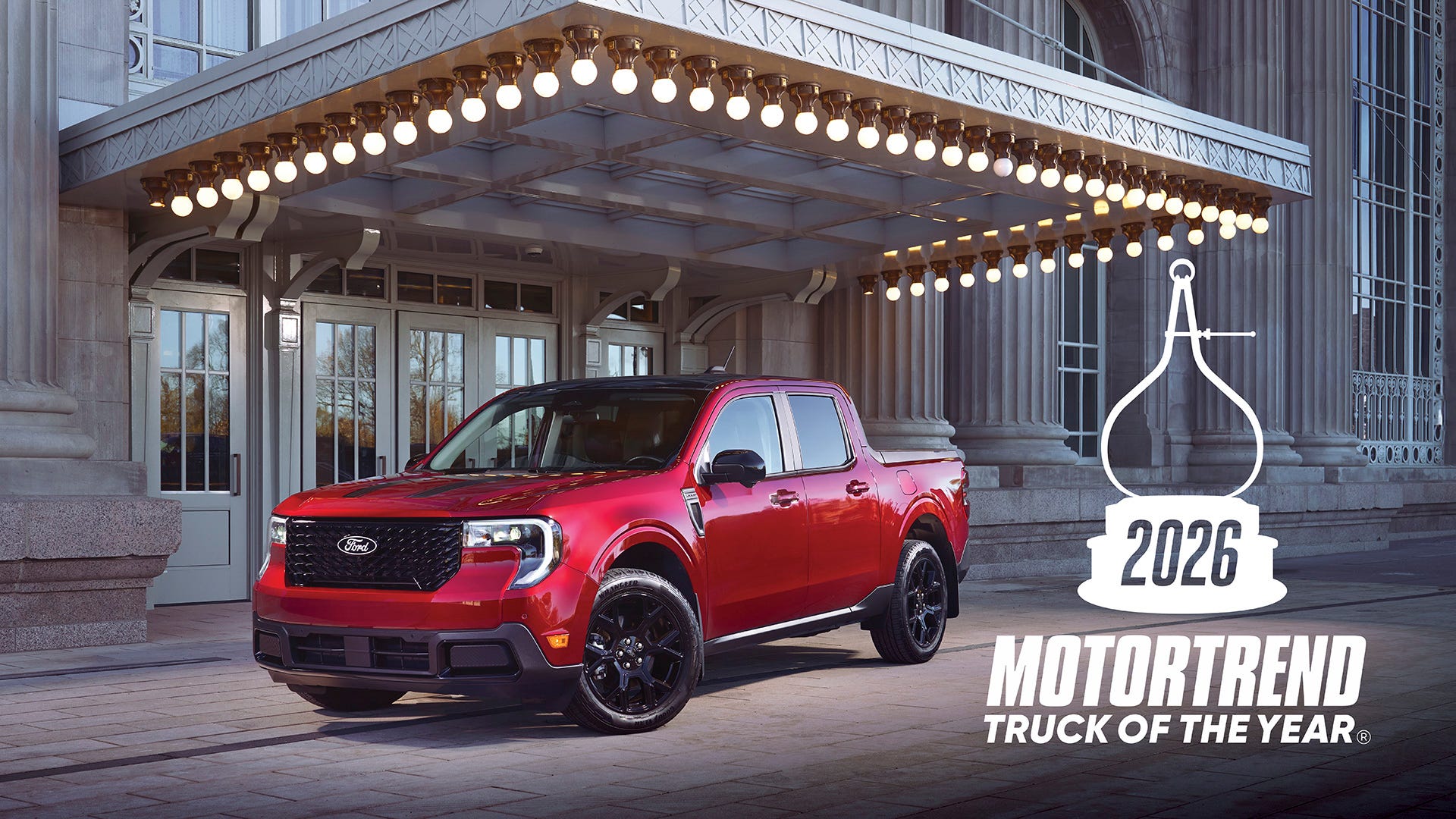
In a landscape increasingly dominated by behemoth pickups, the compact and immensely capable Ford Maverick has once again defied expectations, earning the coveted title of 2026 MotorTrend Truck of the Year. This recognition solidifies the Maverick’s position not just as a segment leader, but as a revolutionary force that challenges conventional notions of what a pickup truck can be. America’s favorite compact pickup has indeed become smarter, tougher, and even more fun, finally securing MotorTrend’s highest honor after years of consistent innovation.
The journey to this prestigious award has been a testament to Ford’s foresight in recognizing a burgeoning demand for a more accessible and utilitarian vehicle. While many trucks continue to escalate in size and complexity, often requiring specialized features like staircase tailgates for basic bed access, the Ford Maverick steadfastly champions practicality. Its design allows an average adult to reach over the side rail and easily retrieve items from the bed floor without extraordinary effort, and the tailgate offers a comfortable perch with feet firmly on the ground – a refreshing return to user-centric design that resonates deeply with a diverse customer base.
This “revolution,” as MotorTrend aptly puts it, began several years ago when the Maverick first emerged, narrowly missing the Golden Calipers to the groundbreaking Rivian R1T. However, for the 2026 model year, Ford has introduced significant mid-cycle enhancements that have unequivocally broadened the Maverick’s appeal, significantly improved its capabilities, and generally raised the bar for the compact pickup segment. These updates arrive just in time, positioning the Maverick strongly ahead of Toyota’s anticipated competitor launch in late 2027.
The Maverick’s Ascent: A Legacy of Innovation and Utility
The Ford Maverick’s initial launch was a strategic masterstroke, tapping into a market segment yearning for a compact, efficient, and affordable pickup truck. It quickly carved out a niche as the “anti-truck” – a vehicle that offered the utility of a truck bed without the intimidating size, fuel consumption, or price tag typically associated with full-size pickups. This unique proposition, coupled with its standard hybrid powertrain, resonated strongly with urban dwellers, small business owners, and outdoor enthusiasts alike.
Challenging the Status Quo with Smart Design
From its inception, the Maverick was designed with an understanding of modern user needs. Its unibody construction, shared with popular Ford SUVs, provided a more comfortable and car-like ride than traditional body-on-frame trucks, while still delivering impressive payload and towing capacities for its class. The innovative FLEXBED system, for instance, allowed for DIY customization, empowering owners to create personalized solutions for cargo management. This focus on practical, smart design laid the groundwork for the Ford Maverick 2026 MotorTrend Truck of the Year to build upon.
The success was undeniable. With nearly half a million sales already under its belt, the Maverick has outsold its only direct competitor, the Hyundai Santa Cruz, by a factor of three. This sales volume is a clear indicator of its market acceptance and the efficacy of Ford’s strategy. It demonstrated that there was a significant unmet demand for a compact, versatile, and fuel-efficient pickup, and the Maverick delivered.
Mid-Cycle Enhancements: Sharpening a Winning Formula
For the 2026 model year, Ford has not rested on its laurels. The mid-cycle enhancements introduced are comprehensive, addressing both hardware and software to make the Maverick an even more compelling package. These updates are designed to improve every aspect of the truck, from its foundational mechanics to its digital interface, ensuring it remains at the forefront of the compact truck segment.
Hardware Upgrades for Enhanced Performance and Durability
Among the significant hardware upgrades are refinements to the suspension system, leading to an even smoother ride and improved handling, particularly when loaded. New material selections in key areas contribute to greater durability and a more premium feel, both inside and out. Powertrain options also see subtle but impactful tweaks, with the hybrid system receiving optimizations for even better fuel economy and the EcoBoost engine gaining slight power and torque enhancements, making the truck feel friskier and more responsive, whether for daily commuting or weekend adventures.
Software Innovations for a Connected Experience
The digital experience within the 2026 Maverick has also undergone a significant overhaul. A more responsive and intuitive infotainment system, complete with updated graphics and faster processing, enhances user interaction. Ford has invested heavily in integrating advanced connectivity features, ensuring that the Maverick is not just a workhorse but also a smart, connected vehicle. The user interface aims for seamless integration of digital ecosystems, reminiscent of how Samsung’s One UI transforms a smartphone experience, making the vehicle’s tech feel familiar and easy to navigate.
These software advancements also extend to over-the-air (OTA) update capabilities, allowing Ford to continuously improve the vehicle’s features and performance post-purchase. This commitment to continuous software evolution, paralleling the multi-faceted enhancements seen in WhatsApp’s recent updates, ensures the Maverick remains current and adaptable to future technological demands, enhancing its long-term value and user satisfaction.
MotorTrend’s Rigorous Evaluation Process
The MotorTrend Truck of the Year award is not given lightly. It follows a meticulous and intensive testing regimen that spans two weeks, during which contenders are subjected to a battery of real-world and controlled tests. The 2026 Ford Maverick distinguished itself amidst a competitive field of two new and three revised contenders by excelling across MotorTrend’s six key criteria:
- Performance of Intended Function: How well does the vehicle do what it’s designed to do?
- Engineering Excellence: The quality of design, construction, and execution.
- Advancement in Design: Innovation in styling, packaging, and materials.
- Efficiency: Fuel economy, environmental impact, and intelligent use of resources.
- Value: Price, standard features, options, and overall ownership cost.
- Safety: Active and passive safety features, crash test performance, and driver assistance systems.
Excelling Across All Categories
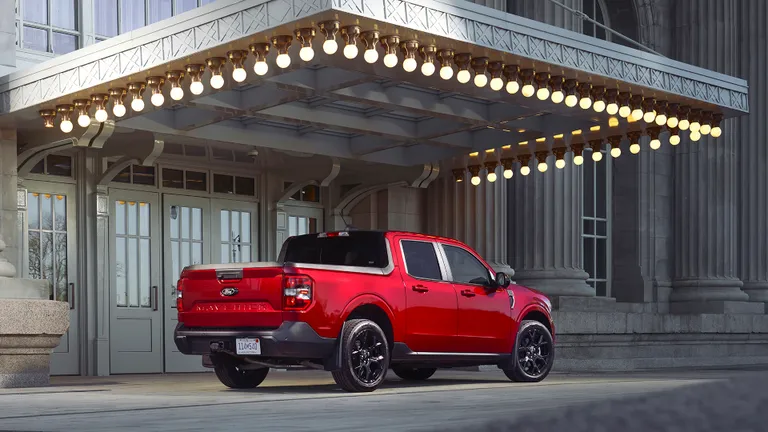
The Maverick’s performance was stellar. In “Performance of Intended Function,” it shone by proving its versatility as both a capable hauler and a comfortable daily driver. Its compact dimensions make it incredibly maneuverable in urban environments, while its robust chassis and available all-wheel-drive system ensure it’s ready for light off-roading or challenging weather conditions. This holistic approach to utility, combined with its refined driving dynamics, sets a benchmark for the segment. Evaluating vehicles on such diverse criteria requires a rigorous evaluation process, akin to what’s used for electric models such as the Chevrolet Blazer EV, which also demands a comprehensive test drive checklist to assess its unique attributes.
Engineering Excellence and Design Philosophy
Ford’s engineering team approached the Maverick with a clear vision: to create a truck that was both highly functional and intelligently designed. This philosophy is evident in every aspect of the vehicle, from its robust chassis to its thoughtfully appointed interior. The Ford Maverick 2026 MotorTrend Truck of the Year stands as a testament to engineering that prioritizes real-world usability and long-term reliability.
Smart Solutions for Everyday Challenges
The unibody construction, a key differentiator from traditional trucks, contributes significantly to the Maverick’s car-like ride quality and overall structural rigidity. This engineering choice allows for a lower step-in height and a more integrated cabin, enhancing passenger comfort. Yet, Ford engineers have masterfully reinforced the structure to handle typical truck duties, showcasing a blend of passenger car refinement with truck-level toughness.
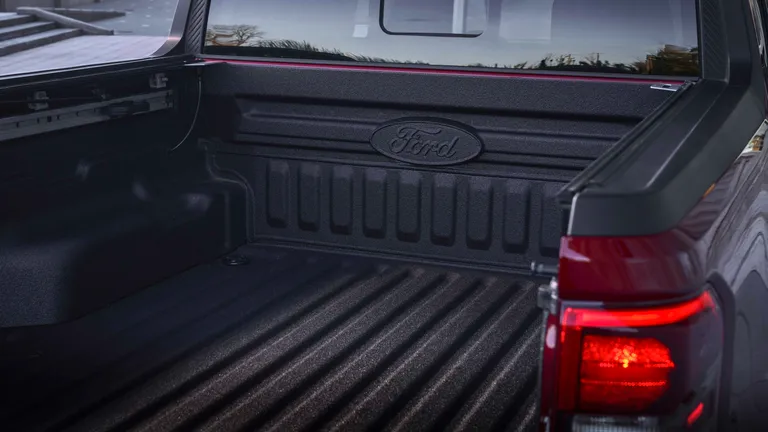
The FLEXBED system remains a highlight of the Maverick’s design. This innovative bed features stamped slots for custom dividers, tie-downs, and even 12V power outlets, making it incredibly adaptable for various cargo needs. Whether it’s hauling lumber, camping gear, or gardening supplies, the FLEXBED provides solutions that are both simple and ingenious. This level of practical innovation highlights Ford’s commitment to delivering genuine utility in a compact package.
Powertrain Prowess: Hybrid and EcoBoost Options
The Maverick continues to offer a choice between its highly efficient standard hybrid powertrain and the more powerful EcoBoost turbocharged gasoline engine. The hybrid, with its exceptional fuel economy, is a game-changer, especially for those transitioning from sedans or SUVs who still need occasional hauling capability. It provides excellent torque for city driving and impressive range. The EcoBoost option, on the other hand, caters to those requiring maximum towing and payload capacity, delivering brisk acceleration and robust performance without sacrificing too much efficiency for its class. Both options contribute to the Maverick’s versatility and appeal across different buyer needs.
Unmatched Value and Efficiency in its Class
One of the most compelling aspects of the Ford Maverick 2026 MotorTrend Truck of the Year is its exceptional value proposition. In an era where vehicle prices are steadily climbing, the Maverick offers an incredibly accessible entry point into the truck segment without compromising on essential features or quality.
Affordability Meets Feature-Rich Design
Ford has strategically priced the Maverick to appeal to a broad demographic, including first-time truck buyers, those looking to downsize from larger trucks, and individuals seeking a versatile vehicle for both work and leisure. Even at its base trim, the Maverick comes well-equipped, offering modern conveniences and safety features that are often optional extras on competitors. This commitment to delivering a rich feature set at a competitive price point significantly enhances its value.
The hybrid powertrain, in particular, contributes immensely to the Maverick’s long-term value through its outstanding fuel efficiency. Lower fuel costs translate directly into significant savings over the vehicle’s lifespan, making it an economically sensible choice for many consumers. This blend of low purchase price and reduced operating costs makes the Maverick a smart investment, further solidifying its appeal.
Safety and Driver-Assist Technologies
Safety is paramount in any modern vehicle, and the 2026 Ford Maverick is no exception. Ford has equipped this award-winning truck with a comprehensive suite of active and passive safety features, ensuring peace of mind for drivers and passengers alike. The integration of advanced driver-assist systems (ADAS) further elevates its safety profile, making it a reliable choice for families and individuals.
Ford Co-Pilot360: A Shield of Protection
At the core of the Maverick’s safety offerings is the Ford Co-Pilot360 suite. This package includes a range of technologies designed to assist the driver and prevent accidents. Features such as Pre-Collision Assist with Automatic Emergency Braking, Lane-Keeping System, and Auto High-Beam Headlamps work together to create a vigilant co-pilot on every journey. These systems not only enhance safety but also reduce driver fatigue, particularly on long trips.
Further enhancing driver confidence are available features like Blind Spot Information System (BLIS) with Cross-Traffic Alert, Adaptive Cruise Control, and Evasive Steering Assist. These technologies provide an extra layer of protection, whether navigating busy highways or maneuvering in tight parking lots. The Maverick’s robust body structure, combined with multiple airbags and advanced restraint systems, ensures excellent passive safety performance in the event of a collision.
The Driving Experience: Beyond the Numbers
While specifications and features are crucial, the true measure of a vehicle often lies in its driving experience. The Ford Maverick 2026 MotorTrend Truck of the Year excels here, offering a ride quality and handling dynamics that belie its truck designation. It’s a vehicle that feels as comfortable and composed on a long highway cruise as it is agile in urban traffic.
Comfort, Handling, and Maneuverability
The unibody platform plays a significant role in the Maverick’s refined road manners. It delivers a smooth, quiet ride that is uncharacteristic for a pickup, minimizing road noise and vibrations. The steering is precise and well-weighted, providing good feedback without feeling overly heavy, making it easy to navigate tight corners and crowded parking lots. Its compact footprint also means it’s incredibly easy to park, a distinct advantage over larger trucks.
Whether equipped with the hybrid or EcoBoost engine, the Maverick offers ample power for daily driving and light hauling. The hybrid provides a seamless power delivery, especially noticeable in stop-and-go traffic, while the EcoBoost offers a more spirited acceleration for those who demand it. The suspension strikes a fine balance between comfort and capability, absorbing bumps effectively while maintaining composure when carrying a payload or towing. The cabin itself is designed for comfort, with supportive seating and intuitive controls. The attention to detail extends to the auditory experience, with an option for an elevated cabin acoustics, which can be as crucial as selecting a high-fidelity DALI KUPID audio setup for home entertainment, ensuring every drive is enjoyable.
Impact on the Pickup Segment and Future Outlook
The Ford Maverick has done more than just win an award; it has fundamentally altered the trajectory of the pickup truck market. By demonstrating that a compact, efficient, and affordable truck can also be incredibly versatile and desirable, it has opened up the segment to a new generation of buyers and rekindled interest among those who had previously dismissed pickups as being too large or too expensive.
Reshaping Expectations for Compact Trucks
The Maverick’s success has prompted other manufacturers to re-evaluate their strategies, with new competitors emerging or being planned for the compact truck space. This increased competition is a direct result of the Maverick proving the viability and profitability of this segment. It’s no longer just about horsepower and towing capacity; it’s about smart design, efficiency, and real-world usability. The Ford Maverick 2026 MotorTrend Truck of the Year is a trailblazer, showing that innovation doesn’t always mean bigger and bolder, but often smarter and more accessible.
The Maverick’s Role in Ford’s Lineup
Within Ford’s extensive truck lineup, the Maverick serves as a crucial entry point, attracting new customers to the brand and potentially moving them up to larger F-Series trucks in the future. It complements the Ranger and F-150 by catering to a distinct customer base that values efficiency and urban maneuverability without sacrificing the utility that only a truck can provide. Its success underscores Ford’s ability to innovate across its entire portfolio, from compact pickups to electric vehicles and commercial vans.
Looking ahead, the Maverick is poised to continue its reign. As consumer preferences evolve towards more sustainable and practical vehicle choices, its hybrid powertrain and compact dimensions will become even more appealing. Ford’s commitment to continuous improvement, evidenced by the 2026 enhancements, suggests a bright future for this award-winning truck. The Maverick isn’t just a truck of the year; it’s a truck for the future, embodying a new era of automotive design and utility.
Key Specifications of the 2026 Ford Maverick
To further illustrate why the Ford Maverick 2026 MotorTrend Truck of the Year stands out, here’s a comparative look at some of its key specifications and how they contribute to its award-winning performance: