
Pixel Users Rejoice: Android 16 Restores Screen-Off Unlock
Google has quietly reintroduced a beloved feature to its Pixel lineup with the latest Android 16 update. The Screen-Off Fingerprint Unlock, which allows users to unlock their devices using the fingerprint sensor even when the screen is completely off, is making a comeback. This welcome return addresses a pain point for many Pixel users who missed the convenience of unlocking their phones without having to wake the display first.
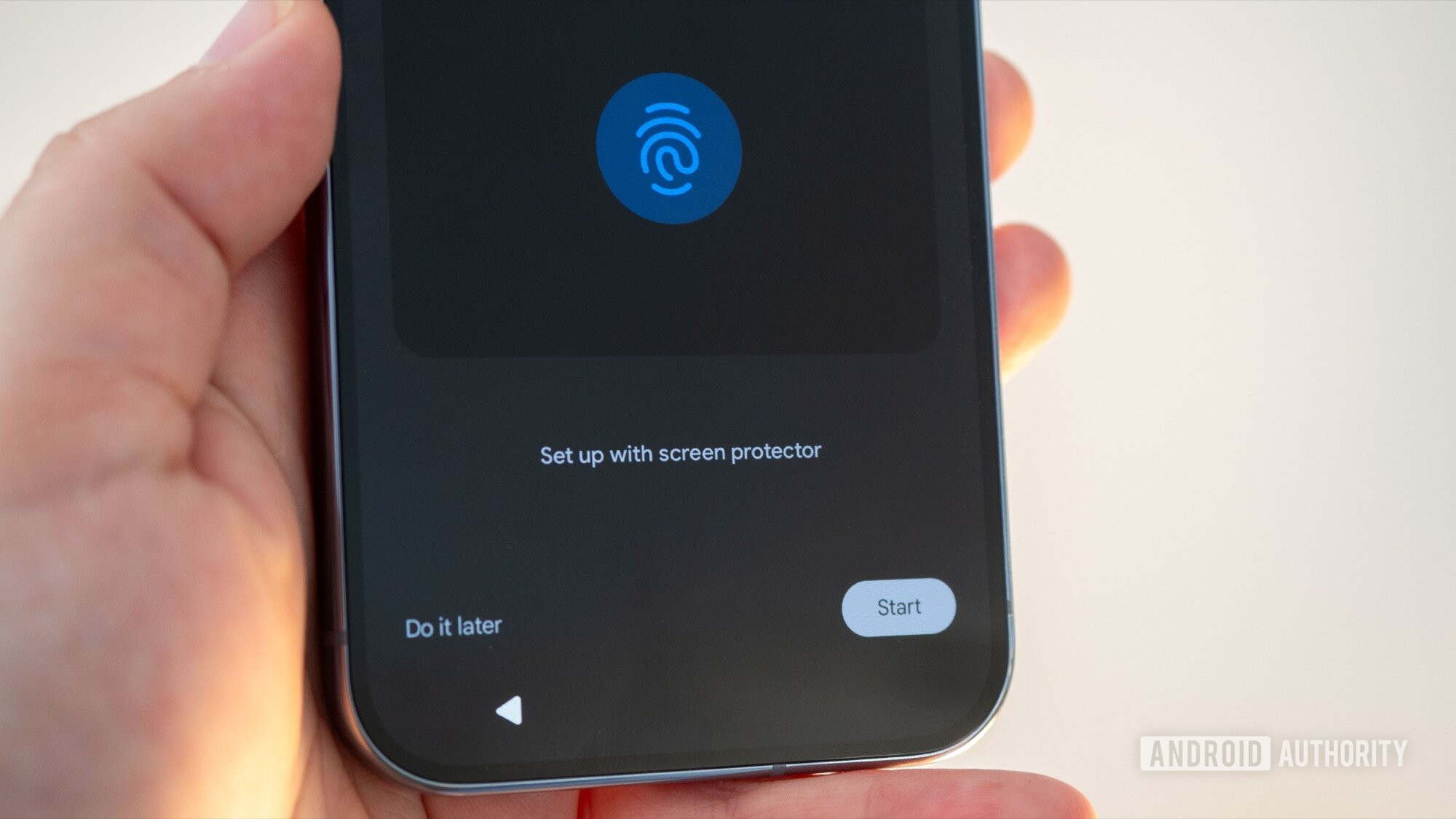
The feature initially surfaced in Android 16 Developer Preview 2 (DP2) for the Pixel 9 series, and later expanded to select older Pixel models during the beta phase. To the dismay of many, it was inexplicably removed in subsequent beta builds, leaving users wondering about its fate. Now, with the stable release of Android 16 QPR2 (Quarterly Platform Release 2), the Screen-Off Fingerprint Unlock is back, albeit with some limitations regarding device compatibility.
The return of the Screen-Off Fingerprint Unlock is particularly significant because it streamlines the unlocking process. Previously, Pixel users had to either double-tap the screen, use the power button, or lift the phone to activate the fingerprint sensor. This added an extra step that, while seemingly minor, could be frustrating in everyday use. The restored feature allows for a more seamless and intuitive unlocking experience, bringing Pixel phones closer to the instant-on responsiveness that users have come to expect from modern smartphones. This update to Android 16 adds another layer of convenience to the user experience.
The Journey of Screen-Off Unlock: From DP2 to QPR2
The timeline of the Screen-Off Fingerprint Unlock feature has been a rollercoaster for Pixel enthusiasts. Its initial appearance in Android 16 DP2 generated considerable excitement, as it promised a significant improvement in user experience. The subsequent expansion to older Pixel models during the beta phase further fueled anticipation. However, the abrupt removal of the feature in later beta builds left many disappointed and speculating about the reasons behind the decision.
The reintroduction of the feature in the stable Android 16 QPR2 release is a testament to Google’s responsiveness to user feedback. While the company has not officially commented on the reasons for the initial removal, the fact that it has been brought back suggests that Google recognized the value and demand for this feature among Pixel users. This demonstrates a commitment to refining the user experience based on real-world usage and preferences.

Device Compatibility: Not All Pixels Are Created Equal
While the return of the Screen-Off Fingerprint Unlock is undoubtedly good news, it’s important to note that the feature is not available on all Pixel devices. According to user reports and initial observations, the feature appears to be primarily limited to the Pixel 9 series and newer models. Notably, the Pixel 9a seems to be an exception, with some users reporting its absence on that device.
The most likely explanation for this limited compatibility is hardware limitations. The Pixel 9 series and above are rumored to utilize an ultrasonic fingerprint scanner, which is known for its superior accuracy and ability to function even when the screen is off. Older Pixel models, including the Pixel 8 Pro, likely use an optical fingerprint scanner, which requires the screen to be illuminated for the sensor to function properly. The specific hardware used in the Pixel 9a remains unclear, but it’s possible that it also uses an older or different type of fingerprint scanner that is not compatible with the Screen-Off Unlock feature. If you’re looking for even more ways to personalize your experience, consider how Spotify Wrapped 2025 offers a personalized music recap each year.
Why Ultrasonic Fingerprint Scanners Matter
Ultrasonic fingerprint scanners offer several advantages over optical scanners, making them a crucial component for enabling the Screen-Off Fingerprint Unlock feature. These advantages include:
- Accuracy: Ultrasonic scanners use sound waves to create a 3D map of the fingerprint, resulting in a more accurate and reliable scan compared to the 2D image captured by optical scanners.
- Security: The 3D mapping technology makes ultrasonic scanners more resistant to spoofing attempts, enhancing the security of the device.
- Functionality with Wet or Dirty Fingers: Ultrasonic scanners are less affected by moisture or dirt on the finger, ensuring reliable unlocking even in challenging conditions.
- Screen-Off Operation: The ability to operate without requiring the screen to be illuminated is the key factor enabling the Screen-Off Fingerprint Unlock feature.
The adoption of ultrasonic fingerprint scanners in the Pixel 9 series and above represents a significant upgrade in biometric authentication technology. This advancement not only enables the Screen-Off Fingerprint Unlock feature but also contributes to improved overall security and user experience. As technology advances, we can expect to see the Oppo Find X9 Pro and other high-end devices incorporate similar security features.
Enabling and Using the Screen-Off Fingerprint Unlock
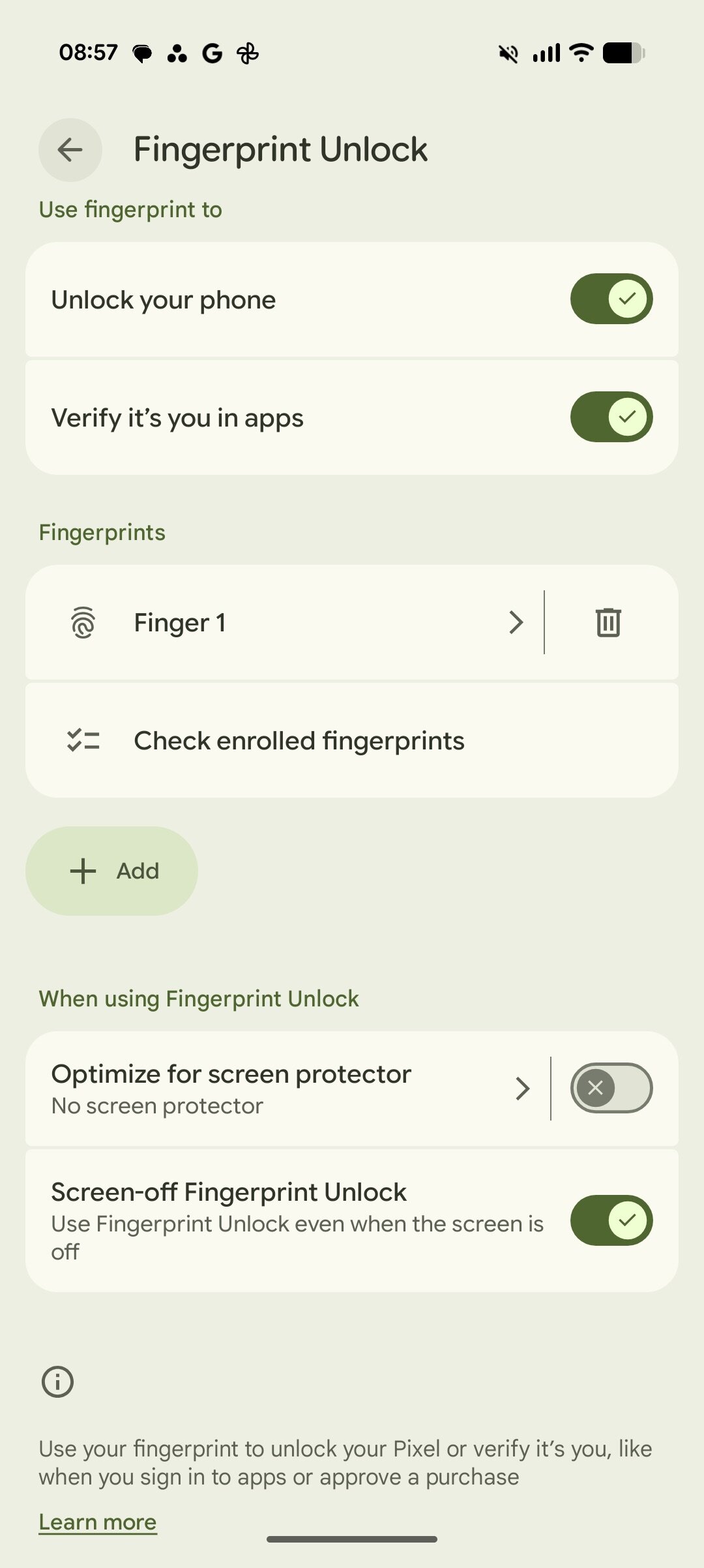
For Pixel users with compatible devices, enabling the Screen-Off Fingerprint Unlock is a straightforward process. The setting can be found within the Fingerprint settings menu. To enable this feature, follow these steps:
- Navigate to Settings on your Pixel device.
- Scroll down and tap on Security.
- Select Fingerprint Unlock (you may need to enter your PIN, pattern, or password).
- Look for the Screen-Off Fingerprint Unlock toggle and enable it.
Once enabled, you can simply place your finger on the fingerprint sensor while the screen is off to unlock your device. The phone will instantly recognize your fingerprint and unlock, providing a seamless and convenient user experience. This eliminates the need to wake the screen before unlocking, saving time and effort.
Potential Benefits and Use Cases
The Screen-Off Fingerprint Unlock offers several potential benefits and use cases, enhancing the overall user experience for Pixel owners. Some of these include:
- Increased Convenience: The most obvious benefit is the added convenience of being able to unlock your phone without waking the screen. This is particularly useful when you need to quickly access your device.
- Faster Unlocking: By eliminating the need to wake the screen, the Screen-Off Unlock can make the unlocking process noticeably faster.
- Improved Accessibility: For users with disabilities, the Screen-Off Unlock can make it easier to access their devices, especially if they have difficulty with gestures or button presses.
- One-Handed Operation: In situations where you only have one hand free, the Screen-Off Unlock allows you to unlock your phone without having to juggle it or perform awkward maneuvers.
- Discreet Unlocking: In situations where you want to unlock your phone discreetly, the Screen-Off Unlock allows you to do so without attracting attention by illuminating the screen.
The Future of Biometric Authentication on Pixel Devices
The reintroduction of the Screen-Off Fingerprint Unlock, coupled with the adoption of ultrasonic fingerprint scanners, signals a clear direction for the future of biometric authentication on Pixel devices. Google is committed to providing a secure, convenient, and user-friendly unlocking experience. As technology continues to evolve, we can expect to see further advancements in biometric authentication on Pixel phones, such as:
- Improved Accuracy and Speed: Future generations of fingerprint scanners are likely to offer even greater accuracy and speed, making the unlocking process even more seamless.
- Enhanced Security: New security measures will be implemented to further protect against spoofing attempts and unauthorized access.
- Integration with Other Biometric Technologies: We may see the integration of fingerprint scanning with other biometric technologies, such as facial recognition, to provide a multi-layered security approach.
- Context-Aware Authentication: Future Pixel devices may be able to adapt the authentication method based on the context of use, such as location, time of day, or user activity.
These advancements will contribute to a more secure and intuitive user experience, making Pixel phones even more appealing to consumers. The advancements in Android are constantly evolving, so it’s important to stay updated on the latest features, such as the Android 16 QPR2 Pixel update eligibility and its new features.
Challenges and Considerations
While the Screen-Off Fingerprint Unlock offers numerous benefits, there are also some challenges and considerations to keep in mind:
- Hardware Limitations: As mentioned earlier, the feature is currently limited to devices with ultrasonic fingerprint scanners. This means that older Pixel models will not be able to take advantage of this feature.
- Power Consumption: Continuously monitoring the fingerprint sensor for input, even when the screen is off, may result in slightly increased power consumption. However, the impact is likely to be minimal.
- Accidental Unlocks: There is a potential for accidental unlocks if the fingerprint sensor is inadvertently touched while the phone is in a pocket or bag. However, this can be mitigated by adjusting the sensitivity of the sensor or using a case that covers the sensor.
- Security Concerns: While ultrasonic fingerprint scanners are generally considered to be more secure than optical scanners, there is always a risk of someone finding a way to bypass the security measures. Google will need to continue to monitor and address any potential security vulnerabilities.
Despite these challenges, the benefits of the Screen-Off Fingerprint Unlock far outweigh the drawbacks. As technology improves, we can expect to see these challenges addressed and the feature become even more reliable and secure. Keeping your device secure is paramount, especially with the increasing sophistication of cyber threats. Securing your phone with aptX support and other advanced features is crucial for protecting your personal data.
User Reactions and Community Feedback
The return of the Screen-Off Fingerprint Unlock has been met with overwhelmingly positive reactions from the Pixel community. Users have expressed their excitement and appreciation for the restored feature on online forums and social media platforms. Many have praised Google for listening to user feedback and addressing a long-standing pain point. Here is a compilation of user reactions and community feedback regarding the Screen-Off Fingerprint Unlock:
- Positive Feedback: Most users are ecstatic about the return of the feature, citing increased convenience and faster unlocking as major benefits.
- Device Compatibility Concerns: Some users have expressed disappointment that the feature is not available on their older Pixel models.
- Feature Requests: Some users have requested additional customization options, such as the ability to adjust the sensitivity of the fingerprint sensor or disable the feature entirely.
- Security Concerns: A few users have raised concerns about the potential for accidental unlocks or security vulnerabilities.
- Overall Satisfaction: Despite some minor concerns, the overall sentiment is overwhelmingly positive, with users expressing their satisfaction with the restored feature.
The positive reception of the Screen-Off Fingerprint Unlock demonstrates the importance of user feedback in shaping the development of software and hardware features. Google’s willingness to listen to and respond to user feedback is a key factor in the success of the Pixel brand.
Android 16 QPR2: A Deeper Dive into the Update
The Android 16 QPR2 update brings more than just the return of the Screen-Off Fingerprint Unlock. This quarterly platform release includes a variety of bug fixes, performance improvements, and new features that enhance the overall Android experience. Some of the key highlights of the Android 16 QPR2 update include:
- Bug Fixes: The update addresses a number of known bugs and issues, improving the stability and reliability of the Android operating system.
- Performance Improvements: Performance optimizations have been implemented to enhance the speed and responsiveness of the system.
- New Features: In addition to the Screen-Off Fingerprint Unlock, the update introduces several new features, such as improved privacy controls, enhanced accessibility options, and updated system apps.
- Security Patches: The update includes the latest security patches, protecting users from known vulnerabilities and threats.
- User Interface Enhancements: Minor user interface tweaks and improvements have been implemented to enhance the visual appeal and usability of the system.
The Android 16 QPR2 update is a significant release that demonstrates Google’s commitment to continuously improving the Android operating system. Users are encouraged to install the update as soon as it becomes available for their device to take advantage of the latest features and improvements.
Comparing Pixel Unlock Methods: A Comprehensive Overview
The Screen-Off Fingerprint Unlock joins a range of other unlock methods available on Pixel devices, each with its own strengths and weaknesses. Here’s a comparison of the various unlock methods:
| Unlock Method | Description | Pros | Cons |
|---|---|---|---|
| Fingerprint Unlock (Screen-Off) | Unlocks the device with the fingerprint sensor while the screen is off. | Fast, convenient, discreet. | Limited to devices with ultrasonic fingerprint scanners, potential for accidental unlocks. |
| Fingerprint Unlock (Screen-On) | Unlocks the device with the fingerprint sensor after the screen is turned on. | Widely available, secure, reliable. | Requires waking the screen, slightly slower than Screen-Off Unlock. |
| Facial Recognition | Unlocks the device by scanning the user’s face. | Fast, convenient, hands-free. | Less secure than fingerprint unlock, may not work in low-light conditions, privacy concerns. |
| PIN/Password/Pattern | Unlocks the device using a PIN, password, or pattern. | Most secure, widely available. | Slower than biometric methods, can be forgotten. |
| Smart Lock | Keeps the device unlocked when certain conditions are met (e.g., trusted location, trusted device). | Convenient, automatic. | Less secure, potential for unauthorized access. |
Users can choose the unlock method that best suits their needs and preferences, balancing security, convenience, and accessibility. Consider exploring deals on laptops if you need a device with enhanced security features; Cyber Monday laptop deals can offer significant savings.
Conclusion: A Step Forward for Pixel User Experience
The return of the Screen-Off Fingerprint Unlock in Android 16 QPR2 is a welcome addition to the Pixel ecosystem. This feature enhances the user experience by providing a more convenient and seamless unlocking method. While the feature is currently limited to devices with ultrasonic fingerprint scanners, it represents a step forward in biometric authentication technology. Google’s commitment to listening to user feedback and continuously improving the Android operating system is evident in this update. As technology evolves, we can expect to see further advancements in biometric authentication on Pixel devices, making them even more secure, convenient, and user-friendly. The return of the Screen-Off Fingerprint Unlock underscores Google’s dedication to providing a premium user experience for Pixel owners.




